Dell Bluetooth Keyboard Folio WK415 Quick User Guide
Summary
This Quick Start Guide for the Dell Bluetooth Keyboard Folio WK415 provides multilingual setup instructions covering insulation strip removal, Bluetooth pairing mode activation via dedicated button, and keyboard-to-tablet pairing procedures. It documents hardware features including home key, shortcut keys, battery tray, power and Bluetooth status lights, and the Bluetooth pairing button. Battery replacement instructions, shortcut key functions for back, search, mute, brightness controls, and med
Page 1 Text Content
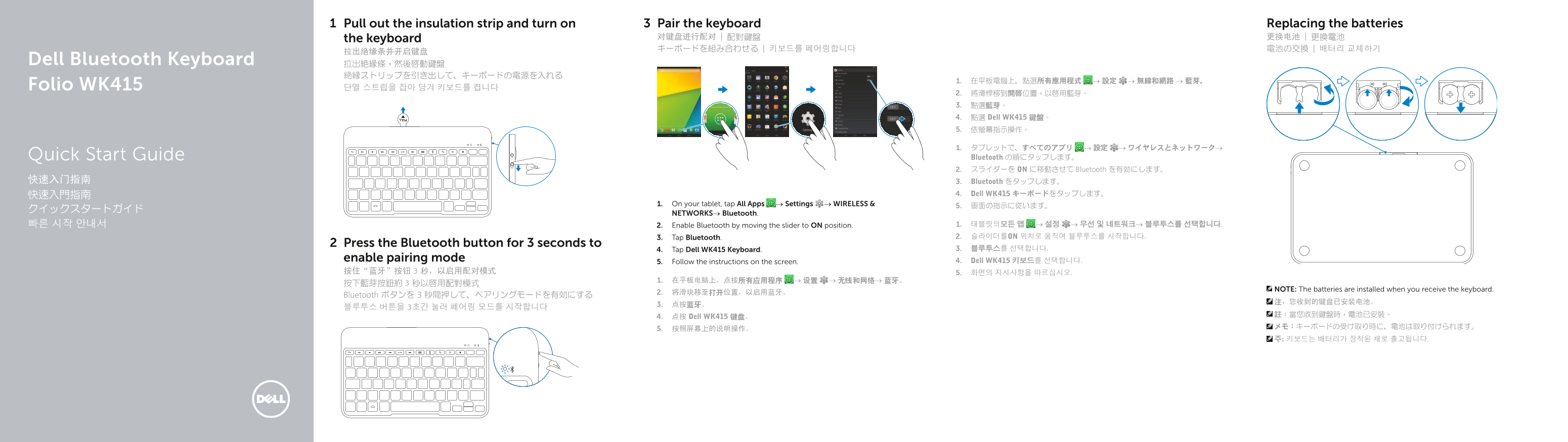
Pull out the insulation strip and turn on Pair the keyboard Replacing the batteries the keyboard 对键盘进行配对 | 配對鍵盤 更换电池 | 更換電池 キーボードを組み合わせる | 키보드를 페어링합니다 電池の交換 | 배터리 교체하기
Dell Bluetooth Keyboard 拉出絕緣條,然後啟動鍵盤
Folio WK415 단열 스트립을 잡아 당겨 키보드를 켭니다
2. 將滑桿移到開啟位置,以啟用藍芽。 3. 點選藍芽。 4. 點選 Dell WK415 鍵盤。 5. 依螢幕指示操作。
1. タブレットで、すべてのアプリ → 設定 → ワイヤレスとネットワーク→ Quick Start Guide Bluetooth の順にタップします。 2. スライダーを ON に移動させて Bluetooth を有効にします。
快速入门指南 3. Bluetooth をタップします。
快速入門指南 4. Dell WK415 キーボードをタップします。
1. On your tablet, tap All Apps → Settings → WIRELESS & 5. 画面の指示に従います。
NETWORKS→ Bluetooth.
빠른 시작 안내서 2. Enable Bluetooth by moving the slider to ON position. 1. 태블릿의모든 앱 → 설정 → 무선 및 네트워크→ 블루투스를 선택합니다. 3. Tap Bluetooth. 2. 슬라이더를ON 위치로 움직여 블루투스를 시작합니다.
Press the Bluetooth button for 3 seconds to
4. Tap Dell WK415 Keyboard. 3. 블루투스를 선택합니다.
enable pairing mode 4. Dell WK415 키보드를 선택합니다.
5. Follow the instructions on the screen.
NOTE: The batteries are installed when you receive the keyboard.
Bluetooth ボタンを 3 秒間押して、ペアリングモードを有効にする
4. 点按 Dell WK415 键盘。
Page Summary Contents For Dell Bluetooth Keyboard Folio WK415 Quick User Guide
Manual Details
| Brand | Dell |
|---|---|
| Pages | 2 |
| File Size | 440.96 KB |
| Published | July 02, 2026 |
Enter the captcha to get the download link:

Frequently Asked Questions
How do I pair the keyboard?
On your tablet, go to All Apps → Settings → WIRELESS & NETWORKS → Bluetooth. Press the Bluetooth button for about 3 seconds until it enters pairing mode. Then, select Dell WK415 Keyboard and follow the on-screen instructions.
What is included with the keyboard regarding batteries?
The manual states that the batteries are installed when you receive the keyboard (or are pre-installed).
How can I use the shortcut keys?
The keyboard includes function keys for functions like Home, Back, Search, Contact, Mute audio, Decrease brightness, and Bluetooth pairing.