Dell Alienware AW2521HF Monitor Quick Start GuideNote: The brand names "Alienware" are already in English, so no translation is needed for these. Other Chinese terms have been appropriately removed or translated according to the rules provided.
Summary
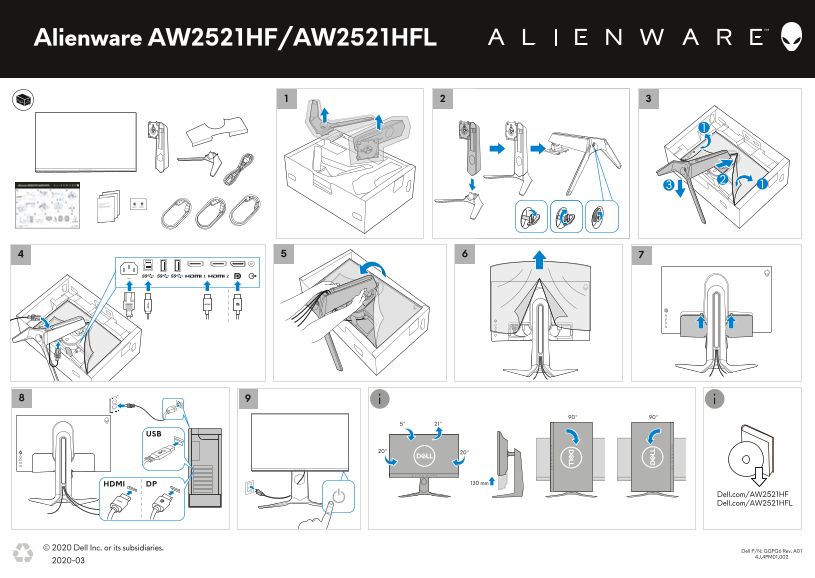
This quick reference document provides essential information for the Alienware AW2521HF and AW2521HFL gaming monitors, including port layout diagrams showing DisplayPort, HDMI, and USB connections. It includes physical dimension details, ergonomic adjustment ranges such as tilt and swivel, and product part numbers. This document is intended for gamers, system builders, and end users who need a quick overview of monitor connectivity and physical specifications for setup and installation.
Page 1 Text Content
Alienware AW2521HF/AW2521HFL
DPHDMI 130 mm
Dell.com/AW2521HF Dell.com/AW2521HFL
© 2020 Dell Inc. or its subsidiaries.
2D Dell P/N: GGPG6 Rev. A01
4J.4PM01.002
2020-03 barcode
Page Summary Contents For Dell Alienware AW2521HF Monitor Quick Start GuideNote: The brand names "Alienware" are already in English, so no translation is needed for these. Other Chinese terms have been appropriately removed or translated according to the rules provided.
Manual Details
| Brand | Alienware |
|---|---|
| Pages | 1 |
| File Size | 878.74 KB |
| Published | May 13, 2026 |
Enter the captcha to get the download link:

Frequently Asked Questions
What are the maximum and minimum tilt angles?
The tilt angle ranges from 5° to 20°.
Does the display have built-in speakers?
No, the display does not have built-in speakers.
What video connections are available?
The display features a DisplayPort and HDMI connections.