Dell Alienware AW2521HF Monitor Quick User Guide
Summary
Experience the high performance of the Alienware AW2521 monitor series. This manual serves as your comprehensive guide to maximizing monitor functionality, detailing essential specifications for optimal visual setup. It covers advanced connectivity options—including HDMI, DisplayPort, and USB ports—along with flexible viewing adjustments (up to 90°). Designed for professionals and enthusiasts requiring crystal-clear detail and reliability, this technical resource ensures you can easily integrate the monitor into any demanding workspace while optimizing every angle and connection.
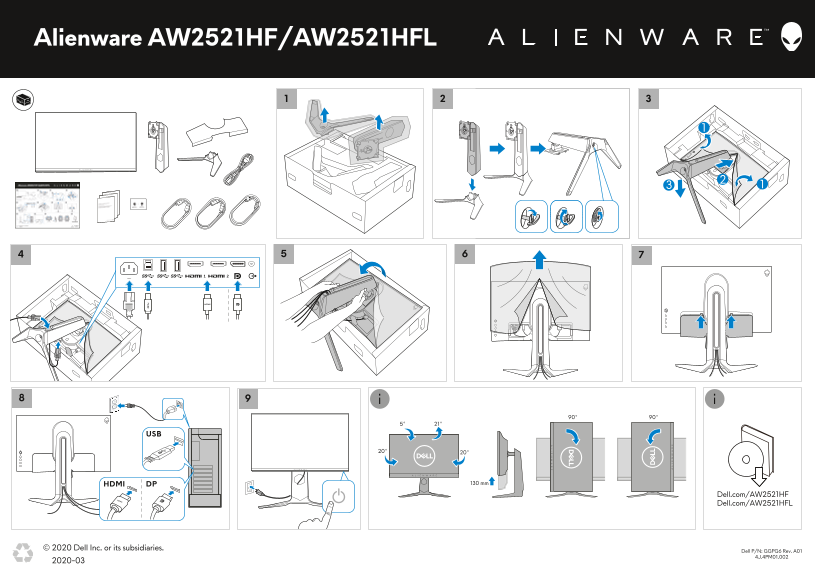
Page 1 Text Content
Alienware AW2521HF/AW2521HFL
DPHDMI 130 mm
Dell.com/AW2521HF Dell.com/AW2521HFL
© 2020 Dell Inc. or its subsidiaries.
2D Dell P/N: GGPG6 Rev. A01
4J.4PM01.002
2020-03 barcode
Page Summary Contents For Dell Alienware AW2521HF Monitor Quick User Guide
Manual Details
| Brand | Alienware |
|---|---|
| Pages | 1 |
| File Size | 879.02 KB |
| Published | May 13, 2026 |
Enter the captcha to get the download link:

Frequently Asked Questions
What are the available connectivity options?
The monitor offers HDMI, DP, and USB connections.
Can this monitor be mounted to a wall?
Yes, it supports various angles for mounting (e.g., 90°, 5°, 21°).
Which Dell part numbers are associated with this model?
The listed part numbers include GGPG6 Rev. A01 and 4J.4PM01.002.
What is the approximate dimensions of the monitor?
It has a height or depth dimension of 130 mm, as noted in the specifications.