Dell 1420X Projector Quick Start Guide
Summary
Dell projector quick start guide with multilingual setup instructions covering remote control battery insertion, VGA/Video/S-Video signal cable connection, lens cap removal, image size/focus/zoom adjustment, auto-adjust for computer synchronization, and video redirection via Fn+F8/F1 for Dell laptops, with projector control panel component overview.
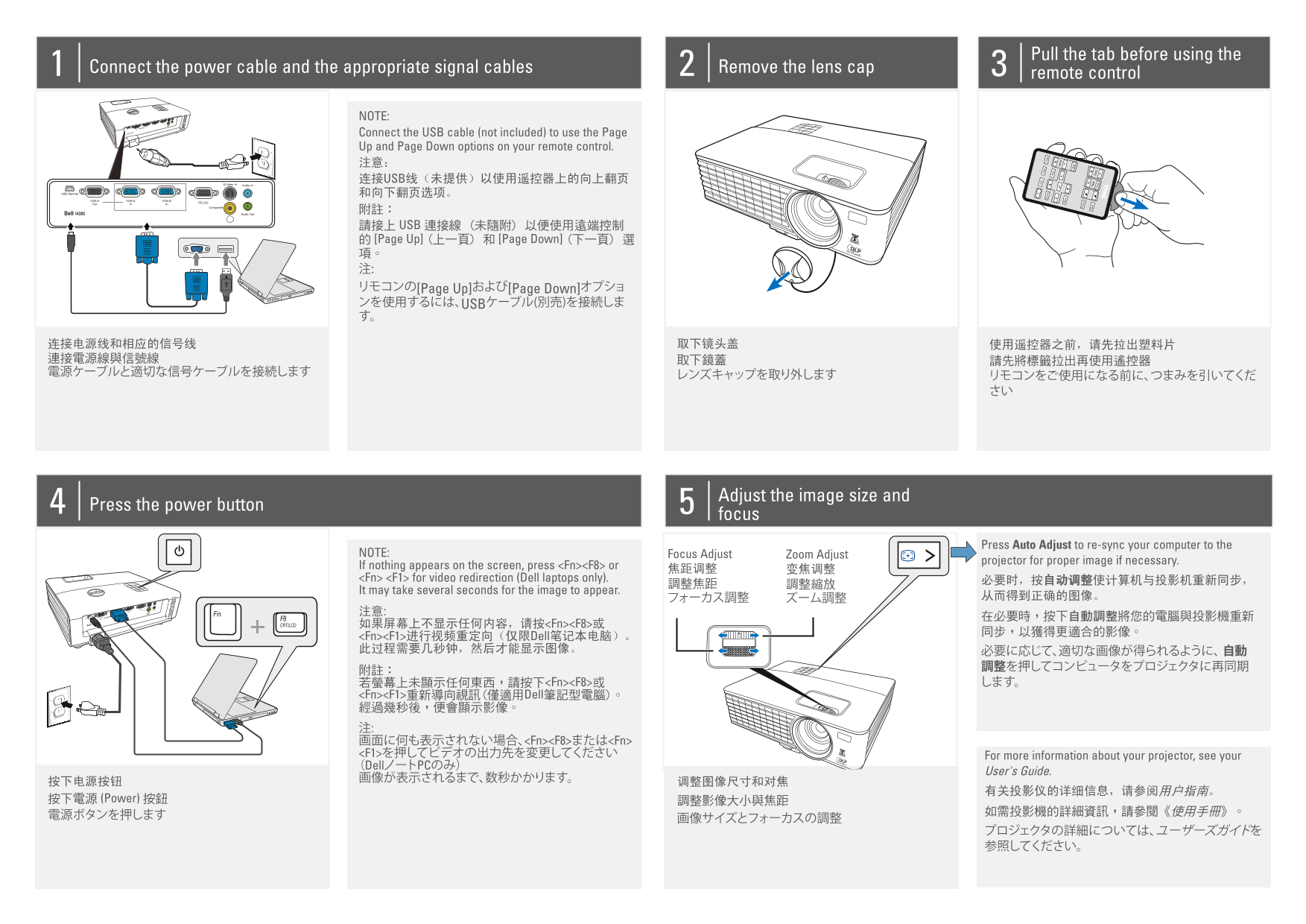
Page 1 Text Content
Pull the tab before using the
Connect the power cable and the appropriate signal cables Remove the lens cap
remote control
NOTE: Connect the USB cable (not included) to use the Page Up and Page Down options on your remote control. 注意: 连接USB线(未提供)以使用遥控器上的向上翻页 和向下翻页选项。 附註: 請接上 USB 連接線 (未隨附) 以便使用遠端控制 的 [Page Up] (上一頁) 和 [Page Down] (下一頁) 選 項。 注: リモコンの[Page Up]および[Page Down]オプショ ンを使用するには、USBケーブル(別売)を接続しま す。
Adjust the image size and
Press the power button
focus
Press Auto Adjust to re-sync your computer to the
NOTE: Focus Adjust Zoom Adjust
projector for proper image if necessary.
If nothing appears on the screen, press <Fn><F8> or
<Fn> <F1> for video redirection (Dell laptops only). 必要时,按自动调整使计算机与投影机重新同步,
It may take several seconds for the image to appear.
CRT/LCD 如果屏幕上不显示任何内容,请按<Fn><F8>或
<Fn><F1>进行视频重定向(仅限Dell笔记本电脑)。 此过程需要几秒钟,然后才能显示图像。 必要に応じて、適切な画像が得られるように、 自動
若螢幕上未顯示任何東西,請按下<Fn><F8>或 します。 <Fn><F1>重新導向視訊(僅適用Dell筆記型電腦)。 經過幾秒後,便會顯示影像。 注: 画面に何も表示されない場合、<Fn><F8>または<Fn> <F1>を押してビデオの出力先を変更してください For more information about your projector, see your (DellノートPCのみ)
User's Guide.
按下電源 (Power) 按鈕 調整影像大小與焦距
VG Vi
de S- Vid
ur ce eo
Au to
Vo lum
en u So
Fr ee ze
Bl an Pa ge
Do wn Zo om
Page Summary Contents For Dell 1420X Projector Quick Start Guide
Manual Details
| Brand | Dell |
|---|---|
| Pages | 2 |
| File Size | 1.16 MB |
| Published | July 03, 2026 |
Enter the captcha to get the download link:

Frequently Asked Questions
如何进行视频重定向(仅限戴尔笔记本电脑)?
按下<Fn><F8>或<Fn><F1>进行视频重新定向。
投影仪在设置后需要多长时间才能显示图像?
画像可能会花费几秒钟才能出现。
使用遥控器之前需要做什么准备工作?
必须先拉出塑料片,然后连接电源线和合适的信号线,并取下镜头盖。
如果屏幕上没有任何内容显示,应该如何操作?
请按<Fn><F8>或另一个(<Fn><F1>)进行视频重定向。