Casio XJ-SK600 Wireless LAN User Guide - Manual Part 2
Summary
Designed for seamless integration into advanced commercial A/V environments, this projector supports a comprehensive suite of Crestron controller commands and parameters. The manual provides detailed technical mapping, guiding system integrators through controls for power management, source selection, picture adjustment (brightness, contrast), volume control, network configuration, and signaling alerts. This resource is essential for professional installers building highly automated presentation systems requiring deep, precise device control.
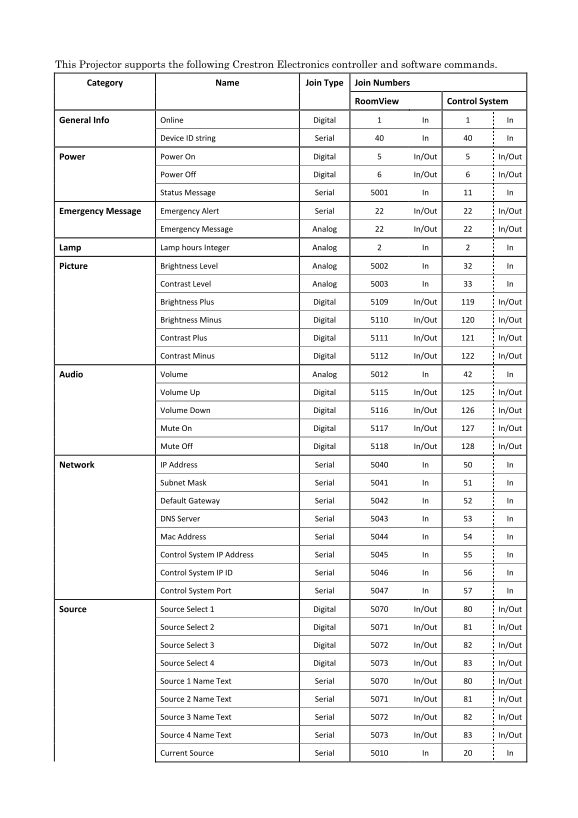
Page 1 Text Content
This Projector supports the following Crestron Electronics controller and software commands. Category Name Join Type Join Numbers
Room View Control System
General Info Online Digital 1 In 1 In
Device ID string Serial 40 In 40 In
Power Power On Digital 5 In/Out 5 In/Out
Power Off Digital 6 In/Out 6 In/Out
Status Message Serial 5001 In 11 In
Emergency Message Emergency Alert Serial 22 In/Out 22 In/Out
Emergency Message Analog 22 In/Out 22 In/Out
Lamp Lamp hours Integer Analog 2 In 2 In
Picture Brightness Level Analog 5002 In 32 In
Contrast Level Analog 5003 In 33 In
Brightness Plus Digital 5109 In/Out 119 In/Out
Brightness Minus Digital 5110 In/Out 120 In/Out
Contrast Plus Digital 5111 In/Out 121 In/Out
Contrast Minus Digital 5112 In/Out 122 In/Out
Audio Volume Analog 5012 In 42 In
Volume Up Digital 5115 In/Out 125 In/Out
Volume Down Digital 5116 In/Out 126 In/Out
Mute On Digital 5117 In/Out 127 In/Out
Mute Off Digital 5118 In/Out 128 In/Out
Network IP Address Serial 5040 In 50 In
Subnet Mask Serial 5041 In 51 In
Default Gateway Serial 5042 In 52 In
DNS Server Serial 5043 In 53 In
Mac Address Serial 5044 In 54 In
Control System IP Address Serial 5045 In 55 In
Control System IP ID Serial 5046 In 56 In
Control System Port Serial 5047 In 57 In
Source Source Select 1 Digital 5070 In/Out 80 In/Out
Source Select 2 Digital 5071 In/Out 81 In/Out
Source Select 3 Digital 5072 In/Out 82 In/Out
Source Select 4 Digital 5073 In/Out 83 In/Out
Source 1 Name Text Serial 5070 In/Out 80 In/Out
Source 2 Name Text Serial 5071 In/Out 81 In/Out
Source 3 Name Text Serial 5072 In/Out 82 In/Out
Source 4 Name Text Serial 5073 In/Out 83 In/Out
Current Source Serial 5010 In 20 In
Page Summary Contents For Casio XJ-SK600 Wireless LAN User Guide - Manual Part 2
Manual Details
| Brand | Casio |
|---|---|
| Pages | 2 |
| File Size | 126.94 KB |
| Published | May 17, 2026 |
Enter the captcha to get the download link:

Frequently Asked Questions
How do I control basic projector functions via Crestron?
Basic controls include Power On (Digital 5), Power Off (Digital 6), and status message via Serial 5001.
Is the lamp life monitored by the system?
Yes, 'Lamp hours' is an Integer Analog variable accessible using Digital 2.
What are the network configuration parameters available?
The projector supports settings for IP Address (Serial 5040), Subnet Mask (Serial 5041), and Default Gateway (Serial 5042).
How can I adjust picture quality remotely?
Picture brightness, contrast level, volume up/down, and mute status can be controlled using various Analog and Digital commands.