ASUS ZenFone 2 Laser (ZE550KL) Software Update SOP for ZenFone (Eng)
Summary
Provides comprehensive step-by-step guidelines for manually performing Over-The-Air (OTA) firmware updates for your ZenFone device. This essential manual guides users through downloading and safely installing an official software ZIP file using a PC connection. It covers prerequisites, including verifying model SKUs, accessing system details, and completing the physical flashing process. Designed for advanced users who need to manually upgrade their operating system to the latest stable version.
Page 1 Text Content
OTA UPDATE PROCEDURE for Zen Fone
※NOTICE: Only apply to same SKU update, Ex: WW->WW, CN->CN, TW->TW.* Software update cannot transfer the software SKU and downgrade the software version. Wrong SKU may cause update failure, please update the same SKU version only. 1. Download OTA ZIP file from ASUS official Web Site. http://www.asus.com/support/ Ex: UL-ASUS_T00G-WW-2014.2.20.838687-user.zip UL-[DEVICE]-[SKU]-[VERSION]-[BUILDTYPE].zip
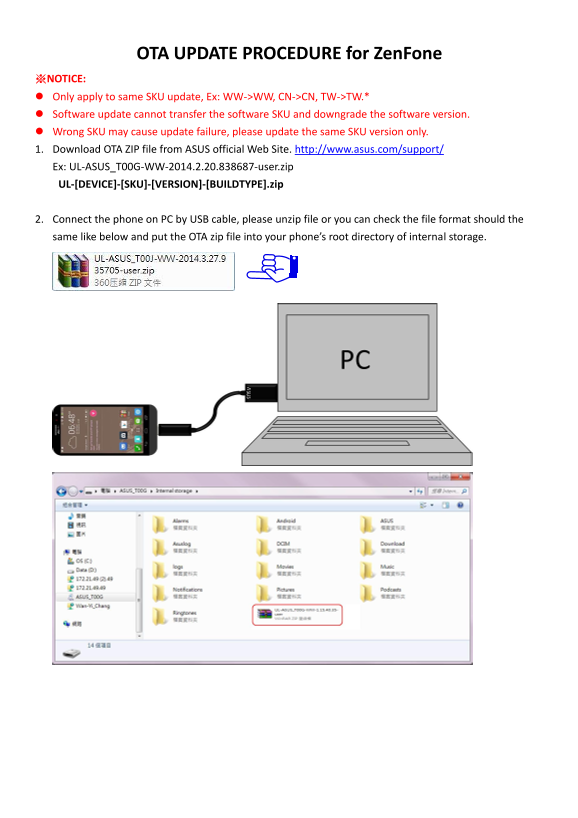
2. Connect the phone on PC by USB cable, please unzip file or you can check the file format should the same like below and put the OTA zip file into your phone’s root directory of internal storage.
Page Summary Contents For ASUS ZenFone 2 Laser (ZE550KL) Software Update SOP for ZenFone (Eng)
Manual Details
| Brand | Laser |
|---|---|
| Pages | 3 |
| File Size | 681.89 KB |
| Published | June 05, 2026 |
Enter the captcha to get the download link:

Frequently Asked Questions
Can I use an OTA update for a different product SKU?
No, the update must be applied to the same SKU (e.g., WW->WW) as described in the manual.
What is the minimum battery requirement for updating the software?
The power adapter must be connected, or the device's battery life must be at least 15% when proceeding with the update.
Where should I place the downloaded OTA ZIP file?
The OTA zip file needs to be placed into the phone’s root directory of internal storage.
How can I find my device model and software version?
Go to Settings > About, and you will find the Model Number or Build number there.