Agilent Technologies Bravo Platform Unpacking Guide
Summary
The essential guide for initiating setup and safely unboxing the Bravo Automated Liquid-Handling Platform. This manual provides critical, detailed, step-by-step procedures for all technical personnel responsible for receiving and deploying complex laboratory automation systems. It covers thorough safety guidelines, component inspection, and preparations needed before integrating the high-capacity platform into your working lab environment, ensuring a smooth start to powerful liquid-handling operations.
Page 1 Text Content
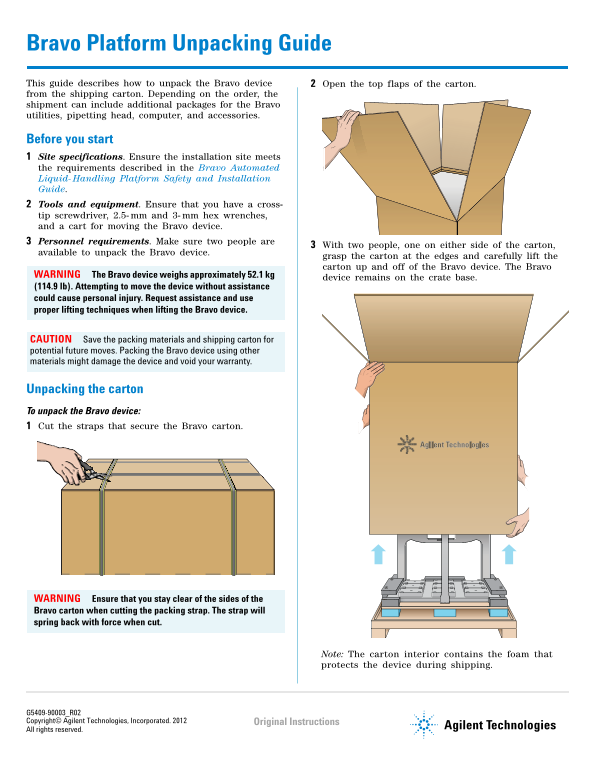
Bravo Platform Unpacking Guide This guide describes how to unpack the Bravo device Open the top flaps of the carton. from the shipping carton. Depending on the order, the shipment can include additional packages for the Bravo utilities, pipetting head, computer, and accessories.
Before you start Site specifications. Ensure the installation site meets the requirements described in the Bravo Automated Liquid- Handling Platform Safety and Installation Guide. Tools and equipment. Ensure that you have a cross- tip screwdriver, 2.5- mm and 3- mm hex wrenches, and a cart for moving the Bravo device. Personnel requirements. Make sure two people are
With two people, one on either side of the carton,
available to unpack the Bravo device.
grasp the carton at the edges and carefully lift the carton up and off of the Bravo device. The Bravo
WARNING The Bravo device weighs approximately 52.1 kg
device remains on the crate base.
(114.9 lb). Attempting to move the device without assistance could cause personal injury. Request assistance and use proper lifting techniques when lifting the Bravo device.
CAUTION Save the packing materials and shipping carton for potential future moves. Packing the Bravo device using other materials might damage the device and void your warranty.
Unpacking the carton To unpack the Bravo device: Cut the straps that secure the Bravo carton.
WARNING Ensure that you stay clear of the sides of the Bravo carton when cutting the packing strap. The strap will spring back with force when cut.
Note: The carton interior contains the foam that protects the device during shipping.
Original Instructions
Agilent Technologies Copyright© Agilent Technologies, Incorporated. 2012
All rights reserved.
Page Summary Contents For Agilent Technologies Bravo Platform Unpacking Guide
Manual Details
| Brand | Agilent Technologies |
|---|---|
| Pages | 4 |
| File Size | 987.93 KB |
| Published | May 13, 2026 |
Enter the captcha to get the download link:

Frequently Asked Questions
How much does the Bravo device weigh and what safety precautions should I take when moving it?
The Bravo device weighs approximately 52.1 kg (114.9 lb). Always request assistance and use proper lifting techniques, as attempting to move it without help could cause injury.
What must I do if I receive a defective item when unpacking the shipment?
Inspect all items for completeness and shipping damage immediately. If an item is defective, contact the Automation Solutions Business Center as soon as possible.
Where can I find instructions for properly installing and using the Bravo device?
For full installation instructions and product documentation, please refer to the dedicated Bravo Automated Liquid-Handling Platform Safety and Installation Guide and online resources at www.agilent.com/lifesciences/automation.
Which tools are required to unpack or service the Bravo device?
You will need a cross-tip screwdriver, 2.5-mm and 3-mm hex wrenches, and a cart for moving the unit.