User Guide for All Share Cast Hub Wireless Sync Transmitter - Samsung Galaxy Smartphones Accessories manual.
Summary
Effortlessly project your mobile device's screen onto any compatible monitor using the AllShare Cast Dongle. Perfect for presenters, home entertainment, or collaboration, this adapter provides seamless wireless and wired screen mirroring up to 1080p. This user guide offers comprehensive, step-by-step setup instructions covering three connection methods: PIN code pairing, joining previously connected displays, and resetting for new pairings. Whether you are connecting a new gadget or troubleshooting connectivity issues, detailed guides ensure quick, reliable casting results.
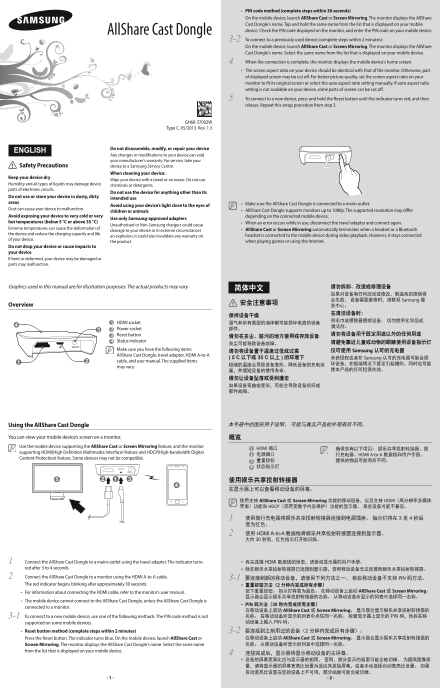
Page 1 Text Content
PIN code method (complete steps within 30 seconds)• On the mobile device, launch All Share Cast or Screen Mirroring. The monitor displays the All Share Cast Dongle's name. Tap and hold the same name from the list that is displayed on your mobile All Share Cast Dongle device. Check the PIN code displayed on the monitor, and enter the PIN code on your mobile device. To connect to a previously used device (complete steps within 2 minutes):3-2 On the mobile device, launch All Share Cast or Screen Mirroring. The monitor displays the All Share Cast Dongle's name. Select the same name from the list that is displayed on your mobile device. When the connection is complete, the monitor displays the mobile device's home screen.4 The screen aspect ratio on your device should be identical with that of the monitor. Otherwise, part • of displayed screen may be cut off. For better picture quality, set the screen aspect ratio on your monitor to fit its original screen or select the auto aspect ratio setting manually. If auto aspect ratio setting is not available on your device, some parts of screen can be cut off. To connect to a new device, press and hold the Reset button until the indicator turns red, and then 5 release. Repeat this setup procedure from step 3.
GH68-37002W
Type C. 05/2013. Rev. 1.3
Do not disassemble, modify, or repair your device
ENGLISH
Any changes or modifications to your device can void your manufacturer’s warranty. For service, take your
Safety Precautions device to a Samsung Service Centre.
When cleaning your device:
Keep your device dry
Wipe your device with a towel or an eraser. Do not use
Humidity and all types of liquids may damage device chemicals or detergents. parts of electronic circuits.
Do not use the device for anything other than its
Do not use or store your device in dusty, dirty intended use areas Make sure the All Share Cast Dongle is connected to a mains outlet.•
Avoid using your device’s light close to the eyes of
Dust can cause your device to malfunction. All Share Cast Dongle supports monitors up to 1080p. The supported resolution may differ •
children or animals
Avoid exposing your device to very cold or very depending on the connected mobile device.
Use only Samsung-approved adapters
hot temperatures (below 5 °C or above 35 °C) When an error occurs while in use, disconnect the travel adapter and connect again.•
Unauthorised or Non-Samsung chargers could cause
Extreme temperatures can cause the deformation of All Share Cast• or Screen Mirroring automatically terminates when a headset or a Bluetooth
damage to your device or in extreme circumstances
the device and reduce the charging capacity and life headset is connected to the mobile device during video playback. However, it stays connected
an explosion, it could also invalidate any warranty on
of your device.
the product. when playing games or using the Internet.
Do not drop your device or cause impacts to your device If bent or deformed, your device may be damaged or parts may malfunction.
Graphics used in this manual are for illustration purposes. The actual products may vary. 请勿拆卸、改造或修理设备
如果对设备有任何改动或修改,制造商的担保将 会失效。 设备需要维修时,请联系 Samsung 服
Overview 安全注意事项
1 HDMI socket 湿气和所有类型的液体都可能损坏电路的设备
2 Power socket 部件。
3 Reset button 请勿将设备用于既定用途以外的任何用途
4 Status indicator 请避免靠近儿童或动物的眼睛使用设备指示灯
Make sure you have the following items: 仅可使用 Samsung 认可的充电器
All Share Cast Dongle, travel adapter, HDMI A-to-A
( 5˚C 以下或 35˚C 以上 ) 的环境下 未获授权或者非 Samsung 认可的充电器可能会损
cable, and user manual. The supplied items
may vary.
Using the All Share Cast Dongle 本手册中的图形用于说明。 可能与真实产品的外观有所不同。
You can view your mobile device’s screen on a monitor. 概览 Use the mobile device supporting the All Share Cast or Screen Mirroring feature, and the monitor
1 HDMI 插口 确保您有以下项目: 娱乐共享投射转接器、旅
supporting HDMI(High Definition Multimedia Interface) feature and HDCP(High-bandwidth Digital
2 电源插口 行充电器、HDMI A-to-A 数据线和用户手册。
Content Protection) feature. Some devices may not be compatible.
使用支持 All Share Cast 或 Screen Mirroring 功能的移动设备,以及支持 HDMI(高分辨率多媒体 界面)功能和 HDCP(高带宽数字内容保护)功能的显示器。 某些设备可能不兼容。
使用旅行充电器将娱乐共享投射转接器连接到电源插座。 指示灯将在 3 至 4 秒后1 变为红色。 使用 HDMI A-to-A 数据线将娱乐共享投射转接器连接到显示器。2 大约 30 秒后,红色指示灯开始闪烁。
Connect the All Share Cast Dongle to a mains outlet using the travel adapter. The indicator turns 1 有关连接 HDMI 数据线的信息,请参阅显示器的用户手册。• red after 3 to 4 seconds. 除非娱乐共享投射转接器已连接到显示器,否则移动设备无法连接到娱乐共享投射转接器。•
Connect the All Share Cast Dongle to a monitor using the HDMI A-to-A cable.2 要连接到新的移动设备,请使用下列方法之一。 有些移动设备不支持 3-1 PIN 码方法。 The red indicator begins blinking after approximately 30 seconds. 重置按钮方法(2 分钟内完成所有步骤)•
For information about connecting the HDMI cable, refer to the monitor’s user manual.• 按下重置按钮。 指示灯将变为蓝色。 在移动设备上启动 All Share Cast 或 Screen Mirroring。 显示器会显示娱乐共享投射转接器的名称。 从移动设备所显示的列表中选择同一名称。
The mobile device cannot connect to the All Share Cast Dongle, unless the All Share Cast Dongle is •
PIN 码方法(30 秒内完成所有步骤)•
connected to a monitor.
在移动设备上启动 All Share Cast 或 Screen Mirroring。 显示器会显示娱乐共享投射转接器的 To connect to a new mobile device, use one of the following methods. The PIN code method is not 3-1 名称。 在移动设备所显示的列表中点住同一名称。 检查显示器上显示的 PIN 码,然后在移 supported on some mobile devices. 动设备上输入 PIN 码。
Reset button method (complete steps within 2 minutes)• 要连接到之前用过的设备(2 分钟内完成所有步骤):3-2
Press the Reset button. The indicator turns blue. On the mobile device, launch All Share Cast or 在移动设备上启动 All Share Cast 或 Screen Mirroring。 显示器会显示娱乐共享投射转接器的 Screen Mirroring. The monitor displays the All Share Cast Dongle's name. Select the same name 名称。 从移动设备所显示的列表中选择同一名称。
from the list that is displayed on your mobile device.
Page Summary Contents For User Guide for All Share Cast Hub Wireless Sync Transmitter - Samsung Galaxy Smartphones Accessories manual.
Manual Details
| Brand | Samsung |
|---|---|
| Pages | 2 |
| File Size | 1.59 MB |
| Published | June 15, 2026 |
Enter the captcha to get the download link:

Frequently Asked Questions
How do I connect the Dongle to a new mobile device?
Press and hold the Reset button until the indicator turns red, then repeat the setup procedure from Step 3. For PIN code use: Select the name on the monitor, check the pin, and enter it on your phone.
What is the maximum supported resolution for the AllShare Cast Dongle?
The AllShare Cast Dongle supports monitors up to 1080p resolution.
What should I do if screen parts are cut off during mirroring?
Ensure the screen aspect ratio on your mobile device matches the monitor, or set the monitor's aspect ratio manually (if 'auto' is unavailable).