# A B C D E F G H I J K L M N O P Q R S T U V W X Y Z

SHARP XL-DH259P Operation Manual

Summary

Upgrade your home audio experience with this comprehensive Micro Component System, featuring reliable stereo sound quality and multi-format media support. This unit seamlessly plays CDs along with digital files in MP3 and WMA formats, while maintaining integrated FM/AM radio reception. The accompanying manual provides expert coverage on setup procedures, detailed maintenance guidelines, technical specifications, and essential safety warnings, ensuring both new users and experienced enthusiasts can operate the system correctly. It is the perfect reliable audio centerpiece for any modern home entertainment environment.
📄 Preview 📖 Table of Contents Contents PAGE OF 16

Page 1 Text Content

ENGLISH

MODEL

XL-DH259P MICRO COMPONENT SYSTEM

OPERATION MANUAL

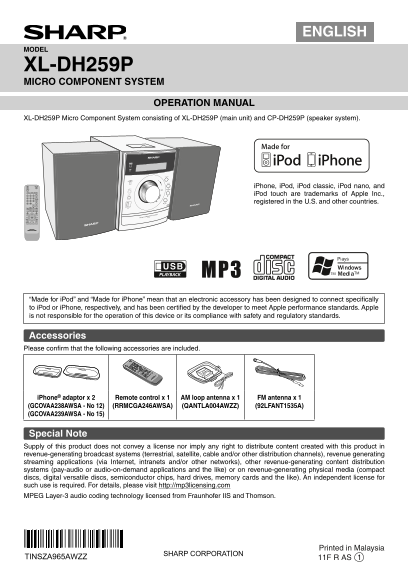
XL-DH259P Micro Component System consisting of XL-DH259P (main unit) and CP-DH259P (speaker system).

i Phone, i Pod, i Pod classic, i Pod nano, and i Pod touch are trademarks of Apple Inc., registered in the U.S. and other countries.

COMPONENT SYSTEM

MICRO XL-DH259

“Made for i Pod” and “Made for i Phone” mean that an electronic accessory has been designed to connect specifi cally to i Pod or i Phone, respectively, and has been certifi ed by the developer to meet Apple performance standards. Apple is not responsible for the operation of this device or its compliance with safety and regulatory standards.

Accessories Please confi rm that the following accessories are included.

CGA232A SA

i Phone® adaptor x 2 Remote control x 1 AM loop antenna x 1 FM antenna x 1 (GCOVAA238AWSA - No 12) (RRMCGA246AWSA) (QANTLA004AWZZ) (92LFANT1535A) (GCOVAA239AWSA - No 15)

Special Note Supply of this product does not convey a license nor imply any right to distribute content created with this product in revenue-generating broadcast systems (terrestrial, satellite, cable and/or other distribution channels), revenue generating streaming applications (via Internet, intranets and/or other networks), other revenue-generating content distribution systems (pay-audio or audio-on-demand applications and the like) or on revenue-generating physical media (compact discs, digital versatile discs, semiconductor chips, hard drives, memory cards and the like). An independent license for such use is required. For details, please visit http://mp3licensing.com MPEG Layer-3 audio coding technology licensed from Fraunhofer IIS and Thomson.

Printed in Malaysia

TINSZA965AWZZ 11F R AS 1

XL-DH259P_USA_EN_cover.indd 1 4/18/2011 2:03:40 PM

Page Summary Contents For SHARP XL-DH259P Operation Manual

Page 1 ENGLISH MODEL XL-DH259P MICRO COMPONENT SYSTEM OPERATION MANUAL XL-DH259P Micro Component System consisting of XL-DH259P (main unit) and CP-DH259P (speaker system). i Phone, i Pod, i Pod classic, i Po...
Page 2 SPECIAL NOTES NOTE This equipment has been tested and found to comply with the limits for a Class B digital device, pursuant to Part 15 of the FCC Rules. These limits are designed to provide reasonabl...
Page 3 IMPORTANT SAFETY INSTRUCTIONS (continued) 11) Only use attachments/accessories specifi ed by the 20) Safety Check - Upon completion of any service or manufacturer. repairs to this product, ask the ser...
Page 4 For U.S. customer only CONSUMER LIMITED WARRANTY SHARP ELECTRONICS CORPORATION warrants to the first consumer purchaser that this Sharp brand product (the "Product"), when ship in its origin...
Page 5 System connections (continued) Make sure to unplug the AC power cord before making any connections. Video cable (not supplied) TV To video input jack AM loop SPEAKERS Plug in with the antenna lever si...
Page 6 Remote control (continued) Auto power on function When you press any of the following buttons, the unit turns on. Notes concerning use: i Pod ® / i Phone, CD, USB, AUDIO IN, TUNER (BAND) Replace the b...
Page 7 Listening to the i Pod or i Phone i Phone and i Pod operations To insert i Pod or i Phone adaptor Made for: i Phone 3GS Open the i Pod cover by pulling up the tip.1 i Phone 3G i Phone i Pod touch (3 r...
Page 8 Listening to the i Pod or i Phone Various i Pod functions (continued) Main Remote Function Operation unit control Navigating the i Pod and i Phone menus Play Press in the pause mode. Press the MENU bu...
Page 9 Listening to a CD or MP3/WMA disc Repeat play (continued) Repeat play can play one track, all tracks or a programed sequence continuously. Various disc functions To repeat one track: Press the PLAY MO...
Page 10 Advanced CD or MP3/WMA disc Procedure to playback MP3/WMA disc with folder mode on playback (continued) To play back CD-R/RW. Press the MEMORY button to save the track number.3 Repeat steps 2 - 3 for ...
Page 11 USB cable is not recommended for use in this audio Listening to USB mass storage device/ system to connect to USB memory device. Use of the MP3 player (continued) USB cable will affect the performance...
Page 12 Within 30 seconds, press the MEMORY button to store 4 Listening to the radio that station in memory. If the “MEMORY” and preset number indicators disappear before the station is memorized, repeat the ...
Page 13 When you select the tuner, select a station by pressing the Setting the clock (continued) or button, and then press the MEMORY button. If a station has not been programmed, “NO PRESET” will be To adju...
Page 14 Timer and sleep operation Enhancing your system (Remote control only) (continued) The connection cord is not included. Purchase a commercially available cord as shown below. Sleep operation Portable T...
Page 15 Troubleshooting chart i Pod and i Phone Many potential problems can be resolved by the owner without calling a Symptom Possible cause service technician. No sound is produced. The i Pod or i Phone is ...
Page 16 Troubleshooting chart (continued) Amplifi er Care of compact discs Output power RMS: Total 160 watt (80 W per channel into 4 ohms at 1 k Hz, 10% Total Compact discs are fairly resistant to damage, how...