Samsung Quick User Guide UE46D
Summary
This comprehensive guide provides professional installation and operational details for Samsung commercial displays (UE46D/UE55D). It serves system integrators, IT professionals, and businesses establishing multi-source visual environments. The manual covers everything from connectivity standards (HDMI, DP, RS232C) to quick setup instructions, environmental guidelines, and power specifications, ensuring seamless integration with various source devices, including PCs and dedicated signal sources. Users can download detailed user manuals for complete technical information and warranty protocols.
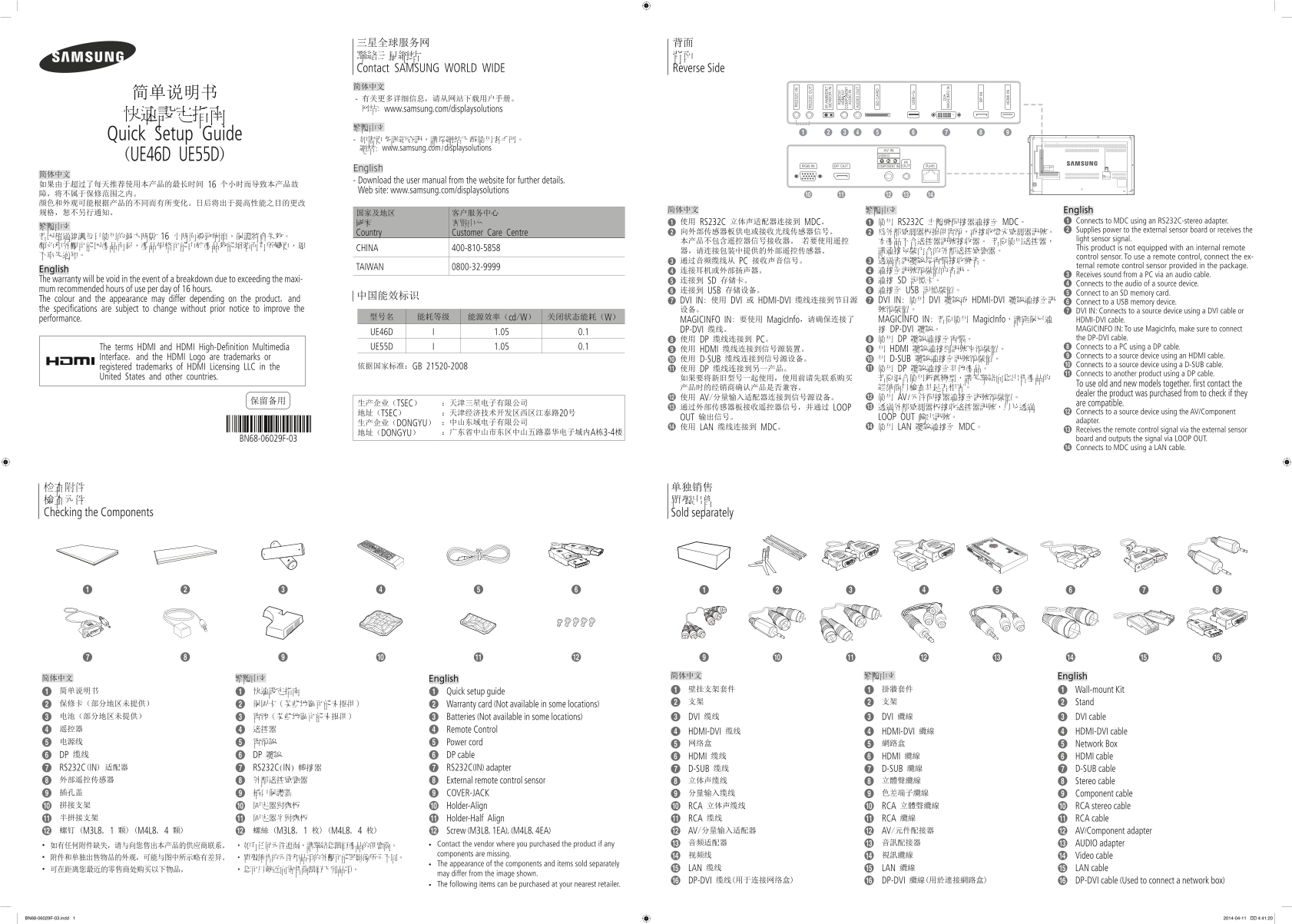
Page 1 Text Content
三星全球服务网 背面 聯絡三星網站 背面 Contact SAMSUNG WORLD WIDE Reverse Side 简体中文
- 有关更多详细信息,请从网站下载用户手册。 网站: www.samsung.com/displaysolutions
Quick Setup Guide
- 如需更多詳細資訊,請從網站下載使用者手冊。 網站: www.samsung.com/displaysolutions
(UE46D UE55D)
English
- Download the user manual from the website for further details.
Web site: www.samsung.com/displaysolutions
简体中文 繁體中文 English
國家 客服中心 1 使用 RS232C 立体声适配器连接到 MDC。 1 使用 RS232C 立體聲配接器連接至 MDC。 1 Connects to MDC using an RS232C-stereo adapter.
2 Supplies power to the external sensor board or receives the
Country Customer Care Centre 2 向外部传感器板供电或接收光线传感器信号。 2 為外部感測器板提供電源,或接收燈光感測器訊號。
light sensor signal.
CHINA 400-810-5858 This product is not equipped with an internal remote
不事先通知。 control sensor. To use a remote control, connect the ex-
3 通过音频缆线从 PC 接收声音信号。 3 透過音訊纜線從電腦接收聲音。
TAIWAN 0800-32-9999 ternal remote control sensor provided in the package.
English 4 连接耳机或外部扬声器。 4 連接至訊號源裝置的音訊。
3 Receives sound from a PC via an audio cable.
The warranty will be void in the event of a breakdown due to exceeding the maxi- 5 连接到 SD 存储卡。 5 連接 SD 記憶卡。
4 Connects to the audio of a source device.
mum recommended hours of use per day of 16 hours. 6 连接到 USB 存储设备。 6 連接至 USB 記憶裝置。
5 Connect to an SD memory card.
The colour and the appearance may differ depending on the product, and 7 DVI IN: 使用 DVI 或 HDMI-DVI 缆线连接到节目源 7 DVI IN: 使用 DVI 纜線或 HDMI-DVI 纜線連接至訊
6 Connect to a USB memory device.
the specifications are subject to change without prior notice to improve the 设备。 號源裝置。 7 DVI IN: Connects to a source device using a DVI cable or
performance. 型号名 能耗等级 能源效率(cd/W) 关闭状态能耗(W)
MAGICINFO IN: 要使用 Magic Info,请确保连接了 MAGICINFO IN: 若要使用 Magic Info,請確保已連 HDMI-DVI cable.
DP-DVI 缆线。 接 DP-DVI 纜線。 MAGICINFO IN: To use Magic Info, make sure to connect
UE46D 1.05 0.1
8 使用 DP 纜線連接至電腦。 the DP-DVI cable.
8 使用 DP 缆线连接到 PC。
The terms HDMI and HDMI High-Definition Multimedia UE55D 1.05 0.1 8 Connects to a PC using a DP cable.
9 使用 HDMI 缆线连接到信号源装置。 9 用 HDMI 纜線連接到訊號來源裝置。
Interface, and the HDMI Logo are trademarks or 9 Connects to a source device using an HDMI cable.
0 使用 D-SUB 缆线连接到信号源设备。 0 用 D-SUB 纜線連接至訊號源裝置。
依据国家标准:GB 21520-2008 0 Connects to a source device using a D-SUB cable.
registered trademarks of HDMI Licensing LLC in the ! 使用 DP 缆线连接到另一产品。 ! 使用 DP 纜線連接至其他產品。
! Connects to another product using a DP cable.
United States and other countries. 如果要将新旧型号一起使用,使用前请先联系购买 若要混合使用新舊機型,請先聯絡向您出售產品的
To use old and new models together, first contact the
dealer the product was purchased from to check if they
@ 使用 AV/分量输入适配器连接到信号源设备。 @ 使用 AV/元件配接器連接至訊號源裝置。
保留备用 生产企业(TSEC) :天津三星电子有限公司
are compatible.
# 通过外部传感器板接收遥控器信号,并通过 LOOP # 透過外部感測器板接收遙控器訊號,以及透過
地址(TSEC) :天津经济技术开发区西区江泰路20号 @ Connects to a source device using the AV/Component
OUT 输出信号。 LOOP OUT 輸出訊號。
:中山东域电子有限公司 adapter.
生产企业(DONGYU)
$ 使用 LAN 缆线连接到 MDC。 $ 使用 LAN 纜線連接至 MDC。
# Receives the remote control signal via the external sensor
地址(DONGYU) :广东省中山市东区中山五路嘉华电子城内A栋3-4楼
BN68-06029F-03 board and outputs the signal via LOOP OUT. $ Connects to MDC using a LAN cable.
检查附件 单独销售 檢查元件 單獨出售 Checking the Components Sold separately
简体中文 繁體中文 English
简体中文 繁體中文 English
简单说明书 快速設定指南 壁挂支架套件 掛牆套件 Wall-mount Kit
Quick setup guide
支架 支架 Stand
保修卡(部分地区未提供) 保固卡(某些地區可能未提供) Warranty card (Not available in some locations) 电池(部分地区未提供) 電池(某些地區可能未提供) Batteries (Not available in some locations) DVI 缆线 DVI 纜線 DVI cable 遥控器 遙控器 Remote Control
HDMI-DVI 缆线 HDMI-DVI 纜線 HDMI-DVI cable
电源线 電源線 Power cord 网络盒 網路盒
Network Box
DP 缆线 DP 纜線 DP cable HDMI 缆线 HDMI 纜線 HDMI cable RS232C(IN) 适配器 RS232C(IN) 轉接器 RS232C(IN) adapter D-SUB 缆线 7 D-SUB 纜線 D-SUB cable
外部遥控传感器 外部遙控感應器 External remote control sensor 立体声缆线 立體聲纜線 Stereo cable 插孔盖 插口保護蓋 COVER-JACK 分量输入缆线 色差端子纜線 Component cable 拼接支架 固定器對齊板 Holder-Align RCA 立体声缆线 RCA 立體聲纜線 RCA stereo cable 半拼接支架 固定器半對齊板 Holder-Half Align RCA 缆线 RCA 纜線 RCA cable
螺钉 (M3L8, 1 颗) (M4L8, 4 颗) 螺絲 (M3L8, 1 枚) (M4L8, 4 枚) Screw (M3L8, 1EA), (M4L8, 4EA) AV/分量输入适配器 AV/元件配接器 AV/Component adapter
Contact the vendor where you purchased the product if any 音频适配器 音訊配接器 AUDIO adapter
components are missing. 视频线 視訊纜線
• 附件和单独出售物品的外观,可能与图中所示略有差异。 • 單獨銷售的元件和品項的外觀可能與影像所示不同。 Video cable
The appearance of the components and items sold separately
• 可在距离您最近的零售商处购买以下物品。 • 您可以就近向零售商購買下列品項。 LAN 缆线 LAN 纜線 LAN cable
may differ from the image shown.
DP-DVI 缆线(用于连接网络盒) DP-DVI 纜線(用於連接網路盒) DP-DVI cable (Used to connect a network box)
The following items can be purchased at your nearest retailer.
BN68-06029F-03.indd 1 2014-04-11 �� 4:41:20
Page Summary Contents For Samsung Quick User Guide UE46D
Manual Details
| Brand | Samsung |
|---|---|
| Pages | 2 |
| File Size | 3.41 MB |
| Published | June 04, 2026 |
Enter the captcha to get the download link:

Frequently Asked Questions
如何连接到外部传感器以使用遥控器功能?
若要使用遥控器,请连接包装内含的外部遥控传感器。
如果超过建议每日使用的最大使用时间会导致故障,保修是否仍然有效?
否,因超出建议每日使用的最长时间而导致的故障将不属于保修范围之内。
哪些接口可以用于连接电脑(PC)和信号源设备?
可以通过DP、HDMI及DVI等多个端口连接到PC或源设备,并支持使用相应的线材和适配器。
产品在不同国家/地区使用时要注意哪些方面?
请参阅产品后方的标签,确认所用电源的电压范围(一般为100-240V)是否与您所在国家/地区的标准电压相符。
使用此设备时推荐的使用和存储环境温度及湿度是多少?
工作温度和存储温度均建议在 0°C ~ 45°C之间;相对湿度需控制在 10%~80%(非凝结)范围内。