Samsung Quick User Guide UD46E-B
Summary
Introducing the Samsung Color Display series (UD46E/UD55E), designed for versatile visual applications. This quick setup guide provides comprehensive instructions on connecting, operating, and understanding your monitor's features. It details various input methods—including DVI, HDMI, DP, and RS232C—and covers essential specifications such as power consumption and connectivity options. Ideal for users who need a detailed reference for initial setup and optimal performance integration with source devices.
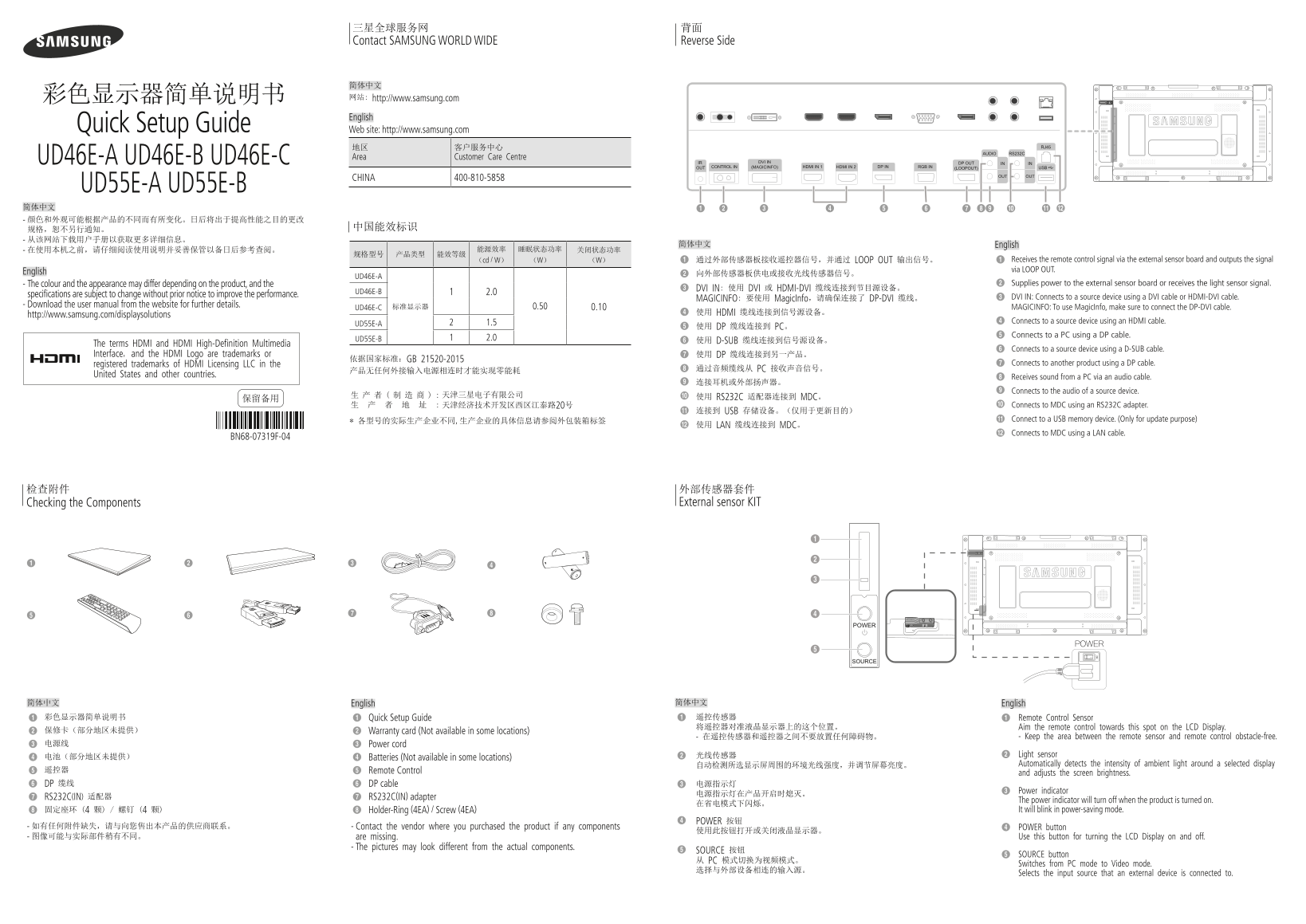
Page 1 Text Content
三星全球服务网 背面 Contact SAMSUNG WORLD WIDE Reverse Side
简体中文 彩色显示器简单说明书 网站: http://www.samsung.com English
Quick Setup Guide Web site: http://www.samsung.com
地区 客户服务中心 Area Customer Care Centre
UD46E-A UD46E-B UD46E-C
CHINA 400-810-5858
UD55E-A UD55E-B 简体中文 - 颜色和外观可能根据产品的不同而有所变化。日后将出于提高性能之目的更改
简体中文 English
(cd / W) (W) (W) 通过外部传感器板接收遥控器信号,并通过 LOOP OUT 输出信号。 Receives the remote control signal via the external sensor board and outputs the signal via LOOP OUT.
English 向外部传感器板供电或接收光线传感器信号。
UD46E-A
- The colour and the appearance may differ depending on the product, and the Supplies power to the external sensor board or receives the light sensor signal.
DVI IN: 使用 DVI 或 HDMI-DVI 缆线连接到节目源设备。
UD46E-B 2.0
specifications are subject to change without prior notice to improve the performance.
MAGICINFO: 要使用 Magic Info,请确保连接了 DP-DVI 缆线。 DVI IN: Connects to a source device using a DVI cable or HDMI-DVI cable.
- Download the user manual from the website for further details. 0.50
UD46E-C 标准显示器 0.10 MAGICINFO: To use Magic Info, make sure to connect the DP-DVI cable.
使用 HDMI 缆线连接到信号源设备。
http://www.samsung.com/displaysolutions
1.5 Connects to a source device using an HDMI cable.
UD55E-A
使用 DP 缆线连接到 PC。
Connects to a PC using a DP cable.
UD55E-B 2.0
使用 D-SUB 缆线连接到信号源设备。
The terms HDMI and HDMI High-Definition Multimedia
Connects to a source device using a D-SUB cable.
Interface, and the HDMI Logo are trademarks or 使用 DP 缆线连接到另一产品。
依据国家标准:GB 21520-2015
registered trademarks of HDMI Licensing LLC in the Connects to another product using a DP cable.
通过音频缆线从 PC 接收声音信号。
United States and other countries.
Receives sound from a PC via an audio cable.
Connects to the audio of a source device.
生 产 者 ( 制 造 商 ) : 天津三星电子有限公司 使用 RS232C 适配器连接到 MDC。
生 产 者 地 址 : 天津经济技术开发区西区江泰路20号 Connects to MDC using an RS232C adapter.
连接到 USB 存储设备。(仅用于更新目的)
* 各型号的实际生产企业不同,生产企业的具体信息请参阅外包装箱标签 Connect to a USB memory device. (Only for update purpose)
使用 LAN 缆线连接到 MDC。
Connects to MDC using a LAN cable.
BN68-07319F-04
Checking the Components External sensor KIT
POWER
简体中文 English 简体中文 English 彩色显示器简单说明书 Quick Setup Guide 遥控传感器 Remote Control Sensor 将遥控器对准液晶显示器上的这个位置。 Aim the remote control towards this spot on the LCD Display.
保修卡(部分地区未提供) Warranty card (Not available in some locations)
- 在遥控传感器和遥控器之间不要放置任何障碍物。 - Keep the area between the remote sensor and remote control obstacle-free.
电源线 Power cord
光线传感器 Light sensor
电池(部分地区未提供) Batteries (Not available in some locations)
自动检测所选显示屏周围的环境光线强度,并调节屏幕亮度。 Automatically detects the intensity of ambient light around a selected display
遥控器 Remote Control
and adjusts the screen brightness.
DP 缆线 DP cable 电源指示灯
Power indicator
RS232C(IN) 适配器 RS232C(IN) adapter
The power indicator will turn off when the product is turned on.
固定座环 (4 颗) / 螺钉 (4 颗) Holder-Ring (4EA) / Screw (4EA) It will blink in power-saving mode.
POWER 按钮
- 如有任何附件缺失,请与向您售出本产品的供应商联系。 - Contact the vendor where you purchased the product if any components POWER button
- 图像可能与实际部件稍有不同。 are missing. Use this button for turning the LCD Display on and off.
- The pictures may look different from the actual components.
SOURCE 按钮
SOURCE button
从 PC 模式切换为视频模式。
Switches from PC mode to Video mode.
Selects the input source that an external device is connected to.
UDE_ABC_QSG_CHINA_BN68-07319F-04.indd 1 2016-09-07 오후 7:26:51
Page Summary Contents For Samsung Quick User Guide UD46E-B
Manual Details
| Brand | Samsung |
|---|---|
| Pages | 2 |
| File Size | 2.39 MB |
| Published | June 04, 2026 |
Enter the captcha to get the download link:

Frequently Asked Questions
How do I operate the remote control?
Aim the remote control towards the designated spot on the LCD display to ensure no obstacles are present between the sensor and the remote.
What signal types can the display connect to its source device?
The unit supports connections via DVI, HDMI/DVI, DP-DVI, HDMI, a DP cable (PC mode), or D-SUB cable.
How much does this display consume during standby/sleep mode?
The power consumption in sleep mode ranges from 0 W to less than 0.5 W, depending on the model and settings.
Does the unit support external control systems (MDC)?
Yes, it can connect using an RS232C adapter or a LAN cable for MDC functionality.