Samsung Quick User Guide OM75D- K
Summary
Maximize your professional presentation setup with this comprehensive technical guide for commercial digital displays. The manual provides detailed instructions on connectivity, allowing seamless integration of multiple source devices via HDMI, DVI, DP, and audio inputs. Learn how to utilize advanced features like external ambient light sensing and remote control functionalities. It is an essential resource for IT professionals, system integrators, and commercial users building sophisticated, multi-source display environments.
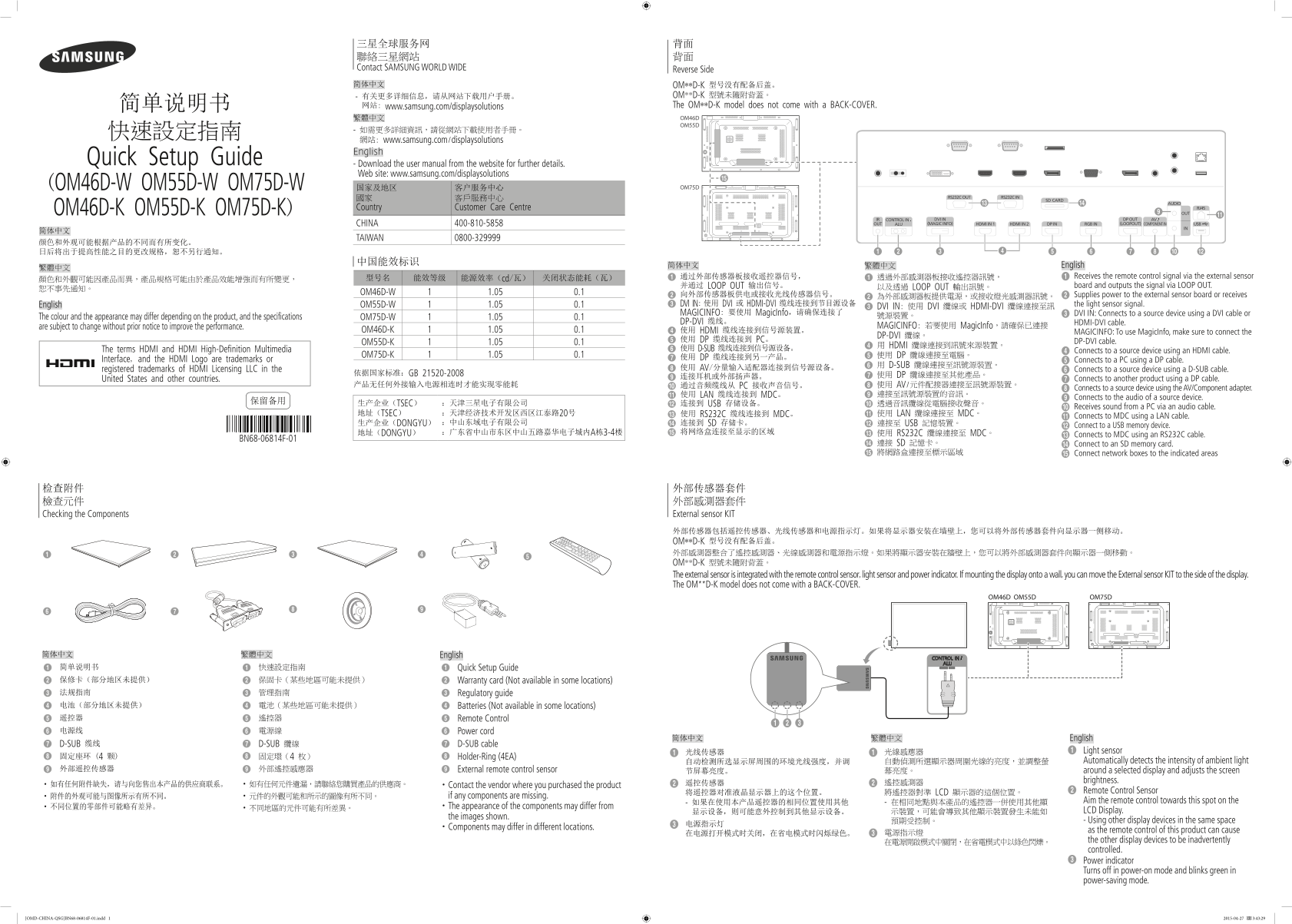
Page 1 Text Content
三星全球服务网 背面 聯絡三星網站 背面 Contact SAMSUNG WORLD WIDE Reverse Side 简体中文 OM**D-K 型号没有配备后盖。
- 有关更多详细信息,请从网站下载用户手册。 OM**D-K 型號未隨附背蓋。 简单说明书 网站: www.samsung.com/displaysolutions The OM**D-K model does not come with a BACK-COVER. 繁體中文 OM46D OM55D
網站: www.samsung.com/displaysolutions English
Quick Setup Guide - Download the user manual from the website for further details.
Web site: www.samsung.com/displaysolutions
(OM46D-W OM55D-W OM75D-W 国家及地区 客户服务中心 OM75D
國家 客戶服務中心 Country Customer Care Centre
OM46D-K OM55D-K OM75D-K)
CHINA 400-810-5858
TAIWAN 0800-329999
简体中文 繁體中文 English
型号名 能效等级 能源效率(cd/瓦) 关闭状态能耗(瓦) 1 通过外部传感器板接收遥控器信号, 1 透過外部感測器板接收遙控器訊號, 1 Receives the remote control signal via the external sensor
并通过 LOOP OUT 输出信号。 以及透過 LOOP OUT 輸出訊號。 board and outputs the signal via LOOP OUT.
OM46D-W 1.05 0.1
2 向外部传感器板供电或接收光线传感器信号。 2 為外部感測器板提供電源,或接收燈光感測器訊號。 2 Supplies power to the external sensor board or receives
English OM55D-W 1.05 0.1 3 DVI IN: 使用 DVI 或 HDMI-DVI 缆线连接到节目源设备 the light sensor signal.
3 DVI IN: 使用 DVI 纜線或 HDMI-DVI 纜線連接至訊
MAGICINFO: 要使用 Magic Info,请确保连接了 3 DVI IN: Connects to a source device using a DVI cable or
The colour and the appearance may differ depending on the product, and the specifications OM75D-W 1.05 0.1 號源裝置。
DP-DVI 缆线。 HDMI-DVI cable.
are subject to change without prior notice to improve the performance. MAGICINFO: 若要使用 Magic Info,請確保已連接
OM46D-K 1.05 0.1 4 使用 HDMI 缆线连接到信号源装置。 MAGICINFO: To use Magic Info, make sure to connect the
DP-DVI 纜線。
5 使用 DP 缆线连接到 PC。 DP-DVI cable.
OM55D-K 1.05 0.1
4 用 HDMI 纜線連接到訊號來源裝置。
The terms HDMI and HDMI High-Definition Multimedia 6 使用 D-SUB 缆线连接到信号源设备。
4 Connects to a source device using an HDMI cable.
OM75D-K 1.05 0.1 5 使用 DP 纜線連接至電腦。
Interface, and the HDMI Logo are trademarks or 7 使用 DP 缆线连接到另一产品。
5 Connects to a PC using a DP cable.
6 用 D-SUB 纜線連接至訊號源裝置。
registered trademarks of HDMI Licensing LLC in the 8 使用 AV/分量输入适配器连接到信号源设备。 6 Connects to a source device using a D-SUB cable.
依据国家标准:GB 21520-2008
9 连接耳机或外部扬声器。 7 使用 DP 纜線連接至其他產品。
United States and other countries. 7 Connects to another product using a DP cable.
产品无任何外接输入电源相连时才能实现零能耗 0 通过音频缆线从 PC 接收声音信号。 8 使用 AV/元件配接器連接至訊號源裝置。
8 Connects to a source device using the AV/Component adapter.
! 使用 LAN 缆线连接到 MDC。 9 連接至訊號源裝置的音訊。
9 Connects to the audio of a source device.
保留备用 生产企业(TSEC) :天津三星电子有限公司
@ 连接到 USB 存储设备。 0 透過音訊纜線從電腦接收聲音。
0 Receives sound from a PC via an audio cable.
地址(TSEC) :天津经济技术开发区西区江泰路20号 # 使用 RS232C 缆线连接到 MDC。 ! 使用 LAN 纜線連接至 MDC。
! Connects to MDC using a LAN cable.
生产企业(DONGYU) :中山东域电子有限公司 $ 连接到 SD 存储卡。 @ 連接至 USB 記憶裝置。
@ Connect to a USB memory device.
地址(DONGYU) :广东省中山市东区中山五路嘉华电子城内A栋3-4楼 % 将网络盒连接至显示的区域 # 使用 RS232C 纜線連接至 MDC。
# Connects to MDC using an RS232C cable.
BN68-06814F-01
$ 連接 SD 記憶卡。 $ Connect to an SD memory card. % 將網路盒連接至標示區域 % Connect network boxes to the indicated areas
检查附件 外部传感器套件 檢查元件 外部感測器套件 Checking the Components External sensor KIT
外部传感器包括遥控传感器、光线传感器和电源指示灯。如果将显示器安装在墙壁上,您可以将外部传感器套件向显示器一侧移动。 OM**D-K 型号没有配备后盖。 外部感測器整合了遙控感測器、光線感測器和電源指示燈。如果將顯示器安裝在牆壁上,您可以將外部感測器套件向顯示器一側移動。 OM**D-K 型號未隨附背蓋。 The external sensor is integrated with the remote control sensor, light sensor and power indicator. If mounting the display onto a wall, you can move the External sensor KIT to the side of the display. The OM**D-K model does not come with a BACK-COVER.
OM46D OM55D OM75D
简体中文 繁體中文 English 简单说明书 快速設定指南 Quick Setup Guide 保修卡(部分地区未提供) 保固卡(某些地區可能未提供) Warranty card (Not available in some locations) 法规指南 管理指南 Regulatory guide 电池(部分地区未提供) 電池(某些地區可能未提供) Batteries (Not available in some locations) 遥控器 遙控器 Remote Control 电源线 電源線 Power cord
简体中文 繁體中文 English
D-SUB 缆线 D-SUB 纜線 D-SUB cable
光线传感器 光線感應器 Light sensor
固定座环 (4 颗) 固定環(4 枚) Holder-Ring (4EA)
自动检测所选显示屏周围的环境光线强度,并调 自動偵測所選顯示器周圍光線的亮度,並調整螢 Automatically detects the intensity of ambient light
外部遥控传感器 外部遙控感應器 External remote control sensor around a selected display and adjusts the screen
遙控感測器 brightness.
·如有任何附件缺失,请与向您售出本产品的供应商联系。 ·如有任何元件遺漏,請聯絡您購買產品的供應商。 ·Contact the vendor where you purchased the product 遥控传感器
将遥控器对准液晶显示器上的这个位置。 將遙控器對準 LCD 顯示器的這個位置。 Remote Control Sensor
·附件的外观可能与图像所示有所不同。 ·元件的外觀可能和所示的圖像有所不同。 if any components are missing.
- 在相同地點與本產品的遙控器一併使用其他顯 Aim the remote control towards this spot on the
·不同位置的零部件可能略有差异。 ·The appearance of the components may differ from
显示设备,则可能意外控制到其他显示设备。 示裝置,可能會導致其他顯示裝置發生未能如 LCD Display.
the images shown.
預期受控制。 - Using other display devices in the same space
·Components may differ in different locations.
as the remote control of this product can cause
在電源開啟模式中關閉,在省電模式中以綠色閃爍。 the other display devices to be inadvertently controlled. Power indicator Turns off in power-on mode and blinks green in power-saving mode.
[OMD-CHINA-QSG]BN68-06814F-01.indd 1 2015-04-27 3:43:29
Page Summary Contents For Samsung Quick User Guide OM75D- K
Manual Details
| Brand | Samsung |
|---|---|
| Pages | 2 |
| File Size | 1.17 MB |
| Published | June 02, 2026 |
Enter the captcha to get the download link:

Frequently Asked Questions
If I need to integrate new and old models simultaneously, what steps should I take?
First contact the dealer where you purchased the product to confirm if they are compatible.
How do I connect an external sound output device or monitor?
Connect external audio devices to the AUDIO OUT port, and use appropriate cables (DVI, HDMI, DP) for video sources.
What should I do if any accessories or components are found missing?
Contact the vendor where you purchased the product.
If mounting this display on a wall, what is done with the external sensor kit?
You can move the External Sensor KIT to the side of the display.