Samsung Quick User Guide for ED40D - Part 2: Product Overview
Summary
Optimize your workspace with this comprehensive guide for Samsung professional display solutions. The manual details quick setup procedures, crucial connectivity information—including HDMI, D-Sub, and Component ports—and expert troubleshooting tips. Find specific instructions on optimizing signal quality, managing cables, and ensuring peak operational performance. It is designed for IT professionals and business users who require reliable viewing and seamless integration in a commercial environment.
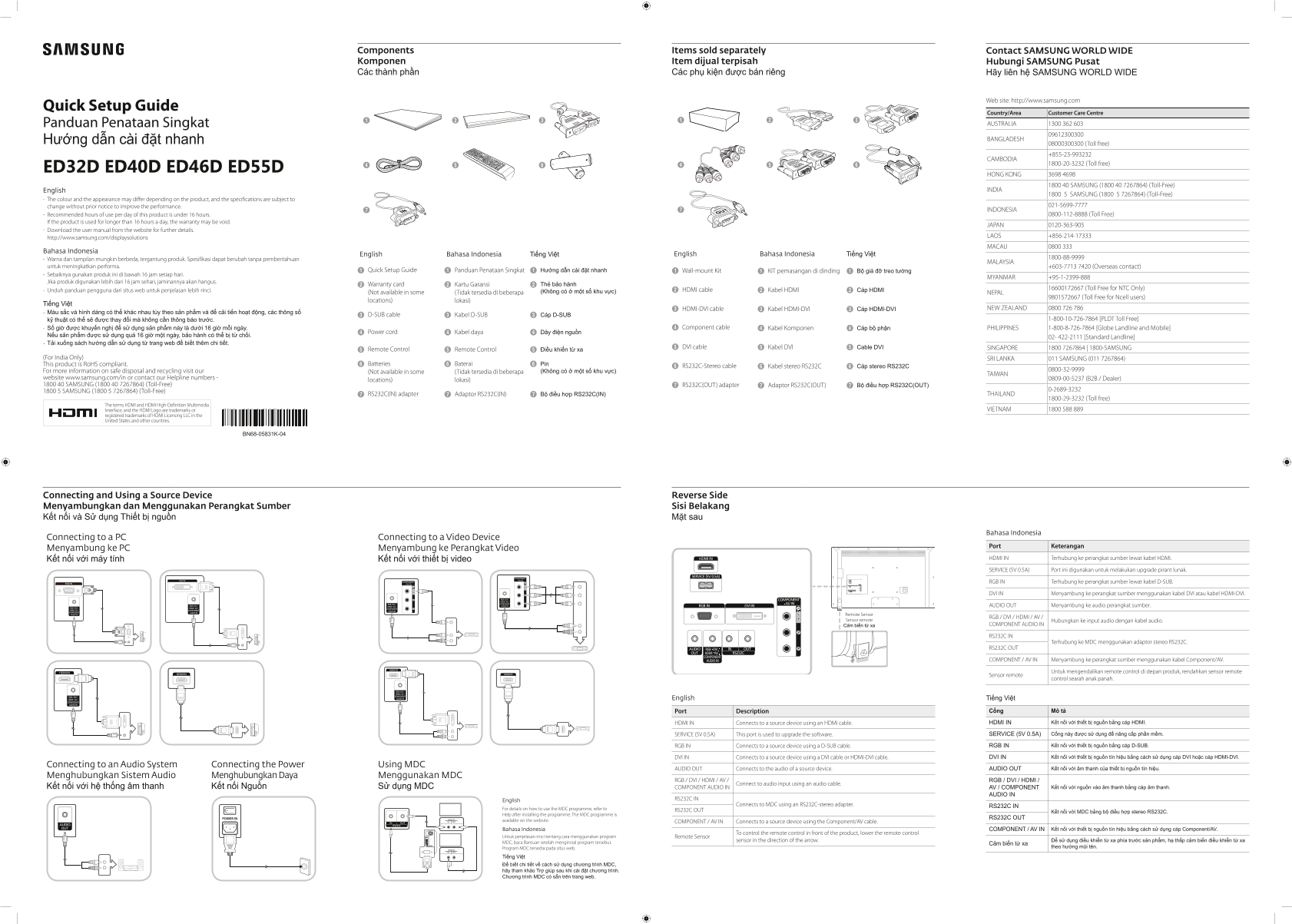
Page 1 Text Content
Components Items sold separately Contact SAMSUNG WORLD WIDE Komponen Item dijual terpisah Hubungi SAMSUNG Pusat Các thành phần Các phụ kiện được bán riêng Hãy liên hệ SAMSUNG WORLD WIDE
Web site: http://www.samsung.com
Quick Setup Guide
Country/Area Customer Care Centre
Panduan Penataan Singkat AUSTRALIA 1300 362 603 Hướng dẫn cài đặt nhanh BANGLADESH
08000300300 (Toll free) +855-23-993232
CAMBODIA
1800-20-3232 (Toll free)
ED32D ED40D ED46D ED55D
HONG KONG 3698 4698
1800 40 SAMSUNG (1800 40 7267864) (Toll-Free)
English INDIA
1800 5 SAMSUNG (1800 5 7267864) (Toll-Free)
The colour and the appearance may differ depending on the product, and the specifications are subject to
change without prior notice to improve the performance. 021-5699-7777
INDONESIA
Recommended hours of use per day of this product is under 16 hours. 0800-112-8888 (Toll Free)
If the product is used for longer than 16 hours a day, the warranty may be void.
JAPAN 0120-363-905
Download the user manual from the website for further details.
LAOS +856-214-17333
http://www.samsung.com/displaysolutions
MACAU 0800 333
Bahasa Indonesia
English Bahasa Indonesia Tiếng Việt English Bahasa Indonesia Tiếng Việt
Warna dan tampilan mungkin berbeda, tergantung produk. Spesifikasi dapat berubah tanpa pemberitahuan
MALAYSIA
untuk meningkatkan performa. +603-7713 7420 (Overseas contact)
Quick Setup Guide Panduan Penataan Singkat Hướng dẫn cài đặt nhanh Wall-mount Kit 1 KIT pemasangan di dinding Bộ giá đỡ treo tường
Sebaiknya gunakan produk ini di bawah 16 jam setiap hari.
MYANMAR +95-1-2399-888
Jika produk digunakan lebih dari 16 jam sehari, jaminannya akan hangus.
Warranty card Kartu Garansi Thẻ bảo hành
16600172667 (Toll Free for NTC Only)
Unduh panduan pengguna dari situs web untuk penjelasan lebih rinci. HDMI cable Kabel HDMI Cáp HDMI
(Not available in some (Tidak tersedia di beberapa (Không có ở một số khu vực) NEPAL
9801572667 (Toll Free for Ncell users)
locations) lokasi)
Tiếng Việt
HDMI-DVI cable Kabel HDMI-DVI Cáp HDMI-DVI NEW ZEALAND 0800 726 786
Màu sắc và hình dáng có thể khác nhau tùy theo sản phẩm và để cải tiến hoạt động, các thông số
D-SUB cable Kabel D-SUB Cáp D-SUB
kỹ thuật có thể sẽ được thay đổi mà không cần thông báo trước. 1-800-10-726-7864 [PLDT Toll Free]
Số giờ được khuyến nghị để sử dụng sản phẩm này là dưới 16 giờ mỗi ngày. Component cable Kabel Komponen Cáp bộ phận PHILIPPINES 1-800-8-726-7864 [Globe Landline and Mobile]
Power cord Kabel daya Dây điện nguồn
Nếu sản phẩm được sử dụng quá 16 giờ một ngày, bảo hành có thể bị từ chối.
02- 422-2111 [Standard Landline]
Tải xuống sách hướng dẫn sử dụng từ trang web để biết thêm chi tiết.
DVI cable Kabel DVI Cable DVI SINGAPORE 1800 7267864 | 1800-SAMSUNG
Remote Control Remote Control Điều khiển từ xa
(For India Only) SRI LANKA 011 SAMSUNG (011 7267864)
This product is Ro HS compliant. Batteries Baterai Pin
RS232C-Stereo cable Kabel stereo RS232C Cáp stereo RS232C
For more information on safe disposal and recycling visit our 0800-32-9999
(Not available in some (Tidak tersedia di beberapa (Không có ở một số khu vực)
TAIWAN
website www.samsung.com/in or contact our Helpline numbers - 0809-00-5237 (B2B / Dealer)
locations) lokasi)
1800 40 SAMSUNG (1800 40 7267864) (Toll-Free) RS232C(OUT) adapter Adaptor RS232C(OUT) Bộ điều hợp RS232C(OUT)
1800 5 SAMSUNG (1800 5 7267864) (Toll-Free)
RS232C(IN) adapter Adaptor RS232C(IN) Bộ điều hợp RS232C(IN) THAILAND
1800-29-3232 (Toll free)
The terms HDMI and HDMI High-Definition Multimedia
Interface, and the HDMI Logo are trademarks or VIETNAM 1800 588 889
registered trademarks of HDMI Licensing LLC in the United States and other countries.
BN68-05831K-04
Connecting and Using a Source Device Reverse Side Menyambungkan dan Menggunakan Perangkat Sumber Sisi Belakang Kết nối và Sử dụng Thiết bị nguồn Mặt sau
Bahasa Indonesia
Connecting to a PC Connecting to a Video Device
Port Keterangan
Menyambung ke PC Menyambung ke Perangkat Video
Kết nối với máy tính Kết nối với thiết bị video HDMI IN Terhubung ke perangkat sumber lewat kabel HDMI. SERVICE (5V 0.5A) Port ini digunakan untuk melakukan upgrade pirant lunak. RGB IN Terhubung ke perangkat sumber lewat kabel D-SUB. DVI IN Menyambung ke perangkat sumber menggunakan kabel DVI atau kabel HDMI-DVI.
AUDIO OUT Menyambung ke audio perangkat sumber.
Remote Sensor
RGB / DVI / HDMI / AV /
Sensor remote Hubungkan ke input audio dengan kabel audio.
Cảm biến từ xa COMPONENT AUDIO IN
RS232C IN
Terhubung ke MDC menggunakan adaptor stereo RS232C.
RS232C OUT
COMPONENT / AV IN Menyambung ke perangkat sumber menggunakan kabel Component/AV.
Untuk mengendalikan remote control di depan produk, rendahkan sensor remote
Sensor remote
control searah anak panah.
English Tiếng Việt
Port Description Cổng Mô tả
HDMI IN Connects to a source device using an HDMI cable. HDMI IN Kết nối với thiết bị nguồn bằng cáp HDMI.
SERVICE (5V 0.5A) This port is used to upgrade the software. SERVICE (5V 0.5A) Cổng này được sử dụng để nâng cấp phần mềm.
RGB IN Connects to a source device using a D-SUB cable. RGB IN Kết nối với thiết bị nguồn bằng cáp D-SUB.
DVI IN Connects to a source device using a DVI cable or HDMI-DVI cable. DVI IN Kết nối với thiết bị nguồn tín hiệu bằng cách sử dụng cáp DVI hoặc cáp HDMI-DVI.
Connecting to an Audio System Connecting the Power Using MDC
AUDIO OUT Connects to the audio of a source device. AUDIO OUT Kết nối với âm thanh của thiết bị nguồn tín hiệu.
Menghubungkan Sistem Audio Menghubungkan Daya Menggunakan MDC
RGB / DVI / HDMI / AV / RGB / DVI / HDMI /
Connect to audio input using an audio cable.
Kết nối với hệ thống âm thanh Kết nối Nguồn Sử dụng MDC COMPONENT AUDIO IN AV / COMPONENT Kết nối với nguồn vào âm thanh bằng cáp âm thanh.
AUDIO IN
RS232C IN
English
Connects to MDC using an RS232C-stereo adapter.
RS232C IN
For details on how to use the MDC programme, refer to
RS232C OUT
Kết nối với MDC bằng bộ điều hợp stereo RS232C.
Help after installing the programme. The MDC programme is
POWER IN RS232C RS232C OUT
IN OUT available on the website. COMPONENT / AV IN Connects to a source device using the Component/AV cable.
Bahasa Indonesia COMPONENT / AV IN Kết nối với thiết bị nguồn tín hiệu bằng cách sử dụng cáp Component/AV.
To control the remote control in front of the product, lower the remote control
Untuk penjelasan rinci tentang cara menggunakan program Remote Sensor
sensor in the direction of the arrow. Để sử dụng điều khiển từ xa phía trước sản phẩm, hạ thấp cảm biến điều khiển từ xa
MDC, baca Bantuan setelah menginstal program tersebut.
Cảm biến từ xa
Program MDC tersedia pada situs web. theo hướng mũi tên.
RS232C IN OUT
Tiếng Việt Để biết chi tiết về cách sử dụng chương trình MDC, hãy tham khảo Trợ giúp sau khi cài đặt chương trình. Chương trình MDC có sẵn trên trang web.
Page Summary Contents For Samsung Quick User Guide for ED40D - Part 2: Product Overview
Manual Details
| Brand | Samsung |
|---|---|
| Pages | 2 |
| File Size | 3.51 MB |
| Published | June 04, 2026 |
Enter the captcha to get the download link:
