Samsung Quick Setup Guide (QB75R) - All Products Viewed
Summary
This comprehensive guide details a versatile high-definition display designed for professional environments, conference rooms, or educational facilities. It features extensive connectivity options, including HDMI, DVI, USB, and specialized inputs for network integration (MDC/Magicinfo). The manual provides essential setup procedures, detailed troubleshooting solutions, technical specifications, and connection advice to ensure reliable performance across all multimedia devices.
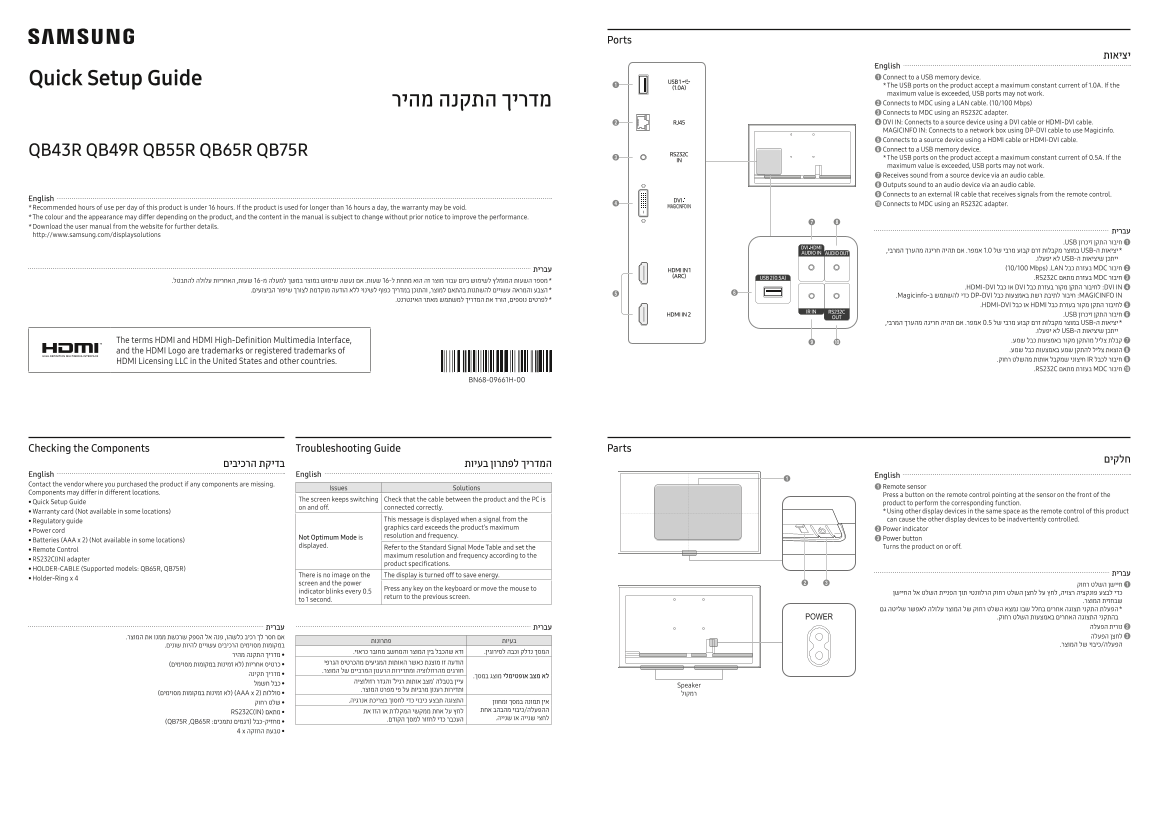
Page 1 Text Content
Ports
English 1 Connect to a USB memory device.
Quick Setup Guide
* The USB ports on the product accept a maximum constant current of 1.0A. If the maximum value is exceeded, USB ports may not work. מדריך התקנה מהיר 2 Connects to MDC using a LAN cable. (10/100 Mbps) 3 Connects to MDC using an RS232C adapter. 4 DVI IN: Connects to a source device using a DVI cable or HDMI-DVI cable. MAGICINFO IN: Connects to a network box using DP-DVI cable to use Magicinfo. 5 Connects to a source device using a HDMI cable or HDMI-DVI cable. QB43R QB49R QB55R QB65R QB75R 6 Connect to a USB memory device. * The USB ports on the product accept a maximum constant current of 0.5A. If the maximum value is exceeded, USB ports may not work. 7 Receives sound from a source device via an audio cable. 8 Outputs sound to an audio device via an audio cable. 9 Connects to an external IR cable that receives signals from the remote control.
English
Connects to MDC using an RS232C adapter.
* Recommended hours of use per day of this product is under 16 hours. If the product is used for longer than 16 hours a day, the warranty may be void. * The colour and the appearance may differ depending on the product, and the content in the manual is subject to change without prior notice to improve the performance. * Download the user manual from the website for further details.
http://www.samsung.com/displaysolutions
1 .USB חיבור התקן זיכרון יציאות ה-USB במוצר מקבלות זרם קבוע מרבי של 1.0 אמפר. אם תהיה חריגה מהערך המרבי,
ייתכן שיציאות ה-USB לא יפעלו.
עברית 2 ) 10/100 Mbps( .LAN בעזרת כבל MDC חיבור 3 .RS232C בעזרת מתאם MDC חיבור
4 .HDMI-DVI או כבל DVI לחיבור התקן מקור בעזרת כבל :DVI IN
.Magicinfo-כדי להשתמש ב DP-DVI חיבור לתיבת רשת באמצעות כבל :MAGICINFO IN
5 .HDMI-DVI או כבל HDMI לחיבור התקן מקור בעזרת כבל 6 .USB חיבור התקן זיכרון יציאות ה-USB במוצר מקבלות זרם קבוע מרבי של 0.5 אמפר. אם תהיה חריגה מהערך המרבי,
ייתכן שיציאות ה-USB לא יפעלו.
The terms HDMI and HDMI High-Definition Multimedia Interface, קבלת צליל מהתקן מקור באמצעות כבל שמע. 7 and the HDMI Logo are trademarks or registered trademarks of הוצאת צליל להתקן שמע באמצעות כבל שמע. 8 חיבור לכבל IR חיצוני שמקבל אותות מהשלט רחוק. 9
HDMI Licensing LLC in the United States and other countries.
0 .RS232C בעזרת מתאם MDC חיבור
BN68-09661H-00
Troubleshooting Guide Checking the Components Parts
English English English Contact the vendor where you purchased the product if any components are missing.
Issues Solutions 1 Remote sensor
Components may differ in different locations.
Press a button on the remote control pointing at the sensor on the front of the
The screen keeps switching Check that the cable between the product and the PC is
• Quick Setup Guide product to perform the corresponding function.
on and off. connected correctly.
• Warranty card (Not available in some locations) * Using other display devices in the same space as the remote control of this product
• Regulatory guide This message is displayed when a signal from the can cause the other display devices to be inadvertently controlled. graphics card exceeds the product’s maximum 2 Power indicator
• Power cord
Not Optimum Mode is resolution and frequency.
• Batteries (AAA x 2) (Not available in some locations) 3 Power button
displayed. Refer to the Standard Signal Mode Table and set the Turns the product on or off.
• Remote Control
maximum resolution and frequency according to the
• RS232C(IN) adapter
product specifications.
• HOLDER-CABLE (Supported models: QB65R, QB75R)
There is no image on the The display is turned off to save energy. עברית
• Holder-Ring x 4
screen and the power חיישן השלט רחוק 1
Press any key on the keyboard or move the mouse to
indicator blinks every 0.5 כדי לבצע פונקציה רצויה, לחץ על לחצן השלט רחוק הרלוונטי תוך הפניית השלט אל החיישן
return to the previous screen.
to 1 second. שבחזית המוצר.
כבל חשמל Speaker
סוללות )AAA x 2( )לא זמינות במקומות מסוימים( רמקול
RS232C)IN( מתאם
)QB75R ,QB65R :מחזיק-כבל )דגמים נתמכים 4 x טבעת החזקה
BN68-09661H-00_QSG_QBR_ISRAEL_L02.indd 1 2019-04-22 오후 2:20:06
Page Summary Contents For Samsung Quick Setup Guide (QB75R) - All Products Viewed
Manual Details
| Brand | Samsung |
|---|---|
| Pages | 2 |
| File Size | 3.27 MB |
| Published | June 02, 2026 |
Enter the captcha to get the download link:

Frequently Asked Questions
What is the recommended maximum daily usage time for this product?
The recommended hours of use per day is under 16 hours; exceeding this may void the warranty.
If my display shows 'No signal,' what steps should I take?
Check that the cable connecting the product to the source device is connected correctly. If issues persist, contact a vendor for assistance.
What are the current limits for the USB ports?
The USB ports accept maximum constant currents of 0.5A or 1.0A, depending on the specific port, and exceeding these values may prevent functionality.
How do I connect external audio systems to the display?
Connect the source device and access the MDC programme (available via the website) to configure the AUDIO OUT function for optimal sound output.