Samsung PS-42P4H Quick User Guide
Summary
Master your home media setup with this comprehensive connectivity guide. This manual details how to link a wide array of external devices—including PCs, camcorders, VCRs, and advanced home theater systems—to your display unit. Learn to utilize diverse video input standards, such as S-Video, DVI, RGB, Component Video, and auxiliary ports, ensuring seamless integration for any complex entertainment environment.
Page 1 Text Content
BN68-00679A-00 ENG 4/19/04 2:57 PM Page 55
Connecting to the External Devices
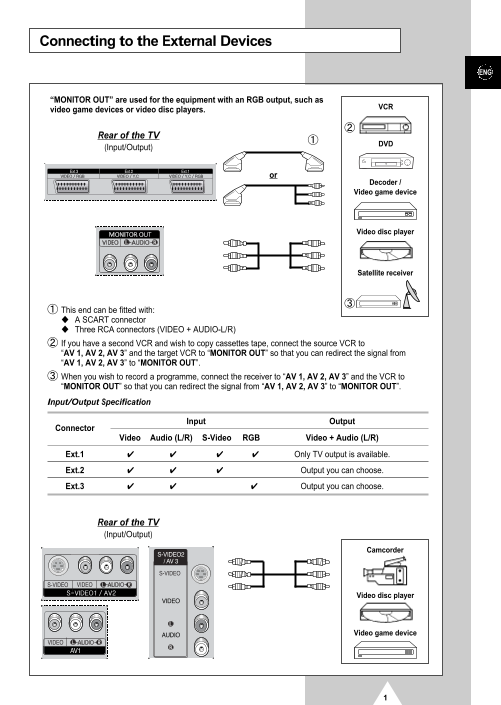
“MONITOR OUT” are used for the equipment with an RGB output, such as
video game devices or video disc players.
Rear of the TV
(Input/Output)
Decoder / Video game device
Video disc player
Satellite receiver
This end can be fitted with: A SCART connector Three RCA connectors (VIDEO + AUDIO-L/R) If you have a second VCR and wish to copy cassettes tape, connect the source VCR to “AV 1, AV 2, AV 3” and the target VCR to “MONITOR OUT” so that you can redirect the signal from “AV 1, AV 2, AV 3” to “MONITOR OUT”. When you wish to record a programme, connect the receiver to “AV 1, AV 2, AV 3” and the VCR to “MONITOR OUT” so that you can redirect the signal from “AV 1, AV 2, AV 3” to “MONITOR OUT”.
Input/Output Specification
Input Output
Connector
Video Audio (L/R) S-Video RGB Video + Audio (L/R)
Ext.1 Only TV output is available.
Ext.2 Output you can choose.
Ext.3 ✔ Output you can choose.
Rear of the TV (Input/Output)
Camcorder
Video disc player
Video game device
Page Summary Contents For Samsung PS-42P4H Quick User Guide
Manual Details
| Brand | Samsung |
|---|---|
| Pages | 5 |
| File Size | 696.26 KB |
| Published | June 06, 2026 |
Enter the captcha to get the download link:
