Samsung PS-42D4S Quick User Guide
Summary
Master your home entertainment setup with comprehensive guidance on all available connectivity options. This professional manual details how to seamlessly link the display unit to virtually any external source—including VCRs, DVD players, game consoles, PCs, and advanced Home Theater Systems. Whether utilizing Component video, DVI inputs, S-Video, or dedicated RCA ports, we provide step-by-step instructions for reliable setup, ensuring optimal performance for every device in your living space.
Page 1 Text Content
BN68-00690A-00Eng 4/23/04 9:16 AM Page 53
Connecting to the External Devices
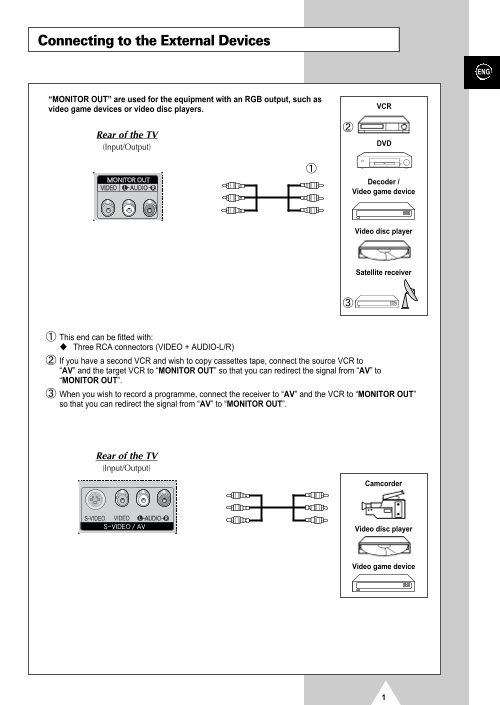
“MONITOR OUT” are used for the equipment with an RGB output, such as
video game devices or video disc players.
Rear of the TV
(Input/Output)
Decoder / Video game device
Video disc player
Satellite receiver
This end can be fitted with: Three RCA connectors (VIDEO + AUDIO-L/R) If you have a second VCR and wish to copy cassettes tape, connect the source VCR to “AV” and the target VCR to “MONITOR OUT” so that you can redirect the signal from “AV” to “MONITOR OUT”. When you wish to record a programme, connect the receiver to “AV” and the VCR to “MONITOR OUT” so that you can redirect the signal from “AV” to “MONITOR OUT”.
Rear of the TV (Input/Output)
Camcorder
Video disc player
Video game device
Page Summary Contents For Samsung PS-42D4S Quick User Guide
Manual Details
| Brand | Samsung |
|---|---|
| Pages | 5 |
| File Size | 413.50 KB |
| Published | June 15, 2026 |
Enter the captcha to get the download link:

Frequently Asked Questions
How do I connect an external source like a VCR for copying tapes?
Connect the source VCR to “AV” and the target VCR to “MONITOR OUT”.
What connectors are used for equipment with S-Video output?
The S-VIDEO and RCA (AUDIO-L/R) connectors are used, such as for a camcorder or VCR.
Where should I connect my Home Theater System?
Connect the monitoring audio out L and R jacks of the MONITOR OUT on the rear panel to the AUDIO IN jacks of the DVD Home Theater System or AV Receiver.
Are there different connections available for PCs?
The “RGB” (video) and “AUDIO” connectors are used for interfacing with a Personal Computer.