# A B C D E F G H I J K L M N O P Q R S T U V W X Y Z

Samsung Air Conditioning Unit AQ12FCX User Guide Part 2 - Product Overview & Installation

Summary

This comprehensive user guide provides everything needed to operate your split-type air conditioner effectively. It covers detailed safety precautions, step-by-step setup instructions, and how to utilize all operating modes—from auto cooling and heating to dry and fan functionality. Learn how to adjust timers, optimize airflow, perform routine cleaning, and troubleshoot common issues, ensuring safe and peak performance for comfortable indoor environments.
📄 Preview PAGE OF 28

Page 1 Text Content

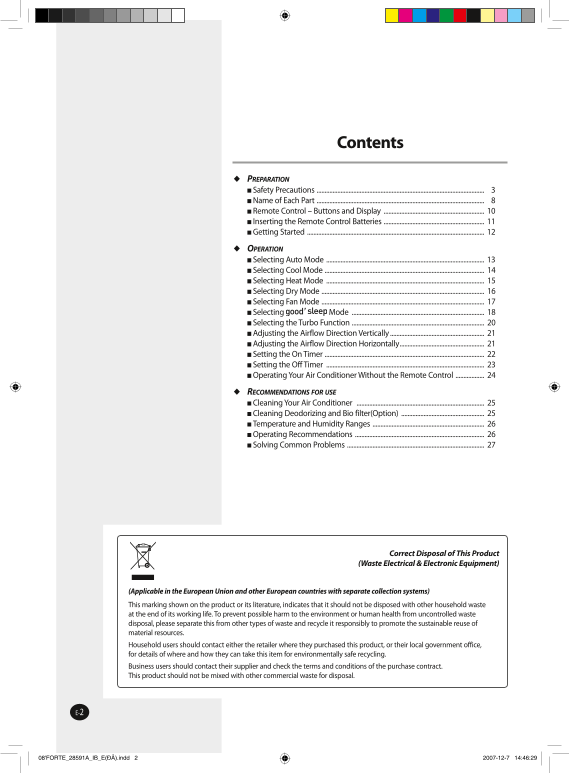
Contents

 PREPARATION Safety Precautions ......................................................................................................... Name of Each Part ......................................................................................................... Remote Control – Buttons and Display ............................................................... Inserting the Remote Control Batteries ............................................................... Getting Started ...............................................................................................................

 OPERATION Selecting Auto Mode ................................................................................................... Selecting Cool Mode .................................................................................................... Selecting Heat Mode ................................................................................................... Selecting Dry Mode ...................................................................................................... Selecting Fan Mode ...................................................................................................... Selecting Mode ................................................................................... Selecting the Turbo Function ................................................................................... Adjusting the Airflow Direction Vertically ........................................................... Adjusting the Airflow Direction Horizontally ..................................................... Setting the On Timer .................................................................................................... Setting the Off Timer ................................................................................................... Operating Your Air Conditioner Without the Remote Control ..................

 RECOMMENDATIONS FOR USE Cleaning Your Air Conditioner ................................................................................ Cleaning Deodorizing and Bio filter(Option) .................................................... Temperature and Humidity Ranges ...................................................................... Operating Recommendations ................................................................................. Solving Common Problems ......................................................................................

Correct Disposal of This Product

(Waste Electrical & Electronic Equipment)

(Applicable in the European Union and other European countries with separate collection systems) This marking shown on the product or its literature, indicates that it should not be disposed with other household waste at the end of its working life. To prevent possible harm to the environment or human health from uncontrolled waste disposal, please separate this from other types of waste and recycle it responsibly to promote the sustainable reuse of material resources. Household users should contact either the retailer where they purchased this product, or their local government office, for details of where and how they can take this item for environmentally safe recycling. Business users should contact their supplier and check the terms and conditions of the purchase contract. This product should not be mixed with other commercial waste for disposal.

08'FORTE_28591A_IB_E(ÐÂ).indd 2 2007-12-7 14:46:29

Page Summary Contents For Samsung Air Conditioning Unit AQ12FCX User Guide Part 2 - Product Overview & Installation

Page 1 Contents  PREPARATION Safety Precautions ......................................................................................................... Name of Each Part .................................
Page 2 Safety Precautions The following safety precautions are provided to protect the users’ safety and prevent property damage. Make sure to read the followings and use the air conditioner properly.  Keep...
Page 3 WARNING DURING OPERATION  Do not attempt to repair,  When using a wireless  Never spill any kind of liquid move, modify or reinstall remote control, the distance into the unit. Should this the unit...
Page 4 WARNING DISPOSING THE UNIT  Before throwing out the  When you need to dispose of  Please recycle or dispose device, it is necessary to pull the unit, consult your dealer. of the packaging material ...
Page 5 CAUTION REGARDING POWER SOURCE  Disconnect the circuit breaker  Contact the service center or  Contact the service center when you don’t use the manufacturer if you want to after turning off the ai...
Page 6 CAUTION DURING OPERATION  Do not touch the pipes  Do not use the air conditioner  Do not give excessive shock connected to the air to maintain the machine, food, to the air conditioner. conditioner...
Page 7 Name of Each Part The design and shape can be changed according to the model. Indoor Unit Air Inlet Temperature sensor Power(On/Off) button Air filter Air flow blades (under the grille) (outlet) Opera...
Page 8 Name of Each Part Outdoor Unit AQ09Series Air Inlet (Rear) Air Outlet Connection Valve (Inside) Outdoor Unit AQ12Series Air Inlet (Rear) Air Outlet Connection Valve (Inside) Outdoor Unit AQ18...
Page 9 Remote Control-Buttons and Display Remote control transmission indicator Mode selection button (AUTO, COOL, DRY, Operating mode indicator FAN, HEAT) ( AUTO, COOL, DRY, FAN, HEAT) Temperature adjustmen...
Page 10 Inserting the Remote Control Batteries You must insert or replace the remote control batteries when:  You purchase the air conditioner  The remote control does not work correctly Note  Use two AAA,...
Page 11 Getting Started The User’s Manual provides you with valuable information about your air conditioner. In order to take full advantage of the air conditioner’s features, please read this manual carefull...
Page 12 Selecting Auto Mode You can select Auto mode if you want to cool or heat your room automatically. You can adjust the temperature in this mode. Press the (On/Off) button. Result:  The operation indica...
Page 13 Selecting Cool Mode You can select Cool mode if you want to cool your room. You can adjust the temperature and the fan speed when cooling. Press the (On/Off) button. Result:  The operation indicator ...
Page 14 Selecting Heat Mode You can select Heat mode if you want to heat your room. You can adjust the temperature and the fan speed when heating. Press the (On/Off) button. Result:  The operation indicator ...
Page 15 Selecting Dry Mode Select Dry mode if you want to dehumidify your room. You can adjust the temperature in this mode. Press the (On/Off) button. Result:  The operation indicator on the indoor unit lig...
Page 16 Selecting Fan Mode Select Fan mode if you want to ventilate your room. It helps to refresh the air in your room. You can adjust the fan speed in this mode. Press the (On/Off) button. Result:  The ope...
Page 17 Selecting Mode mode helps users to fall asleep well after going to bed whether Temperature changes in mode being too hot to sleep or being awakened by coldness. The mode can To prevent excessive cooli...
Page 18 Selecting the Energy Saving Function Selecting Mode Temperature changes in mode To prevent excessive cooling/heating during sleep, the mode automatically modifies the temperature setting in accordance...
Page 19 Selecting the Turbo Function You can select the Turbo Function if you want to cool or heat your room as quickly as possible. The Turbo function operates for 30 minutes with the maximum settings before...
Page 20 Adjusting the Airflow Direction Vertically You can adjust the airflow direction vertically. The outer airflow blade moves up and down to increase the efficiency of the cooling or heating operation. Pr...
Page 21 Setting the On Timer You can set the On Timer to turn on the air conditioner automatically at the appointed time within a range of 30 minutes to 24 hours. Press the button until the desired time is di...
Page 22 Setting the Off Timer You can set the Off Timer to turn off the air conditioner automatically at the appointed time within a range of 30 minutes to 24 hours. Press the button until the desired time is...
Page 23 Operating Your Air Conditioner Without the Remote Control Your air conditioner can be operated directly from the indoor unit if the remote control is lost or broken. To switch the air conditioner on, ...
Page 24 Cleaning Your Air Conditioner To get the best possible use out of your air conditioner, you must clean it regularly to remove the dust that accumulates on the air filter. IMPORTANT Before cleaning you...
Page 25 Temperature and Humidity Ranges The table below indicates the temperature and humidity ranges the air conditioner can be operated within. Refer to the table for efficient use. MODE OPERATING CONDITION...
Page 26 Solving Common Problems Before contacting the after-sales service, perform the following simple checks. They may save you the time and expense of an unnecessary call. Problem Explanation/Solution The ...
Page 27 Contact SAMSUNG WORLD WIDE If you have any comments or questions regarding a Samsung product, contact the SAMSUNG customer care center. Country Customer Care Center Web Site BELGIUM 0032 (0)2 201 24 1...
Page 28 USER’S MANUAL AQ09F Series AQ12F Series AQ18F Series AQ24F Series AQ09N Series AQ12N Series AQ18N Series AQ24N Series AQ09S Series Split type Air Conditioner (Cooling and Heating) EΛ IK EU TS...