Ruijie 2.29 - How to Send Logs to the Specified Log Server User Manual
Summary
Designed for network administrators, this guide provides detailed instructions on implementing centralized log management. Learn how to configure your device to send comprehensive logs—including time stamps, sequence numbers, and all severity levels (0-7)—to a remote Syslog server. This capability is crucial for advanced network monitoring, troubleshooting, and maintaining accurate audit trails across distributed infrastructure.
Page 1 Text Content
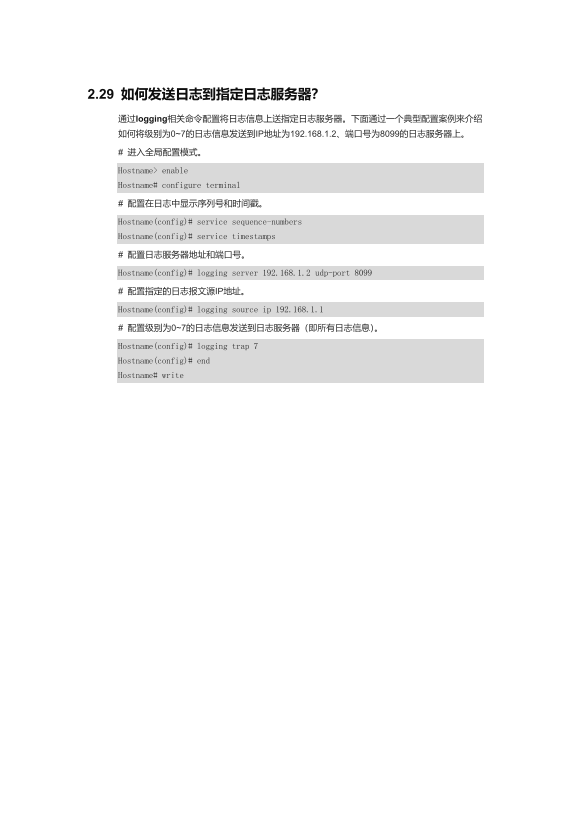
2.29 如何发送日志到指定日志服务器? 通过logging相关命令配置将日志信息上送指定日志服务器。下面通过一个典型配置案例来介绍 如何将级别为0~7的日志信息发送到IP地址为192.168.1.2、端口号为8099的日志服务器上。 # 进入全局配置模式。 Hostname> enable Hostname# configure terminal # 配置在日志中显示序列号和时间戳。 Hostname(config)# service sequence-numbers Hostname(config)# service timestamps # 配置日志服务器地址和端口号。 Hostname(config)# logging server 192.168.1.2 udp-port 8099
# 配置指定的日志报文源IP地址。
Hostname(config)# logging source ip 192.168.1.1
Hostname(config)# logging trap 7 Hostname(config)# end Hostname# write
Page Summary Contents For Ruijie 2.29 - How to Send Logs to the Specified Log Server User Manual
Manual Details
| Brand | Server |
|---|---|
| Pages | 1 |
| File Size | 150.22 KB |
| Published | June 05, 2026 |
Enter the captcha to get the download link:

Frequently Asked Questions
如何指定日志服务的服务器地址和端口号?
使用'logging server <IP地址> udp-port <端口号>'命令配置。例如:logging server 192.168.1.2 udp-port 8099。
是否需要为本地设备设置指定的报文源IP地址?
是的,您可以使用'logging source ip <IP地址>'来指定日志的源IP地址(如192.168.1.1)。
如何确保发送到服务器的所有级别日志都能被捕获记录?
使用'logging trap 7'命令配置即可,这意味着将级别为0到7的所有信息都发送给日志服务器。
在发送日志之前是否需要启用时间戳和序列号功能?
为了完整的日志记录,您应该使用'service sequence-numbers'和'service timestamps'命令进行配置。