# A B C D E F G H I J K L M N O P Q R S T U V W X Y Z

Roland Roland RP-301R SuperNATURAL PianoMIDI Implementation User's Guide

Summary

Unlock advanced musical capabilities with detailed MIDI implementation specifications. This manual serves as a comprehensive technical guide for integrators and developers, covering all supported MIDI messages—including Modulation depth, Portamento Time, Volume control (and Part balance), Expression, Pan, and Bank Select functionality. It provides precise protocol details necessary to map external controls or system processes accurately, ensuring deep compatibility across various DAWs and hardware setups. Ideal for electronic music producers, sound designers, and skilled technicians requiring robust musical synthesis integration.
📄 Preview PAGE OF 36

Page 1 Text Content

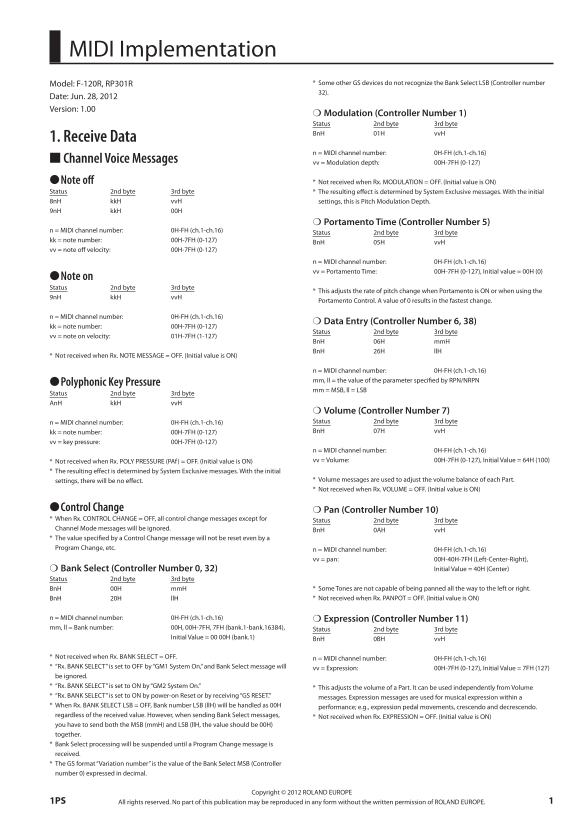
MIDI Implementation

Model: F-120R, RP301R * Some other GS devices do not recognize the Bank Select LSB (Controller number 32).

Date: Jun. 28, 2012 Version: 1.00

Modulation (Controller Number 1) Status 2nd byte 3rd byte Bn H 01H vv H

1. Receive Data

n = MIDI channel number: 0H-FH (ch.1-ch.16)

Channel Voice Messages vv = Modulation depth: 00H-7FH (0-127) ●Note off * Not received when Rx. MODULATION = OFF. (Initial value is ON) Status 2nd byte 3rd byte * The resulting eff ect is determined by System Exclusive messages. With the initial 8n H kk H vv H settings, this is Pitch Modulation Depth. 9n H kk H 00H

Portamento Time (Controller Number 5)

n = MIDI channel number: 0H-FH (ch.1-ch.16)

Status 2nd byte 3rd byte

kk = note number: 00H-7FH (0-127)

Bn H 05H vv H

vv = note off velocity: 00H-7FH (0-127)

n = MIDI channel number: 0H-FH (ch.1-ch.16) vv = Portamento Time: 00H-7FH (0-127), Initial value = 00H (0)

●Note on Status 2nd byte 3rd byte

* This adjusts the rate of pitch change when Portamento is ON or when using the

9n H kk H vv H

Portamento Control. A value of 0 results in the fastest change.

n = MIDI channel number: 0H-FH (ch.1-ch.16)

Data Entry (Controller Number 6, 38)

kk = note number: 00H-7FH (0-127)

Status 2nd byte 3rd byte

vv = note on velocity: 01H-7FH (1-127)

Bn H 06H mm H Bn H 26H ll H

* Not received when Rx. NOTE MESSAGE = OFF. (Initial value is ON)

n = MIDI channel number: 0H-FH (ch.1-ch.16) mm, ll = the value of the parameter specifi ed by RPN/NRPN

●Polyphonic Key Pressure

mm = MSB, ll = LSB

Status 2nd byte 3rd byte An H kk H vv H

Volume (Controller Number 7) n = MIDI channel number: 0H-FH (ch.1-ch.16) Status 2nd byte 3rd byte kk = note number: 00H-7FH (0-127) Bn H 07H vv H

vv = key pressure: 00H-7FH (0-127)

n = MIDI channel number: 0H-FH (ch.1-ch.16) * Not received when Rx. POLY PRESSURE (PAf) = OFF. (Initial value is ON) vv = Volume: 00H-7FH (0-127), Initial Value = 64H (100)

* The resulting eff ect is determined by System Exclusive messages. With the initial

settings, there will be no eff ect. * Volume messages are used to adjust the volume balance of each Part. * Not received when Rx. VOLUME = OFF. (Initial value is ON)

●Control Change Pan (Controller Number 10) * When Rx. CONTROL CHANGE = OFF, all control change messages except for Status 2nd byte 3rd byte Channel Mode messages will be ignored. Bn H 0AH vv H * The value specifi ed by a Control Change message will not be reset even by a Program Change, etc. n = MIDI channel number: 0H-FH (ch.1-ch.16)

vv = pan: 00H-40H-7FH (Left-Center-Right), Bank Select (Controller Number 0, 32) Initial Value = 40H (Center)

Status 2nd byte 3rd byte

Bn H 00H mm H * Some Tones are not capable of being panned all the way to the left or right. Bn H 20H ll H * Not received when Rx. PANPOT = OFF. (Initial value is ON)

n = MIDI channel number: 0H-FH (ch.1-ch.16) Expression (Controller Number 11) mm, ll = Bank number: 00H, 00H-7FH, 7FH (bank.1-bank.16384), Status 2nd byte 3rd byte Initial Value = 00 00H (bank.1) Bn H 0BH vv H

* Not received when Rx. BANK SELECT = OFF. n = MIDI channel number: 0H-FH (ch.1-ch.16) * “Rx. BANK SELECT” is set to OFF by “GM1 System On,” and Bank Select message will vv = Expression: 00H-7FH (0-127), Initial Value = 7FH (127) be ignored. * “Rx. BANK SELECT” is set to ON by “GM2 System On.” * This adjusts the volume of a Part. It can be used independently from Volume * “Rx. BANK SELECT” is set to ON by power-on Reset or by receiving “GS RESET.” messages. Expression messages are used for musical expression within a * When Rx. BANK SELECT LSB = OFF, Bank number LSB (ll H) will be handled as 00H performance; e.g., expression pedal movements, crescendo and decrescendo. regardless of the received value. However, when sending Bank Select messages, * Not received when Rx. EXPRESSION = OFF. (Initial value is ON) you have to send both the MSB (mm H) and LSB (ll H, the value should be 00H) together. * Bank Select processing will be suspended until a Program Change message is received. * The GS format “Variation number” is the value of the Bank Select MSB (Controller number 0) expressed in decimal.

Copyright © 2012 ROLAND EUROPE

All rights reserved. No part of this publication may be reproduced in any form without the written permission of ROLAND EUROPE.1PS

Page Summary Contents For Roland Roland RP-301R SuperNATURAL PianoMIDI Implementation User's Guide

Page 1 MIDI Implementation Model: F-120R, RP301R * Some other GS devices do not recognize the Bank Select LSB (Controller number 32). Date: Jun. 28, 2012 Version: 1.00 Modulation (Controller Number 1) Status...
Page 2 MIDI Implementation Hold 1 (Controller Number 64) Cutoff (Controller Number 74) Status 2nd byte 3rd byte Status 2nd byte 3rd byte Bn H 40H vv H Bn H 4AH vv H n = MIDI channel number: 0H-FH (ch.1-ch.16...
Page 3 MIDI Implementation Portamento Control (Controller Number 84) parameter. Refer to Section 4. Supplementary material “Examples of actual MIDI messages” <Example 4>. On the GS devices, Data entry ...
Page 4 MIDI Implementation RPN MSB/LSB (Controller Number 100, 101) ●Channel Pressure Status 2nd byte 3rd byte Status 2nd byte Bn H 65H mm H Dn H vv H Bn H 64H ll H n = MIDI channel number: 0H-FH (ch.1-ch.16...
Page 5 MIDI Implementation ●All Notes Off (Controller Number 123) System Exclusive Message Status 2nd byte 3rd byte Status Data byte Status Bn H 7BH 00H F0H ii H, dd H, ......, ee H F7H n = MIDI channel numb...
Page 6 MIDI Implementation GM System Off Master Fine Tuning “GM System Off ” is a command message that resets the internal state of this Status Data byte Status instrument from the GM state to its native con...
Page 7 MIDI Implementation Chorus Parameters Controller Status Data byte Status Status Data byte Status F0H 7FH, 7FH, 04H, 05H, 01H, 01H, F7H F0H 7FH, 7FH, 09H, 03H, 0n H, cc H, F7H 01H, 01H, 02H, pp H, vv H...
Page 8 MIDI Implementation ●Data Transmission 2. Transmit Data This instrument can receive the various parameters using System Exclusive messages. The exclusive message of GS format data has a model ID of 42...
Page 9 MIDI Implementation n = MIDI channel number: 0H-FH (ch.1-ch.16) pp = Program number: 00H-7FH (prog.1-prog.128) System Realtime Message ●Realtime Clock Status F8H ●Start Status FAH ●Continue Status FBH...
Page 10 MIDI Implementation 3. Parameter Address Map (Model ID = 42H) This map indicates address, size, Data (range), Parameter, Description, and Default Value of parameters which can be transferred using and...
Page 11 MIDI Implementation 02: Room 3 03: Hall 1 04: Hall 2 05: Plate 06: Delay 07: Panning Delay 40 01 31 00 00 01 00-07 REVERB CHARACTER 0-7 04 4 40 01 32 00 00 01 00-07 REVERB PRE-LPF 0-7 00 0 40 01 33 00...
Page 12 MIDI Implementation ●Part Parameters This instrument has 16 parts. Parameters that can be set individually for each Part are called Part parameters. If you use exclusive messages to set Part parameter...
Page 13 MIDI Implementation 40 1x 24 00 00 01 00-01 Rx. BANK SELECT LSB OFF/ON 00 OFF * This instrument can be recognized Bank Select LSB (40H-43H) even if this message is OFF. 40 1x 25 00 00 01 00-01 TONE RE...
Page 14 MIDI Implementation 40 2x 28 00 00 01 00-7F CAf LFO2 PITCH DEPTH 0-600 [cent] 00 0 [cent] 40 2x 29 00 00 01 00-7F CAf LFO2 TVF DEPTH 0-2400 [cent] 00 0 [cent] 40 2x 2A 00 00 01 00-7F CAf LFO2 TVA DEPT...
Page 15 MIDI Implementation 4. Supplementary Material ●Examples of Actual MIDI Messages <Example1> 92 3E 5F 9n is the Note-on status, and n is the MIDI channel number. Since 2H = 2, 3EH = 62, ●Decimal a...
Page 16 MIDI Implementation ●Example of an Exclusive Message and Calculating a ●The Scale Tune Feature (Address: 40 1x 40) The scale Tune feature allows you to fi nely adjust the individual pitch of the notes...
Page 17 MIDI Implementation 5. Eff ect List EFX Parameter Map The parameters with”#1” or “#2” at the end of parameter name can be controlled with 0100: Equalizer each exclusive message”Part EFX CONTROL 1” and...
Page 18 MIDI Implementation ●0102: Enhancer ●0105: Low Boost Controls the overtone structure of the high frequencies, adding sparkle and tightness Boosts the volume of the lower range, creating powerful lows....
Page 19 MIDI Implementation ●0110: Overdrive Specifi cations of each Speaker Type The speaker column indicates the diameter of each speaker unit (in inches) and the Creates a soft distortion similar to that p...
Page 20 MIDI Implementation ●0114: Guitar Amp Simulator Type Cabinet Speaker Microphone This is an eff ect that simulates the sound of a guitar amplifi er. BG Stack 2 Large sealed enclosure 12 x 2 Condenser M...
Page 21 MIDI Implementation ●0129: Multi Stage Phaser No Parameter Value Description Extremely high settings of the phase diff erence produce a deep phaser eff ect. When this is set to “note,” the Rate Mode 0...
Page 22 MIDI Implementation ●0128: 2Band Flanger No Parameter Value Description A fl anger that lets you apply an eff ect independently to the low-frequency and Adjusts the amount of the high-frequency ranges...
Page 23 MIDI Implementation ●012b: Ring Modulator ●012c: Slicer This is an eff ect that applies amplitude modulation (AM) to the input signal, By applying successive cuts to the sound, this eff ect turns a co...
Page 24 MIDI Implementation ●0131: Limiter No Parameter Value Description Compresses signals that exceed a specifi ed volume level, preventing distortion from Adjusts the diff erences in Pre Pre Delay occurri...
Page 25 MIDI Implementation ●0143: Space D ●0145: 2Band Chorus This is a multiple chorus that applies two-phase modulation in stereo. It gives no A chorus eff ect that lets you apply an eff ect independently ...
Page 26 MIDI Implementation ●0122: Rotary No Parameter Value Description The Rotary eff ect simulates the sound of the rotary speakers often used with the Tweeter Slow 0.05–10.00 electric organs of the past. ...
Page 27 MIDI Implementation ●015b: Stereo Delay1 No Parameter Value Description This is a stereo delay. Gain of the high frequency High Gain 0–30 -15–+15 d B range No Parameter Value Description Volume balanc...
Page 28 MIDI Implementation ●015e: Stereo Delay4 No Parameter Value Description This is a stereo delay. Gain of the high frequency High Gain 0–30 -15–+15 d B range No Parameter Value Description Volume balanc...
Page 29 MIDI Implementation ●0151: Modulation Delay No Parameter Value Description Adds modulation to the delayed sound. Adjusts the frequency above which sound fed back to the No Parameter Value Description ...
Page 30 MIDI Implementation ●0159: Tape Echo No Parameter Value Description A virtual tape echo that produces a realistic tape delay sound. This simulates the tape Amount of boost/cut for the Low Gain 0–30 -1...
Page 31 MIDI Implementation ●0156: Gate Reverb No Parameter Value Description This is a special type of reverb in which the reverberant sound is cut off before its Frequency of modulation Flanger Rate 0–21 no...
Page 32 MIDI Implementation ●0206: Enhancer  Chorus No Parameter Value Description This eff ect connects an enhancer and a chorus in series. Adjusts the delay time from Delay Time 0–127 1–2540 ms the direct ...
Page 33 MIDI Implementation ●020a: Flanger  Delay No Parameter Value Description This eff ect connects a fl anger and a delay in series. When this is set to “note,” the Flanger Rate 0–1 Hz, note eff ect is s...
Page 34 MIDI Implementation 6. Tone List [Piano] button Upper Layer No. Name MSB LSB PC MSB LSB PC G.Piano1 G.Piano2 G.Piano3 Honky Ton P+ String P+Choir P+Bell [Other] button No Name MSB LSB PC No Name MSB L...
Page 35 Digital Piano Date: Jun. 28, 2012 Model F-120R, RP301R MIDI Implementation Chart Version: 1.00 Function... Transmitted Recognized Remarks Basic Default 1–16 Channel Changed 1–16 1–16 Default Mode 3 Mo...
Page 36 Contents MIDI Implementation 1 Master Coarse Tuning 6 0113: Distortion2 19 1. Receive Data 1 Global Parameter Control 6 0107: Speaker Simulator 19 Channel Voice Messages 1 Reverb Parameters 6 Specifi ...

Manual Details

Brand Roland
Pages 36
File Size 191.61 KB
Published May 31, 2026
88 views

Enter the captcha to get the download link:

captcha

Frequently Asked Questions

What is the initial volume setting for a Part?

The initial value for Volume (Controller Number 7) is 64H (100).

How can I control panning functionality?

Use Pan (Controller Number 10); the value range dictates Left-Center-Right movement. The initial state is Center (40H).

What are the limitations of MIDI bank selection?

The Bank Select LSB (Controller number) may not be recognized by all GS devices. Additionally, sending a bank select message requires sending both MSB and LSB together for accurate results.

Do I need special settings to adjust pitch changes over time?

Yes, use Portamento Time (Controller Number 5). A value of '0' results in the fastest pitch change rate when Portamento is active.