# A B C D E F G H I J K L M N O P Q R S T U V W X Y Z

Roland HP-307 SuperNATURAL PianoMIDI Implementation User's Manual

Summary

Deep dive into advanced sound synthesis and MIDI control protocols for professional musicians and studio engineers. This manual provides comprehensive technical documentation, covering everything from detailed MIDI message handling and system-wide performance controls (e.g., Volume, Pan) to granular adjustments of sophisticated audio effects. Master precise sound shaping using parameters like Expression depth, release time, and advanced delay features, ensuring optimal use of your digital instrument for professional music production.
📄 Preview PAGE OF 32

Page 1 Text Content

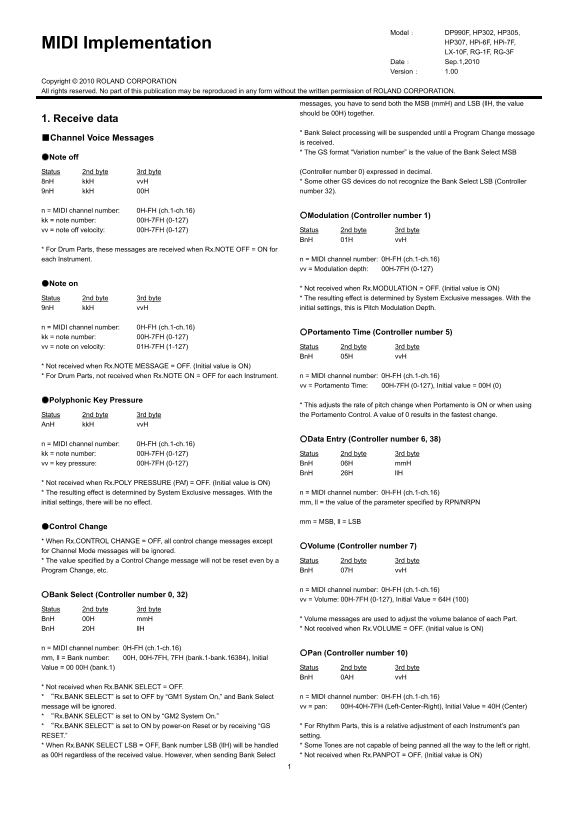
Model: DP990F, HP302, HP305, MIDI Implementation HP307, HPi-6F, HPi-7F, LX-10F, RG-1F, RG-3F Date: Sep.1,2010 Version: 1.00

Copyright © 2010 ROLAND CORPORATION All rights reserved. No part of this publication may be reproduced in any form without the written permission of ROLAND CORPORATION.

messages, you have to send both the MSB (mm H) and LSB (ll H, the value should be 00H) together.

1. Receive data

* Bank Select processing will be suspended until a Program Change message

■Channel Voice Messages

is received. * The GS format “Variation number” is the value of the Bank Select MSB

●Note off

Status 2nd byte 3rd byte (Controller number 0) expressed in decimal. 8n H kk H vv H * Some other GS devices do not recognize the Bank Select LSB (Controller 9n H kk H 00H number 32).

n = MIDI channel number: 0H-FH (ch.1-ch.16)

○Modulation (Controller number 1)

kk = note number: 00H-7FH (0-127) vv = note off velocity: 00H-7FH (0-127) Status 2nd byte 3rd byte

Bn H 01H vv H

* For Drum Parts, these messages are received when Rx.NOTE OFF = ON for each Instrument. n = MIDI channel number: 0H-FH (ch.1-ch.16)

vv = Modulation depth: 00H-7FH (0-127)

●Note on

* Not received when Rx.MODULATION = OFF. (Initial value is ON) Status 2nd byte 3rd byte * The resulting effect is determined by System Exclusive messages. With the 9n H kk H vv H initial settings, this is Pitch Modulation Depth.

n = MIDI channel number: 0H-FH (ch.1-ch.16)

○Portamento Time (Controller number 5)

kk = note number: 00H-7FH (0-127) vv = note on velocity: 01H-7FH (1-127) Status 2nd byte 3rd byte

Bn H 05H vv H

* Not received when Rx.NOTE MESSAGE = OFF. (Initial value is ON) * For Drum Parts, not received when Rx.NOTE ON = OFF for each Instrument. n = MIDI channel number: 0H-FH (ch.1-ch.16)

vv = Portamento Time: 00H-7FH (0-127), Initial value = 00H (0)

●Polyphonic Key Pressure

* This adjusts the rate of pitch change when Portamento is ON or when using Status 2nd byte 3rd byte the Portamento Control. A value of 0 results in the fastest change.

An H kk H vv H

○Data Entry (Controller number 6, 38)

n = MIDI channel number: 0H-FH (ch.1-ch.16) kk = note number: 00H-7FH (0-127) Status 2nd byte 3rd byte vv = key pressure: 00H-7FH (0-127) Bn H 06H mm H

Bn H 26H ll H

* Not received when Rx.POLY PRESSURE (PAf) = OFF. (Initial value is ON) * The resulting effect is determined by System Exclusive messages. With the n = MIDI channel number: 0H-FH (ch.1-ch.16) initial settings, there will be no effect. mm, ll = the value of the parameter specified by RPN/NRPN

mm = MSB, ll = LSB

●Control Change

* When Rx.CONTROL CHANGE = OFF, all control change messages except

○Volume (Controller number 7)

for Channel Mode messages will be ignored. * The value specified by a Control Change message will not be reset even by a Status 2nd byte 3rd byte Program Change, etc. Bn H 07H vv H

n = MIDI channel number: 0H-FH (ch.1-ch.16)

○Bank Select (Controller number 0, 32)

vv = Volume: 00H-7FH (0-127), Initial Value = 64H (100)

Status 2nd byte 3rd byte

Bn H 00H mm H * Volume messages are used to adjust the volume balance of each Part. Bn H 20H ll H * Not received when Rx.VOLUME = OFF. (Initial value is ON)

n = MIDI channel number: 0H-FH (ch.1-ch.16)

○Pan (Controller number 10)

mm, ll = Bank number: 00H, 00H-7FH, 7FH (bank.1-bank.16384), Initial Value = 00 00H (bank.1) Status 2nd byte 3rd byte

Bn H 0AH vv H

* Not received when Rx.BANK SELECT = OFF.

* “Rx.BANK SELECT” is set to OFF by “GM1 System On,” and Bank Select n = MIDI channel number: 0H-FH (ch.1-ch.16)

message will be ignored. vv = pan: 00H-40H-7FH (Left-Center-Right), Initial Value = 40H (Center) * “Rx.BANK SELECT” is set to ON by “GM2 System On.”

* “Rx.BANK SELECT” is set to ON by power-on Reset or by receiving “GS * For Rhythm Parts, this is a relative adjustment of each Instrument’s pan

RESET.” setting. * When Rx.BANK SELECT LSB = OFF, Bank number LSB (ll H) will be handled * Some Tones are not capable of being panned all the way to the left or right. as 00H regardless of the received value. However, when sending Bank Select * Not received when Rx.PANPOT = OFF. (Initial value is ON)

Page Summary Contents For Roland HP-307 SuperNATURAL PianoMIDI Implementation User's Manual

Page 1 Model: DP990F, HP302, HP305, MIDI Implementation HP307, HPi-6F, HPi-7F, LX-10F, RG-1F, RG-3F Date: Sep.1,2010 Version: 1.00 Copyright © 2010 ROLAND CORPORATION All rights reserved. No part of this pub...
Page 2 ○Expression (Controller number 11) ○Release Time (Controller number 72) Status 2nd byte 3rd byte Status 2nd byte 3rd byte Bn H 0BH vv H Bn H 48H vv H n = MIDI channel number: 0H-FH (ch.1-ch.16) n = MI...
Page 3 messages to specify the parameter to be controlled, and then use Data Entry messages to specify the value of the specified parameter. Once an NRPN ○Portamento control (Controller number 84) parameter ...
Page 4 to specify the parameter to be controlled, and then use Data Entry messages to specify the value of the specified parameter. Once an RPN parameter has been * Not received when Rx.PITCH BEND = OFF. (In...
Page 5 Bn H 7DH 00H This is a command message that resets the internal settings of the unit to the General MIDI initial state (General MIDI System-Level 1). After receiving this n = MIDI channel number: 0H-F...
Page 6 Parameters of the Global Parameter Control are newly provided for the General Byte Explanation MIDI 2. F0H Exclusive status 41H ID number (Roland) ○Reverb Parameters 10H Device ID (dev: 00H-1FH (1-32)...
Page 7 Status Data byte Status bits 0 to 6 = channel 1 to 7 F0H 7FH, 7FH, 09H, 01H, 0n H, pp H, rr H F7H ss H 12 byte tuning offset of 12 semitones from C to B 00H = -64 [cents] Byte Explanation 40H = 0 [cen...
Page 8 aa H Address MSB: upper byte of the starting address of the transmitted data n = MIDI channel number: 0H-FH (ch.1-ch.16) bb H Address: middle byte of the starting address of the vv = Control value: 00...
Page 9 ■System exclusive messages ○Identity Reply Status Data byte Status F0H 7EH, 10H, 06H, 02H, 41H, vv H,,vv H, nn H, nn H, rr H, rr H, rr H, rr H F7H (See the table.) Byte Explanation F0H Exclusive statu...
Page 10 3. Parameter Address Map (Model ID = 42H) This map indicates address, size, Data (range), Parameter, Description, and Default Value of parameters which can be transferred using and “Data set 1 (DT1).”...
Page 11 02: Room 3 03: Hall 1 04: Hall 2 05: Plate 06: Delay 07: Panning Delay 40 01 31 00 00 01 00-07 REVERB CHARACTER 0-7 04 4 40 01 32 00 00 01 00-07 REVERB PRE-LPF 0-7 00 0 40 01 33 00 00 01 00-7F REVERB ...
Page 12 ●Part Parameters This instrument has 16 parts. Parameters that can be set individually for each Part are called Part parameters. If you use exclusive messages to set Part parameters, specify the addre...
Page 13 * “Rx.BANK SELECT” is set to OFF by “GM1 System On,” and Bank Select message will be ignored. * “Rx.BANK SELECT” is set to ON by “GM2 System On.” * “Rx.BANK SELECT” is set to ON by power-on Reset or b...
Page 14 40 2x 28 00 00 01 00-7F CAf LFO2 PITCH DEPTH 0-600 [cent] 00 0 [cent] 40 2x 29 00 00 01 00-7F CAf LFO2 TVF DEPTH 0-2400 [cent] 00 0 [cent] 40 2x 2A 00 00 01 00-7F CAf LFO2 TVA DEPTH 0-100.0 [%] 00 0 [...
Page 15 4. Supplementary material 0... 4 Since from the preceding table, 0 = 00H, 4 = 04H, 14 = 0EH, 10 = 0AH, the ●Decimal and Hexadecimal table answer is 00 04 0E 0AH. In MIDI documentation, data values and...
Page 16 (B2) 26 03 (MIDI ch.3) lower byte of parameter value: 03H ●Example of an Exclusive message and calculating a (B2) 64 7F (MIDI ch.3) lower byte of RPN parameter number: 7FH Checksum (B2) 65 7F (MIDI ch...
Page 17 5. Effect List ■EFX Parameter Map 0100: Equalizer The parameters with”#1” or “#2” at the end of parameter name can be 0101: Spectrum controlled with each exclusive message”Part EFX CONTROL 1” and “Par...
Page 18 Filter resonance level ● 0104: Isolator Increasing this value will 4 Filter Resonance #2 0-100 0-100 This is an equalizer which cuts the volume greatly, allowing you to add a special emphasize the reg...
Page 19 ● 0107: Speaker Simulator Turning this “On” produces a sharper and brighter sound. Simulates the speaker type and mic settings used to record the speaker sound. 10 Pre Amp Bright 0-1 Off, On This para...
Page 20 Speed at which to raise or lower ● 0120: Phaser the frequency at which the sound 2 Speed #1 0-127 -100 - +100 This is a stereo phaser. A phase-shifted sound is added to the original sound is modulated...
Page 21 Rate at which the high-range ● 0127: 3D Flanger 11 High Rate #2 1-127 0.05-10.00 Hz flanger sound is modulated (Hz) This applies a 3D effect to the flanger sound. The flanger sound will be Rate at whi...
Page 22 ● 0103: Humanizer ● 0126: Auto Pan Adds a vowel character to the sound, making it similar to a human voice. No Parameter Value Description Cyclically modulates the stereo location of the sound. 1 Driv...
Page 23 3 Rate #1 1-127 0.05-10.00 Hz Frequency of modulation (Hz) ● 0130: Compressor 4 Rate 0-21 note Frequency of modulation (note) Flattens out high levels and boosts low levels, smoothing out fluctuations...
Page 24 Rate at which the low-range chorus ● 0143: Space D 4 Low Rate 1-127 0.05-10.00 Hz sound is modulated (Hz) This is a multiple chorus that applies two-phase modulation in stereo. It gives Rate at which ...
Page 25 Speed at which the low-frequency ● 012d: Rotary2 12 R-Wf Accel 0-15 0-15 rotor’s rotation rate changes when This type provides modified response for the rotary speaker, with the low end the rotation s...
Page 26 13 High Gain 0-30 -15 - +15 d B Gain of the high frequency range ● 015c: Stereo Delay2 D100:0W - Volume balance between the direct 14 Balance #2 0-100 This is a stereo delay. D0:100W sound (D) and the...
Page 27 No Parameter Value Description ● 015f: Stereo Delay5 When this is set to “note,” the This is a stereo delay. 1 Delay Left Mode 0-1 ms, note effect is synchronized with the No Parameter Value Descripti...
Page 28 Speed of wow/flutter (complex ● 0157: 3D Delay 10 Wow/Flutter Rate 0-127 0-127 variation in pitch caused by tape This applies a 3D effect to the delay sound. The delay sound will be positioned wear an...
Page 29 When this is set to “note,” the ● 0175: Telephone 4 Flanger Rate Mode 0-1 Hz, note effect is synchronized with the No Parameter Value Description tempo. Audio quality of the telephone 5 Flanger Rate #...
Page 30 Adjusts the frequency above which ● 0206: Enhancer→Chorus sound fed back to the effect will be 200-8000 Hz, This effect connects an enhancer and a chorus in series. 7 Delay HF Damp 0-17 cut. If you do...
Page 31 Modulation depth of the flanger ● 020a: Flanger→Delay 11 Flanger Depth 0-127 0-127 effect This effect connects a flanger and a delay in series. Adjusts the proportion of the No Parameter Value Descrip...
Page 32 MIDI Implementation Chart DIGITAL PIANO Date: Sep. 1, 2010 Model DP990F, HP302, HP305, HP307, HPi-6F, HPi-7F, LX-10F, RG-1F, RG-3F Version: 1.00 Function... Transmitted Recognized Remarks Default 1 1-...