Roland OP-R09C Cover Stand Set Owner's Manual
Summary
This comprehensive owner's manual provides essential safety guidelines and operational instructions for the OP-R09C Stand Set, specifically designed for users of R-09 devices. It covers everything needed for safe installation, including detailed procedures for attaching tripods and optional mic stands, along with critical maintenance tips and warnings to ensure proper unit care. Ideal for new owners seeking complete assurance in using their equipment correctly.
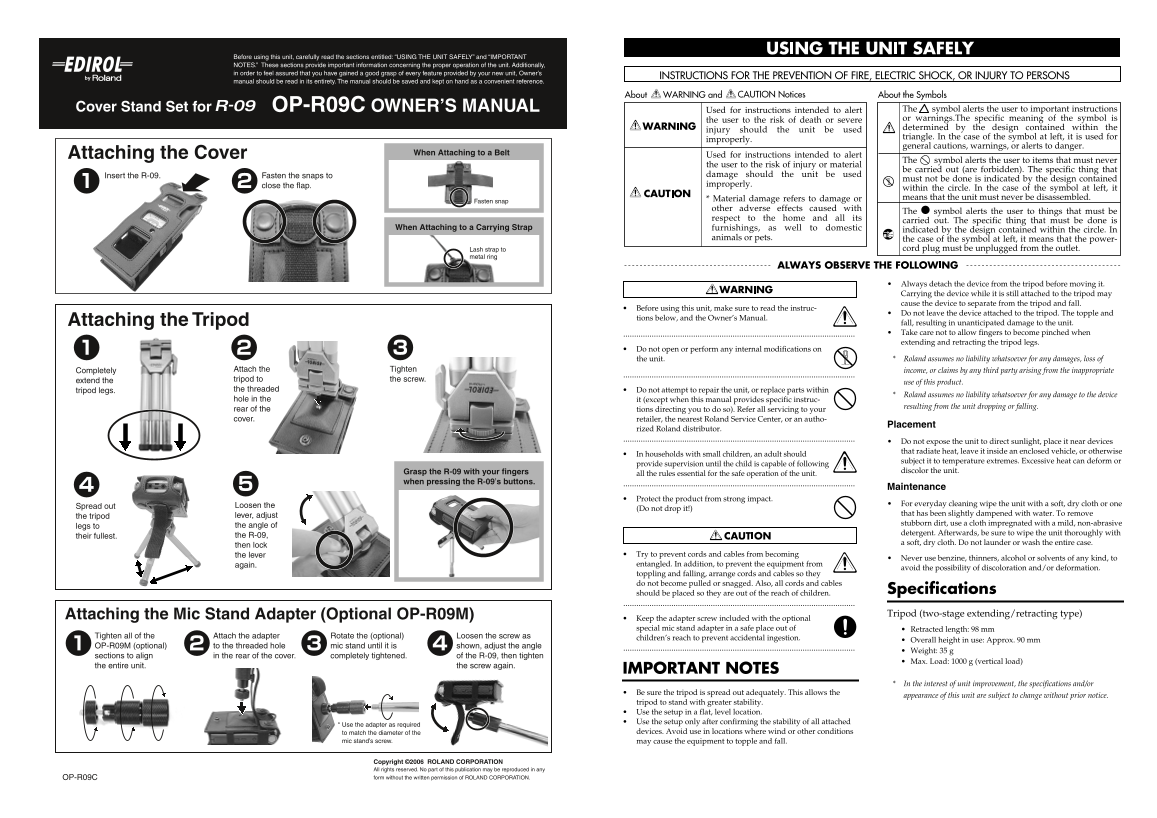
Page 1 Text Content
OP-R09C_je.fm ページ 2006年4月11日 火曜日 午前11時58分
USING THE UNIT SAFELY
Before using this unit, carefully read the sections entitled: “USING THE UNIT SAFELY” and “IMPORTANT NOTES.” These sections provide important information concerning the proper operation of the unit. Additionally, in order to feel assured that you have gained a good grasp of every feature provided by your new unit, Owner’s manual should be read in its entirety. The manual should be saved and kept on hand as a convenient reference.
Cover Stand Set for OP-R09C OWNER’S MANUAL Used for instructions intended to alert The symbol alerts the user to important instructions
the user to the risk of death or severe or warnings.The specific meaning of the symbol is determined by the design contained within the
injury should the unit be used
triangle. In the case of the symbol at left, it is used for
improperly.
general cautions, warnings, or alerts to danger.
Attaching the Cover When Attaching to a Belt Used for instructions intended to alert
The symbol alerts the user to items that must never
the user to the risk of i njury or material
be carried out (are forbidden). The specific thing that
Insert the R-09. Fasten the snaps to damage should the unit be used
must not be done is indicated by the design contained
close the flap. improperly.
within the circle. In the case of the symbol at left, it * Material damage refe rs to damage or means that the unit must never be disassembled.
Fasten snap
other adverse effec ts caused with
The ● symbol alerts the user to things that must be
respect to the hom e and all its
carried out. The specific thing that must be done is
When Attaching to a Carrying Strap furnishings, as we ll to domestic
indicated by the design contained within the circle. In
animals or pets. the case of the symbol at left, it means that the power-
Lash strap to cord plug must be unplugged from the outlet.
metal ring
Always detach the device from the tripod before moving it. Carrying the device while it is still attached to the tripod may cause the device to separate from the tripod and fall.
Before using this unit, make sure to read the in struc-
Do not leave the device attached to the tripod. The topple and
tions below, and the Owner’s Manual.
Attaching the Tripod fall, resulting in unanticipated damage to the unit. Take care not to allow fingers to become pinched when
002a extending and retracting the tripod legs. Do not open or perform any internal modificat ions on
the unit. Roland assumes no liability whatsoever for any damages, loss of
Completely Attach the Tighten income, or claims by any third party arising from the inappropriate extend the tripod to the screw.
use of this product.
tripod legs. the threaded Do not attempt to repair the unit, or replace pa rts within
Roland assumes no liability whatsoever for any damage to the device
hole in the it (except when this manual provides specific i nstruc-
resulting from the unit dropping or falling.
rear of the tions directing you to do so). Refer all servicin g to your cover. retailer, the nearest Roland Service Center, or a n autho-
Placement
rized Roland distributor.
354a Do not expose the unit to direct sunlight, place it near devices that radiate heat, leave it inside an enclosed vehicle, or otherwise
In households with small children, an adult sho uld
subject it to temperature extremes. Excessive heat can deform or
provide supervision until the child is capable of following
Grasp the R-09 with your fingers discolor the unit.
all the rules essential for the safe operation of th e unit.
when pressing the R-09’s buttons.
Maintenance 401a
Protect the product from strong impact.
Loosen the For everyday cleaning wipe the unit with a soft, dry cloth or one
Spread out
(Do not drop it!)
that has been slightly dampened with water. To remove
the tripod lever, adjust
stubborn dirt, use a cloth impregnated with a mild, non-abrasive
legs to the angle of
detergent. Afterwards, be sure to wipe the unit thoroughly with
their fullest. the R-09,
a soft, dry cloth. Do not launder or wash the entire case.
then lock
the lever Try to prevent cords and cables from becomin
Never use benzine, thinners, alcohol or solvents of any kind, to
again. entangled. In addition, to prevent the equipme nt from
avoid the possibility of discoloration and/or deformation.
toppling and falling, arrange cords and cables so they do not become pulled or snagged. Also, all cords and cables
should be placed so they are out of the reach of children. Specifications
Attaching the Mic Stand Adapter (Optional OP-R09M) Tripod (two-stage extending/retracting type)
Keep the adapter screw included with the opti onal special mic stand adapter in a safe place out of Retracted length: 98 mm
Tighten all of the Attach the adapter Rotate the (optional) Loosen the screw as children’s reach to prevent accidental ingestion
Overall height in use: Approx. 90 mm
OP-R09M (optional) to the threaded hole mic stand until it is shown, adjust the angle
Weight: 35 g
sections to align in the rear of the cover. completely tightened. of the R-09, then tighten
Max. Load: 1000 g (vertical load)
the entire unit. the screw again.
IMPORTANT NOTES
962a In the interest of unit improvement, the specifications and/or
Be sure the tripod is spread out adequately. Th is allows the
appearance of this unit are subject to change without prior notice.
tripod to stand with greater stability.
Use the setup in a flat, level location. Use the setup only after confirming the stabilit y of all attached
* Use the adapter as required
to match the diameter of the devices. Avoid use in locations where wind or other conditions
mic stand’s screw. may cause the equipment to topple and fall.
Copyright ©2006 ROLAND CORPORATION All rights reserved. No part of this publication may be reproduced in any OP-R09C form without the written permission of ROLAND CORPORATION.
Page Summary Contents For Roland OP-R09C Cover Stand Set Owner's Manual
Manual Details
| Brand | Roland |
|---|---|
| Pages | 1 |
| File Size | 676.87 KB |
| Published | June 06, 2026 |
Enter the captcha to get the download link:

Frequently Asked Questions
How should I clean the unit?
Wipe it with a soft, dry cloth or one slightly dampened with water. Use non-abrasive detergent and follow up with a soft, dry cloth.
What are the safety precautions when using the tripod?
Always detach the device from the tripod before moving it. Do not leave the device attached to the tripod.
Can I modify or service the unit myself?
No. Do not open or perform any internal modifications, and do not attempt to repair the unit or replace parts.
Is there a weight limit for the mic stand adapter?
The maximum load capacity is 1000 g (vertical load).
What should I do with electrical cords and cables?
Arrange them so they do not become pulled or snagged, and keep them out of the reach of children.