Roland MV-8000 Music Production Workstation Questions and Answers User Manual
Summary
Master comprehensive control over your music creation process with this advanced sequencing unit. This guide details sophisticated techniques for professional audio and MIDI work, allowing users to master tempo synchronization, record intricate sequences, and build complex tracks. Learn how to set precise tempos for audio phrases, assign sounds to every MIDI track, manage project memory efficiently, and perform in-depth editing of deleted notes or events. Ideal for advanced musicians, producers, and sound designers seeking ultimate control over modern music production workflows.
Page 1 Text Content
QA_e.fm ページ 2003年11月28日 金曜日 午前6時29分 QA_e.fm ページ 2003年11月28日 金曜日 午前6時29分
Q14. I want to set the tempo to the audio phrase.
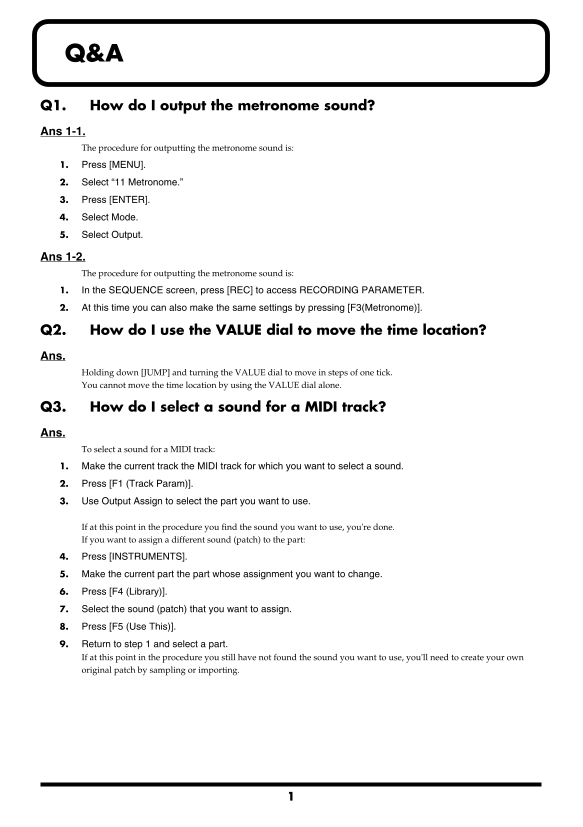
Q1. How do I output the metronome sound?
Ans 1-1.
1. Press [AUDIO PHRASE] and then strike the pad if you want to set an audio phrase tempo.
The procedure for outputting the metronome sound is:
2. Press [F5 (Edit)].
1. Press [MENU].
3. Set the range of the start point and end point of an audio phrase.
2. Select “11 Metronome.”
4. Set length (phrase) from Start Point to End Point on BPM Base Note Parameters. Set how many notes on
3. Press [ENTER].
which type of note. If this is set, the tempo of audio phrase will be calculated automatically. Result of calculation will be shown on right 4. Select Mode. upper part of screen as [Audio Phrase BPM: ].
5. Select Output.
Q15. How can I playback Audio Phrase and Sequence in tempo sync.
Ans 1-2. Ans. The procedure for outputting the metronome sound is: Use Audio Phrase that has tempo information. You can change duration of such audio phrase and enables you to do 1. In the SEQUENCE screen, press [REC] to access RECORDING PARAMETER.
playback in tempo sync.
2. At this time you can also make the same settings by pressing [F3(Metronome)].
1. Operate “Ans. of the Q14” all.
Q2. How do I use the VALUE dial to move the time location?
2. Turn the BPM Sync parameter On. With above setting, duration of audio phrase automatically extends or shrinks without alternation of pitch according to
the tempo of the sequence.
Holding down [JUMP] and turning the VALUE dial to move in steps of one tick. You cannot move the time location by using the VALUE dial alone.
Q3. How do I select a sound for a MIDI track? Ans. To select a sound for a MIDI track: 1. Make the current track the MIDI track for which you want to select a sound. 2. Press [F1 (Track Param)]. 3. Use Output Assign to select the part you want to use.
If at this point in the procedure you find the sound you want to use, you're done. If you want to assign a different sound (patch) to the part: 4. Press [INSTRUMENTS]. 5. Make the current part the part whose assignment you want to change. 6. Press [F4 (Library)]. 7. Select the sound (patch) that you want to assign. 8. Press [F5 (Use This)]. 9. Return to step 1 and select a part. If at this point in the procedure you still have not found the sound you want to use, you'll need to create your own original patch by sampling or importing.
40565123 ’03-12-3KS
Page Summary Contents For Roland MV-8000 Music Production Workstation Questions and Answers User Manual
Manual Details
| Brand | Roland |
|---|---|
| Pages | 4 |
| File Size | 116.03 KB |
| Published | June 04, 2026 |
Enter the captcha to get the download link:

Frequently Asked Questions
How do I assign a different sound patch to a MIDI track?
Select the part, press [F4 (Library)], select the desired sound patch, and then press [F5 (Use This)].
What should I check if I don't hear sound when recording an audio phrase?
Check the MIXER screen to ensure the AUDIO PHRASE Level is not set too low. Low levels will prevent audible output.
How do I synchronize an audio phrase playback with the sequence tempo?
Start in the SEQUENCE screen, access RECORDING PARAMETER using [REC], and use an Audio Phrase explicitly containing tempo information.
How can I optimize project memory storage by removing unused samples?
Select 'OPTIMIZE PROJ' from the menu and press ENTER. This function automatically erases all samples within the project that are not currently being used.