Roland MV-8000 Music Production Workstation Applications Guide
Summary
Explore advanced sound creation with this professional module designed for deep audio customization. This technical guide provides comprehensive instruction on sophisticated signal routing management, including setting up MFX paths, utilizing LFO modulation, and precisely controlling levels across multiple inputs (MIC/LINE) and auxiliary outputs. Essential reading for musicians, producers, and sound designers who require granular control and extensive flexibility in their electronic music composition toolkit.
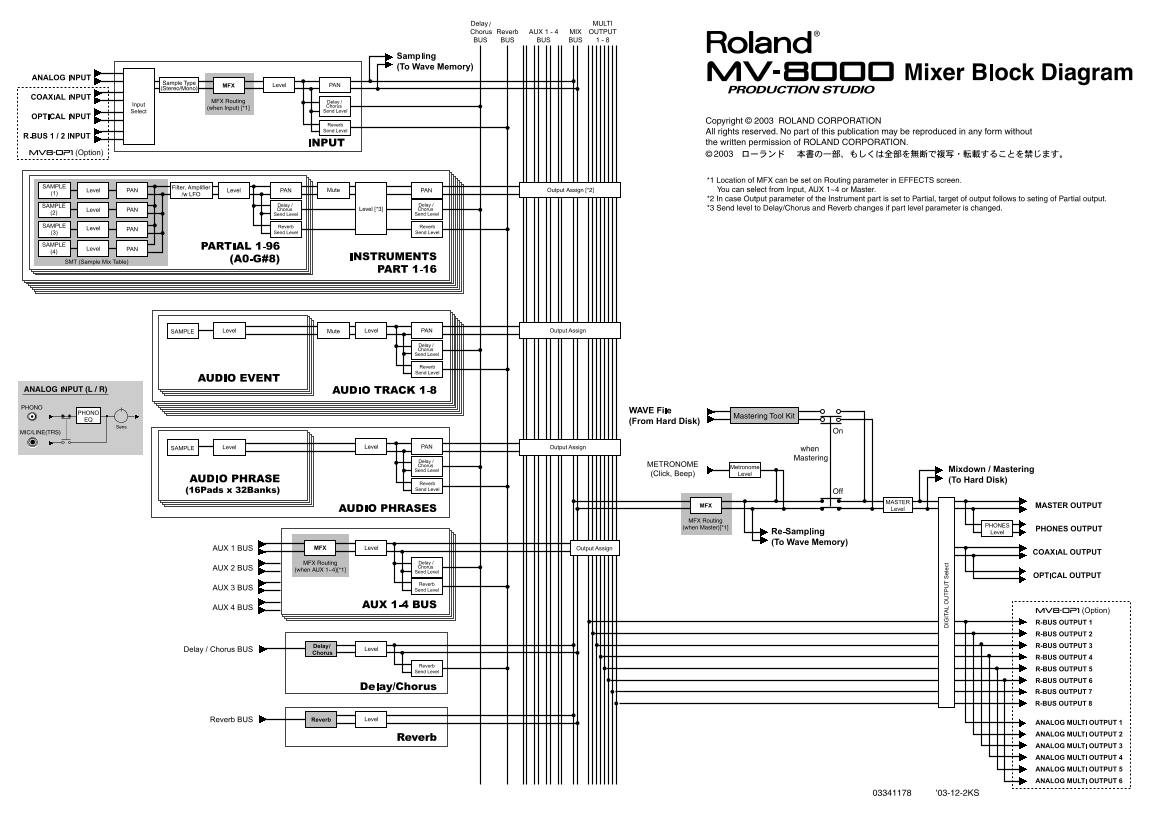
Page 1 Text Content
Sample Type (Stereo/Mono)
MFX Routing (when Input) [*1]
Copyright © 2003 ROLAND CORPORATION All rights reserved. No part of this publication may be reproduced in any form without the written permission of ROLAND CORPORATION.
*1 Location of MFX can be set on Routing parameter in EFFECTS screen.
Filter, Amplifier
Output Assign [*2] You can select from Input, AUX 1~4 or Master.
/w LFO
*2 In case Output parameter of the Instrument part is set to Partial, target of output follows to seting of Partial output. Level [*3] *3 Send level to Delay/Chorus and Reverb changes if part level parameter is changed.
PHONO
PHONO
Mastering Tool Kit
MIC/LINE(TRS) On
when Mastering
MFX Routing (when Master)[*1]
MFX Routing (when AUX 1~4)[*1]
03341178 '03-12-2KS
Page Summary Contents For Roland MV-8000 Music Production Workstation Applications Guide
Manual Details
| Brand | Roland |
|---|---|
| Pages | 2 |
| File Size | 517.67 KB |
| Published | June 02, 2026 |
Enter the captcha to get the download link:

Frequently Asked Questions
Where can I adjust the MFX routing location settings?
MFX can be set on the Routing parameter in the EFFECTS screen.
What input types are available when using the Mastering tool kit?
You can use MIC or LINE (TRS) inputs when Mastering is Off.
How does the output target behave if an instrument part parameter is set to 'Partial'?
If the Instrument part Output parameter is Partial, the output target follows the setting of Partial output.