Philips QG3040 30 Trimming Kit Support & User Manual
Summary
Achieve professional grooming results for multiple areas with this precision facial hair trimmer. This versatile electric device is designed to safely trim nose hairs, ear hairs, eyebrows, and beard stubble. The comprehensive manual guides users through setting up and utilizing specialized attachments for targeted trimming in the nostrils, outer ears, and brows. It also provides detailed instructions on charging, maintenance, and best practices for achieving a neatly defined appearance while ensuring the longevity of your device. Essential reading for all users seeking precise, multi-function grooming care at home.
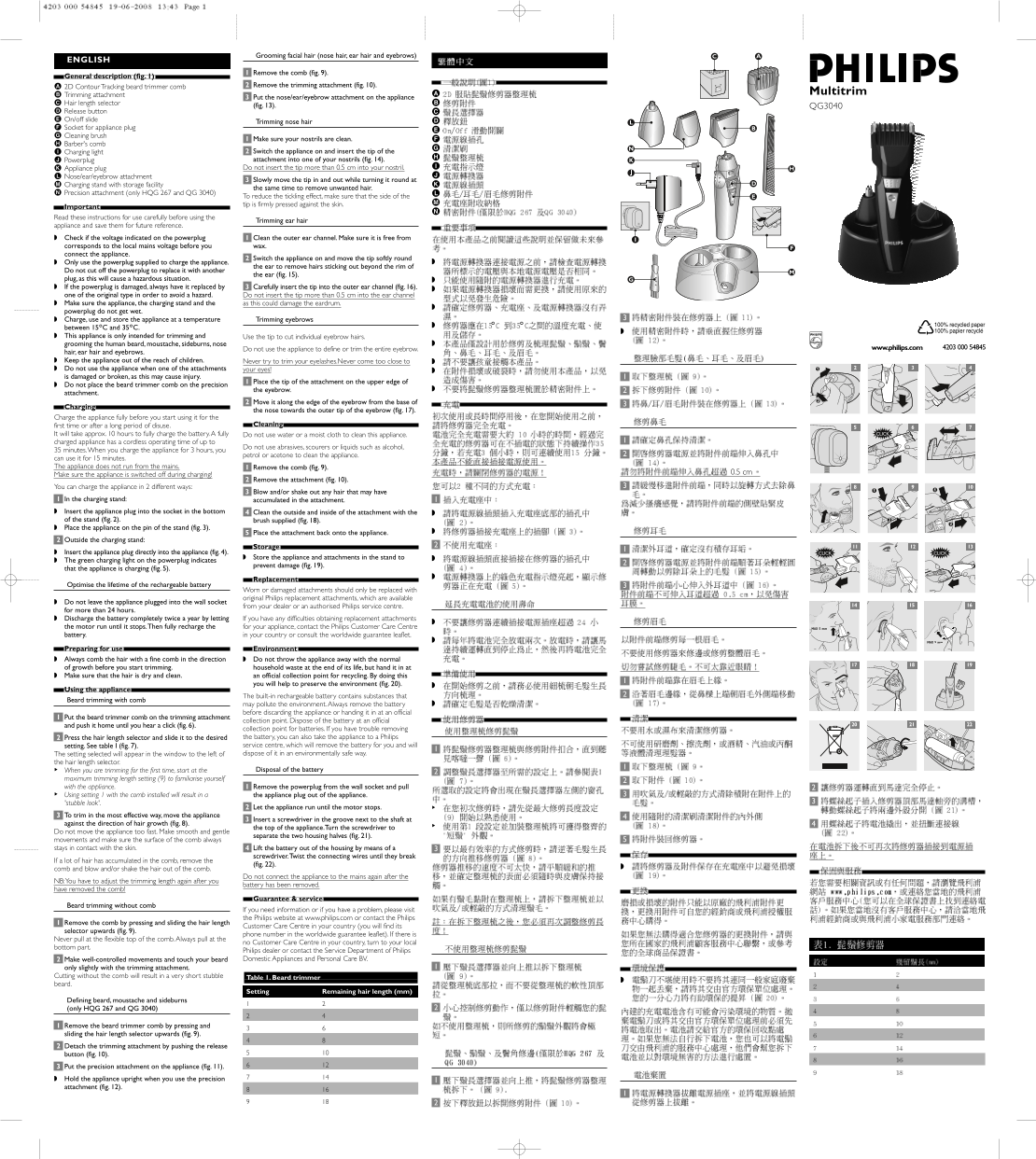
Page 1 Text Content
Grooming facial hair (nose hair, ear hair and eyebrows)
ENGLISH
Remove the comb (fig. 9).
General description (fig. 1).
2D Contour Tracking beard trimmer comb Remove the trimming attachment (fig. 10).
Multitrim
Trimming attachment
Put the nose/ear/eyebrow attachment on the appliance
Hair length selector
(fig. 13). QG3040
Release button On/off slide
Trimming nose hair
Socket for appliance plug Cleaning brush
Make sure your nostrils are clean.
Barber's comb
Charging light Switch the appliance on and insert the tip of the Powerplug attachment into one of your nostrils (fig. 14). Appliance plug Do not insert the tip more than 0.5 cm into your nostril.
Nose/ear/eyebrow attachment
Slowly move the tip in and out while turning it round at
Charging stand with storage facility
the same time to remove unwanted hair.
Precision attachment (only HQG 267 and QG 3040)
To reduce the tickling effect, make sure that the side of the tip is firmly pressed against the skin.
Important. Read these instructions for use carefully before using the
Trimming ear hair
appliance and save them for future reference. Check if the voltage indicated on the powerplug Clean the outer ear channel. Make sure it is free from corresponds to the local mains voltage before you wax. connect the appliance.
Switch the appliance on and move the tip softly round
Only use the powerplug supplied to charge the appliance.
the ear to remove hairs sticking out beyond the rim of
Do not cut off the powerplug to replace it with another
the ear (fig. 15).
plug, as this will cause a hazardous situation. If the powerplug is damaged, always have it replaced by Carefully insert the tip into the outer ear channel (fig. 16). one of the original type in order to avoid a hazard. Do not insert the tip more than 0.5 cm into the ear channel Make sure the appliance, the charging stand and the as this could damage the eardrum. powerplug do not get wet. Charge, use and store the appliance at a temperature Trimming eyebrows between 15c C and 35c C. This appliance is only intended for trimming and Use the tip to cut individual eyebrow hairs. grooming the human beard, moustache, sideburns, nose
Do not use the appliance to define or trim the entire eyebrow. 4203 000 54845www.philips.com
hair, ear hair and eyebrows. Keep the appliance out of the reach of children. Never try to trim your eyelashes.Never come too close to Do not use the appliance when one of the attachments your eyes! is damaged or broken, as this may cause injury.
Place the tip of the attachment on the upper edge of
Do not place the beard trimmer comb on the precision
the eyebrow.
attachment.
Move it along the edge of the eyebrow from the base of
Charging.
the nose towards the outer tip of the eyebrow (fig. 17).
Charge the appliance fully before you start using it for the
first time or after a long period of disuse. Cleaning.
It will take approx. 10 hours to fully charge the battery.A fully Do not use water or a moist cloth to clean this appliance. charged appliance has a cordless operating time of up to
Do not use abrasives, scourers or liquids such as alcohol,
35 minutes.When you charge the appliance for 3 hours, you
petrol or acetone to clean the appliance.
can use it for 15 minutes. The appliance does not run from the mains. Remove the comb (fig. 9).
0.5 cm
Make sure the appliance is switched off during charging!
Remove the attachment (fig. 10).
You can charge the appliance in 2 different ways:
Blow and/or shake out any hair that may have
In the charging stand: accumulated in the attachment. Insert the appliance plug into the socket in the bottom Clean the outside and inside of the attachment with the of the stand (fig. 2). brush supplied (fig. 18). Place the appliance on the pin of the stand (fig. 3).
Place the attachment back onto the appliance.
Outside the charging stand:
Storage.
Insert the appliance plug directly into the appliance (fig. 4).
Store the appliance and attachments in the stand to
The green charging light on the powerplug indicates
prevent damage (fig. 19).
that the appliance is charging (fig. 5).
Replacement.
Optimise the lifetime of the rechargeable battery
Worn or damaged attachments should only be replaced with original Philips replacement attachments, which are available
Do not leave the appliance plugged into the wall socket
from your dealer or an authorised Philips service centre.
for more than 24 hours. Discharge the battery completely twice a year by letting If you have any difficulties obtaining replacement attachments the motor run until it stops.Then fully recharge the for your appliance, contact the Philips Customer Care Centre MAX 5 mm battery. in your country or consult the worldwide guarantee leaflet.
MAX 5 mm
Preparing for use. Environment. Always comb the hair with a fine comb in the direction Do not throw the appliance away with the normal of growth before you start trimming. household waste at the end of its life, but hand it in at Make sure that the hair is dry and clean. an official collection point for recycling. By doing this
you will help to preserve the environment (fig. 20).
Using the appliance.
The built-in rechargeable battery contains substances that
Beard trimming with comb
may pollute the environment.Always remove the battery before discarding the appliance or handing it in at an official
Put the beard trimmer comb on the trimming attachment
collection point. Dispose of the battery at an official
and push it home until you hear a click (fig. 6).
collection point for batteries. If you have trouble removing Press the hair length selector and slide it to the desired the battery, you can also take the appliance to a Philips setting. See table I (fig. 7). service centre, which will remove the battery for you and will The setting selected will appear in the window to the left of dispose of it in an environmentally safe way.
the hair length selector.
When you are trimming for the first time, start at the Disposal of the battery
maximum trimming length setting (9) to familiarise yourself with the appliance. Remove the powerplug from the wall socket and pull Using setting 1 with the comb installed will result in a the appliance plug out of the appliance. 'stubble look'.
Let the appliance run until the motor stops.
To trim in the most effective way, move the appliance
Insert a screwdriver in the groove next to the shaft at
against the direction of hair growth (fig. 8).
the top of the appliance.Turn the screwdriver to
Do not move the appliance too fast. Make smooth and gentle
separate the two housing halves (fig. 21).
movements and make sure the surface of the comb always stays in contact with the skin. Lift the battery out of the housing by means of a
screwdriver.Twist the connecting wires until they break
If a lot of hair has accumulated in the comb, remove the
(fig. 22).
comb and blow and/or shake the hair out of the comb.
Do not connect the appliance to the mains again after the
NB:You have to adjust the trimming length again after you
battery has been removed.
have removed the comb!
Guarantee & service.
Beard trimming without comb
If you need information or if you have a problem, please visit the Philips website at www.philips.com or contact the Philips
Remove the comb by pressing and sliding the hair length
Customer Care Centre in your country (you will find its
selector upwards (fig. 9).
phone number in the worldwide guarantee leaflet). If there is
Never pull at the flexible top of the comb.Always pull at the
no Customer Care Centre in your country, turn to your local
bottom part.
Philips dealer or contact the Service Department of Philips Make well-controlled movements and touch your beard Domestic Appliances and Personal Care BV.
only slightly with the trimming attachment. Cutting without the comb will result in a very short stubble Table 1. Beard trimmer beard.
Setting Remaining hair length (mm)
Defining beard, moustache and sideburns (only HQG 267 and QG 3040)
Remove the beard trimmer comb by pressing and sliding the hair length selector upwards (fig. 9). Detach the trimming attachment by pushing the release button (fig. 10). Put the precision attachment on the appliance (fig. 11). Hold the appliance upright when you use the precision attachment (fig. 12).
Page Summary Contents For Philips QG3040 30 Trimming Kit Support & User Manual
Manual Details
| Brand | Philips |
|---|---|
| Pages | 2 |
| File Size | 1.75 MB |
| Published | June 01, 2026 |
Enter the captcha to get the download link:

Frequently Asked Questions
How far into the ear canal can I insert the trimmer tip?
Do not insert the tip more than 0.5 cm into your nostril or outer ear channel.
How do I clean the comb if hair is stuck in it?
Remove the attached comb, and then blow and/or shake out any accumulated hair using a cleaning brush.
What is the battery charge time for this appliance?
It will take approximately 10 hours to fully charge the device.
How do I start trimming my beard while keeping the length consistent?
First remove the comb by sliding the selector upwards, then make well-controlled movements over your beard.