Philips Beardtrimmer series 7000 Vacuum Hair Trimmer BT7520 15 Product Support & User Manual
Summary
Effortlessly achieve a polished look with this Philips beard trimmer, featuring precise styling capabilities perfect for short or stubble beard maintenance. This manual is your essential guide to optimal performance, covering safe operation and deep cleaning methods, including care for the precision trimmers and vacuum system. Designed for users who value cordless convenience and high-quality grooming results, it provides clear instructions on charging, troubleshooting common issues, and maintaining product longevity while ensuring safety guidelines are followed.
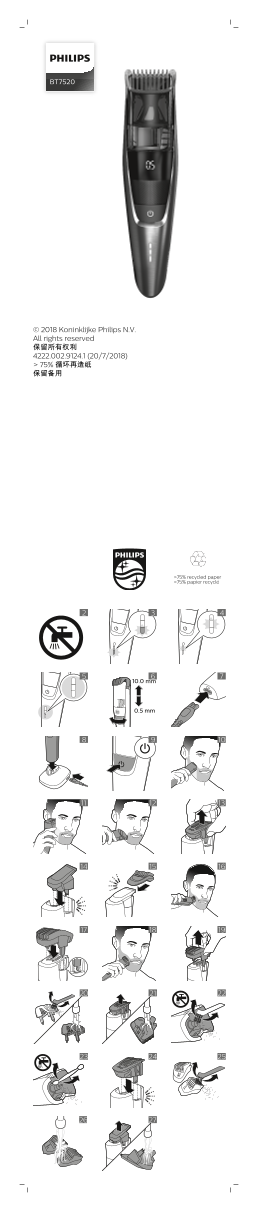
Page 1 Text Content
BT7520
© 2018 Koninklijke Philips N.V. All rights reserved 保留所有权利 4222.002.9124.1 (20/7/2018) > 75% 循环再造纸 保留备用
>75% recycled paper >75% papier recyclé
10.0 mm
0.5 mm
Page Summary Contents For Philips Beardtrimmer series 7000 Vacuum Hair Trimmer BT7520 15 Product Support & User Manual
Manual Details
| Brand | Philips |
|---|---|
| Pages | 7 |
| File Size | 654.88 KB |
| Published | May 29, 2026 |
Enter the captcha to get the download link:

Frequently Asked Questions
The appliance won't power on; what should I check first?
Ensure the battery has charged for at least one hour to restore sufficient power.
How do I properly clean this device?
You can wash the removable trimmer parts under a running tap, but never immerse or rinse the main appliance body in water.
What is the maximum usage time on a full charge?
When fully charged, it has a cordless operating time of up to 100 minutes.
How should I dispose of the appliance after use?
Do not dispose of it with general household waste; take it to a government-designated recycling center or authorized service center for proper removal of batteries.