Panasonic SL-SW895 SL-SW890 SL-SW891C User Manual
Summary
Enjoy portable music anytime, anywhere, with this versatile CD Player featuring an added hand grip for comfortable movement while jogging. This comprehensive manual provides users with detailed operating instructions and expert safety guidelines covering AC adaptor use, car installation, battery maintenance, and hearing protection protocols. It is essential reading for optimizing performance and ensuring safe operation whether you are in the car, exercising outdoors, or indoors.
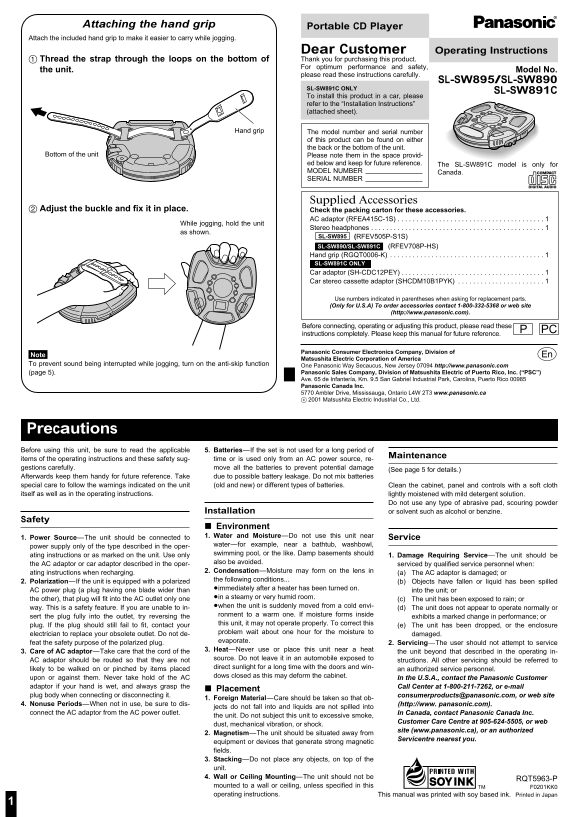
Page 1 Text Content
Attaching the hand grip Portable CD Player
Attach the included hand grip to make it easier to carry while jogging.
Dear Customer Operating Instructions Thread the strap through the loops on the bottom of Thank you for purchasing this product. For optimum performance and safety,
the unit. Model No.
please read these instructions carefully.
SL-SW895/SL-SW890
SL-SW891C ONLY
SL-SW891C
To install this product in a car, please refer to the “Installation Instructions” (attached sheet).
Hand grip The model number and serial number
of this product can be found on either the back or the bottom of the unit.
Bottom of the unit Please note them in the space provid-
ed below and keep for future reference. The SL-SW891C model is only for MODEL NUMBER Canada. SERIAL NUMBER
Supplied Accessories
Adjust the buckle and fix it in place. Check the packing carton for these accessories.
AC adaptor (RFEA415C-1S) . . . . . . . . . . . . . . . . . . . . . . . . . . . . . . . . . . . . . . . 1
While jogging, hold the unit
Stereo headphones . . . . . . . . . . . . . . . . . . . . . . . . . . . . . . . . . . . . . . . . . . . . . . 1
as shown.
SL-SW895 (RFEV505P-S1S) SL-SW890/SL-SW891C (RFEV708P-HS) Hand grip (RGQT0006-K) . . . . . . . . . . . . . . . . . . . . . . . . . . . . . . . . . . . . . . . . . 1 SL-SW891C ONLY Car adaptor (SH-CDC12PEY) . . . . . . . . . . . . . . . . . . . . . . . . . . . . . . . . . . . . . . 1 Car stereo cassette adaptor (SHCDM10B1PYK) . . . . . . . . . . . . . . . . . . . . . . . 1
Use numbers indicated in parentheses when asking for replacement parts. (Only for U.S.A) To order accessories contact 1-800-332-5368 or web site
(http://www.panasonic.com).
PBefore connecting, operating or adjusting this product, please read these PC
instructions completely. Please keep this manual for future reference.
Panasonic Consumer Electronics Company, Division of
Note. p Matsushita Electric Corporation of America To prevent sound being interrupted while jogging, turn on the anti-skip function One Panasonic Way Secaucus, New Jersey 07094 http://www.panasonic.com
(page 5). Panasonic Sales Company, Division of Matsushita Electric of Puerto Rico, Inc. (“PSC”) Ave. 65 de Infantería, Km. 9.5 San Gabriel Industrial Park, Carolina, Puerto Rico 00985 Panasonic Canada Inc. 5770 Ambler Drive, Mississauga, Ontario L4W 2T3 www.panasonic.ca c 2001 Matsushita Electric Industrial Co., Ltd.
Precautions
Before using this unit, be sure to read the applicable 5. Batteries—If the set is not used for a long period of
Maintenance
items of the operating instructions and these safety sug- time or is used only from an AC power source, re- gestions carefully. move all the batteries to prevent potential damage
(See page 5 for details.)
Afterwards keep them handy for future reference. Take due to possible battery leakage. Do not mix batteries special care to follow the warnings indicated on the unit (old and new) or different types of batteries. Clean the cabinet, panel and controls with a soft cloth
itself as well as in the operating instructions. lightly moistened with mild detergent solution.
Do not use any type of abrasive pad, scouring powder
Installation or solvent such as alcohol or benzine.
Safety
Environment 1. Water and Moisture—Do not use this unit near Service
1. Power Source—The unit should be connected to
water—for example, near a bathtub, washbowl,
power supply only of the type described in the oper-
swimming pool, or the like. Damp basements should
ating instructions or as marked on the unit. Use only 1. Damage Requiring Service—The unit should be
also be avoided.
the AC adaptor or car adaptor described in the oper- serviced by qualified service personnel when:
2. Condensation—Moisture may form on the lens in
ating instructions when recharging. 1. (a) The AC adaptor is damaged; or
the following conditions...
2. Polarization—If the unit is equipped with a polarized 1. (b) Objects have fallen or liquid has been spilled
2. ≥immediately after a heater has been turned on.
AC power plug (a plug having one blade wider than into the unit; or
2. ≥in a steamy or very humid room.
the other), that plug will fit into the AC outlet only one 1. (c) The unit has been exposed to rain; or
2. ≥when the unit is suddenly moved from a cold envi-
way. This is a safety feature. If you are unable to in- 1. (d) The unit does not appear to operate normally or
ronment to a warm one. If moisture forms inside
sert the plug fully into the outlet, try reversing the exhibits a marked change in performance; or
this unit, it may not operate properly. To correct this
plug. If the plug should still fail to fit, contact your 1. (e) The unit has been dropped, or the enclosure
problem wait about one hour for the moisture to
electrician to replace your obsolete outlet. Do not de- damaged.
evaporate.
feat the safety purpose of the polarized plug. 2. Servicing—The user should not attempt to service
3. Heat—Never use or place this unit near a heat
3. Care of AC adaptor—Take care that the cord of the the unit beyond that described in the operating in-
source. Do not leave it in an automobile exposed to
AC adaptor should be routed so that they are not structions. All other servicing should be referred to
direct sunlight for a long time with the doors and win-
likely to be walked on or pinched by items placed an authorized service personnel.
dows closed as this may deform the cabinet.
upon or against them. Never take hold of the AC 2. In the U.S.A., contact the Panasonic Customer adaptor if your hand is wet, and always grasp the 2. Call Center at 1-800-211-7262, or e-mail
Placement
plug body when connecting or disconnecting it. 2. [email protected], or web site
1. Foreign Material—Care should be taken so that ob-
4. Nonuse Periods—When not in use, be sure to dis- 2. (http://www. panasonic.com).
jects do not fall into and liquids are not spilled into
connect the AC adaptor from the AC power outlet. 2. In Canada, contact Panasonic Canada Inc.
the unit. Do not subject this unit to excessive smoke,
2. Customer Care Centre at 905-624-5505, or web
dust, mechanical vibration, or shock.
2. site (www.panasonic.ca), or an authorized
2. Magnetism—The unit should be situated away from
2. Servicentre nearest you.
equipment or devices that generate strong magnetic fields. 3. Stacking—Do not place any objects, on top of the unit. 4. Wall or Ceiling Mounting—The unit should not be
RQT5963-P
mounted to a wall or ceiling, unless specified in this F0201KK0 operating instructions. This manual was printed with soy based ink. Printed in Japan
Page Summary Contents For Panasonic SL-SW895 SL-SW890 SL-SW891C User Manual
Manual Details
| Brand | Panasonic |
|---|---|
| Pages | 8 |
| File Size | 428.68 KB |
| Published | June 20, 2026 |
Enter the captcha to get the download link:

Frequently Asked Questions
How can I carry the unit while jogging?
Attach the included hand grip to make it easier to carry.
What accessories are available for car installation?
Car adaptor (SH-CDC12PEY) and Car stereo cassette adaptor (SHCDM10B1PYK).
How do I clean the unit safely?
Clean with a soft cloth lightly moistened with mild detergent solution; avoid abrasive pads or solvents.
What safety precautions should be taken when driving?
Start volume low, increase slowly until comfortable, and never operate while distracted from traffic.