Mounting instructions for Siemens RDF280.V, RDF280.V VS, RDF280.V VG
Summary
This comprehensive guide provides detailed instructions for the Siemens RDF280.V smart room controller. It covers everything necessary from secure mounting and wiring diagrams to advanced parameter setup, including Modbus integration and precise temperature adjustment. Ideal for HVAC technicians, engineers, and facilities managers, this manual ensures proper installation, commissioning, and operation of your commercial building climate control system. Master every feature, from setting optimal setpoints and selecting fan speeds to configuring operational modes and executing factory resets.
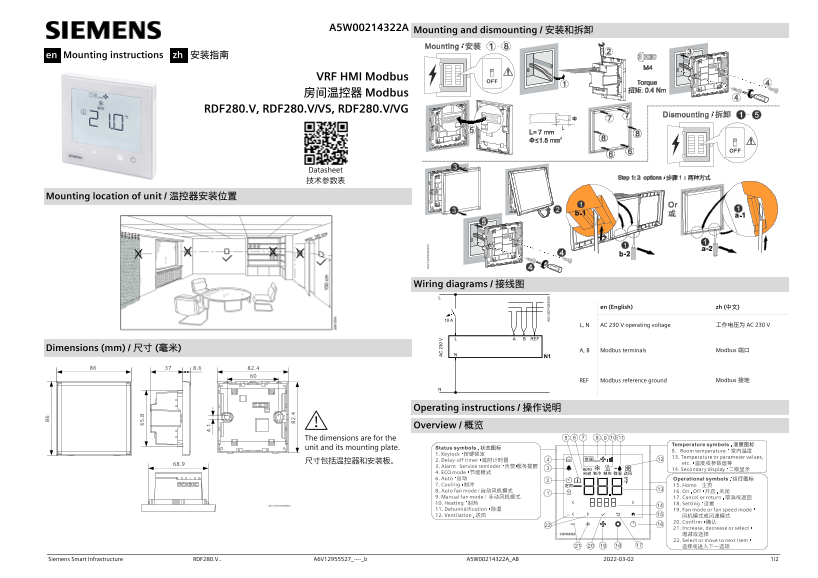
Page 1 Text Content
A5W00214322A Mounting and dismounting / 安装和拆卸
en Mounting instructions zh 安装指南
VRF HMI Modbus 房间温控器 Modbus
RDF280.V, RDF280.V/VS, RDF280.V/VG
Datasheet 技术参数表
Mounting location of unit / 温控器安装位置
Wiring diagrams / 接线图
en (English) zh (中文)
L, N AC 230 V operating voltage 工作电压为 AC 230 V
Dimensions (mm) / 尺寸 (毫米) A, B Modbus terminals Modbus 端口
REF Modbus reference ground Modbus 接地
Operating instructions / 操作说明
Overview / 概览
The dimensions are for the unit and its mounting plate. 尺寸包括温控器和安装板。
Siemens Smart Infrastructure RDF280.V.. A6V12955527_----_b A5W00214322A_AB 2022-03-02 1/2
Page Summary Contents For Mounting instructions for Siemens RDF280.V, RDF280.V VS, RDF280.V VG
Manual Details
| Brand | Siemens |
|---|---|
| Pages | 2 |
| File Size | 3.28 MB |
| Published | May 28, 2026 |
Enter the captcha to get the download link:

Frequently Asked Questions
What is the standard operating voltage?
The working voltage for this unit is AC 230 V.
How do I perform advanced parameter configuration (e.g., Modbus baud rate)?
For advanced parameters, release the buttons and press minus (-) until Pxx is displayed, then use + or - to select and confirm the changes.
What happens if the power fails?
The unit can be configured to revert to a previous operating mode (P27) or force it OFF/Normal mode.
How do I set the timer delay-off function?
Set P28=1, then press and hold the icon for more than 3 seconds to enter the delay-off timer mode.