Page 1
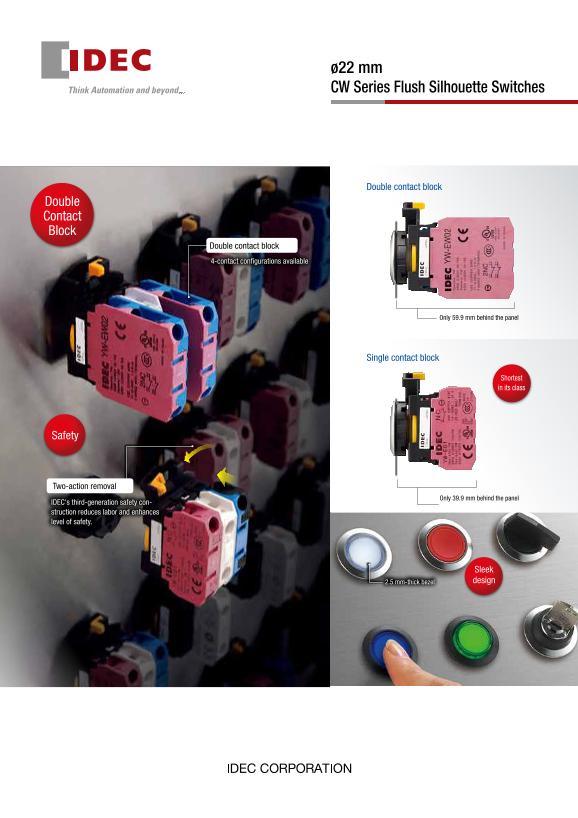
ø22 mm CW Series Flush Silhouette Switches Double contact block Double Contact Block Double contact block 4-contact configurations available Only 59.9 mm behind the panel Single contact block Shortest...
Page 2
ø22 mm CW Series Flush Silhouette Switches Double New double contact blocks with four-contact configurations. Contact (Illuminated pushbuttons, pushbuttons, selector switches, key selector switches) B...
Page 3
Sleek and stylish switches and pilot lights with a 2.5 mm-thick bezel The CW series gives a sleek, stylish image to your machines or control panels. The surface is safer with less chance of unexpected...
Page 4
ø22 Flush Silhouette Switches CW Series Flush bezel projects only 2.5 mm from front of panel Only 39.9 mm depth behind the panel (single contact block, momentary). • ø22.3 mm mounting hole compliant w...
Page 5
ø22 Flush Silhouette Switches CW Series Weight (Examples) Direct Opening of Key Selector Switch 46g (CW1L-M1E02QH, 2 contacts) Applicable Type 2-position (3NC) 3-position (2NC) Illuminated Pushbutton ...
Page 6
ø22 Flush Silhouette Switches CW Series Part No. Development Note: Please use these charts to interpret the part numbers as all combinations Illuminated Pushbuttons are not possible to be created. Bez...
Page 7
ø22 Flush Silhouette Switches CW Series Selector Switches Bezel Color Contact Configuration Code Bezel Color See page 12 and 13. Black Metallic Operator Code Shape Positions Blank Knob 2-position Leve...
Page 8
ø22 Flush Silhouette Switches CW Series Illuminated Pushbuttons Illuminated Pushbuttons Package quantity: 1 Operating Contact Part No. Illumination Color Shape Operation Voltage Configuration Metallic...
Page 9
ø22 Flush Silhouette Switches CW Series Illuminated Pushbuttons Illuminated Pushbuttons Package quantity: 1 Operating Contact Part No. Illumination Color Shape Operation Voltage Configuration Metallic...
Page 10
ø22 Flush Silhouette Switches CW Series Pilot Lights Pilot Lights Package quantity: 1 Part No. Illumination Color Shape Operating Voltage Metallic Bezel Code ➁Black Bezel Round Flush CWP-1 6V AC/DC C...
Page 11
ø22 Flush Silhouette Switches CW Series Pushbuttons Pushbuttons Package quantity: 1 Contact Part No. Shape Operation Button Color Code ➀ Configuration Black Bezel Metallic Bezel Round Flush 1NO CW1B-M...
Page 12
ø22 Flush Silhouette Switches CW Series Selector Switches Selector Switches Package quantity: 1 CWS (Knob Operator) Shape (metallic bezel)(black bezel) Contact Block Operator Position Contact No. of ...
Page 13
ø22 Flush Silhouette Switches CW Series Selector Switches Package quantity: 1 Operator CL CL CL Contact Block CL Contact Position No. of Configuration Positions Mounting (Code) Spring return Spring re...
Page 14
ø22 Flush Silhouette Switches CW Series Key Selector Switches Key Selector Switches Package quantity: 1 Shape (metallic bezel)(black bezel) Contact Contact Block Operator Position No. of Positions Con...
Page 15
ø22 Flush Silhouette Switches CW Series Key Selector Switches Package quantity: 1 Operator CL CL CL Contact Block CL Position No. of Contact Positions Configuration Mounting Contact Spring return Spri...
Page 16
ø22 Flush Silhouette Switches CW Series Dimensions All dimensions in mm. Dimensions .4 See page 5 for mounting hole layout. Illuminated Pushbuttons 1 to 2 contacts Round Flush Round Extended M3.5 Term...
Page 17
ø22 Flush Silhouette Switches CW Series Dimensions All dimensions in mm. Pushbuttons See page 5 for mounting hole layout. 1 to 3 contacts Round Flush Round Extended M3.5 Terminal Screw Panel Thickness...
Page 18
ø22 Flush Silhouette Switches CW Series Dimensions All dimensions in mm. Selector Switches See page 5 for mounting hole layout. 1 to 3 contacts Knob Operator Lever Operator M3.5 Terminal Screw Panel T...
Page 19
ø22 Flush Silhouette Switches CW Series Dimensions .4 All dimensions in mm. Key Selector Switches Keys .4 1 to 3 contacts Reversible Key M3.5 Terminal Screw Panel Thickness 0.8 to 3.2 Contact Block 8....
Page 20
ø22 Flush Silhouette Switches CW Series Accessories / Maintenance Parts Accessories Package Shape Material Part No. Remarks Quantity Locking Ring Wrench • Used to tighten the locking ring when install...
Page 21
ø22Flush Silhouette Switches CW Series Accessories / Maintenance Parts Maintenance Parts Used for replacement only. Do not use the maintenance parts to remodel or expand the CW series control units. P...
Page 22
ø22 Flush Silhouette Switches CW Series Instructions Safety Precautions • Turn off the power to the CW series control units before installation, • For wiring, use wires of a proper size to meet the vo...
Page 23
Flush Silhouette Switches CW Series Instructions ø22 Operating Instructions Pushbuttons (momentary) Installing the Rubber Boot Momentary pushbutton caps cannot be removed. Do not tamper with When usin...
Page 24
ø22 Flush Silhouette Switches CW Series Instructions Contact Blocks and LED Modules Wiring To remove the contact block from the operator, insert a flat screwdriver Applicable Wires under the latch and...