Hewlett-Packard HP Deskjet Ink Advantage 4620 Series Install Billboard
Summary
Essential guide for setting up your new HP Inkjet Printer series. This manual provides comprehensive, step-by-step instructions covering everything from unboxing and connecting power, to installing ink cartridges and loading paper. Users will find detailed guidance on running initial calibrations, installing necessary software for Windows/Mac OS X, and successfully registering the product online to ensure efficient support and functionality.
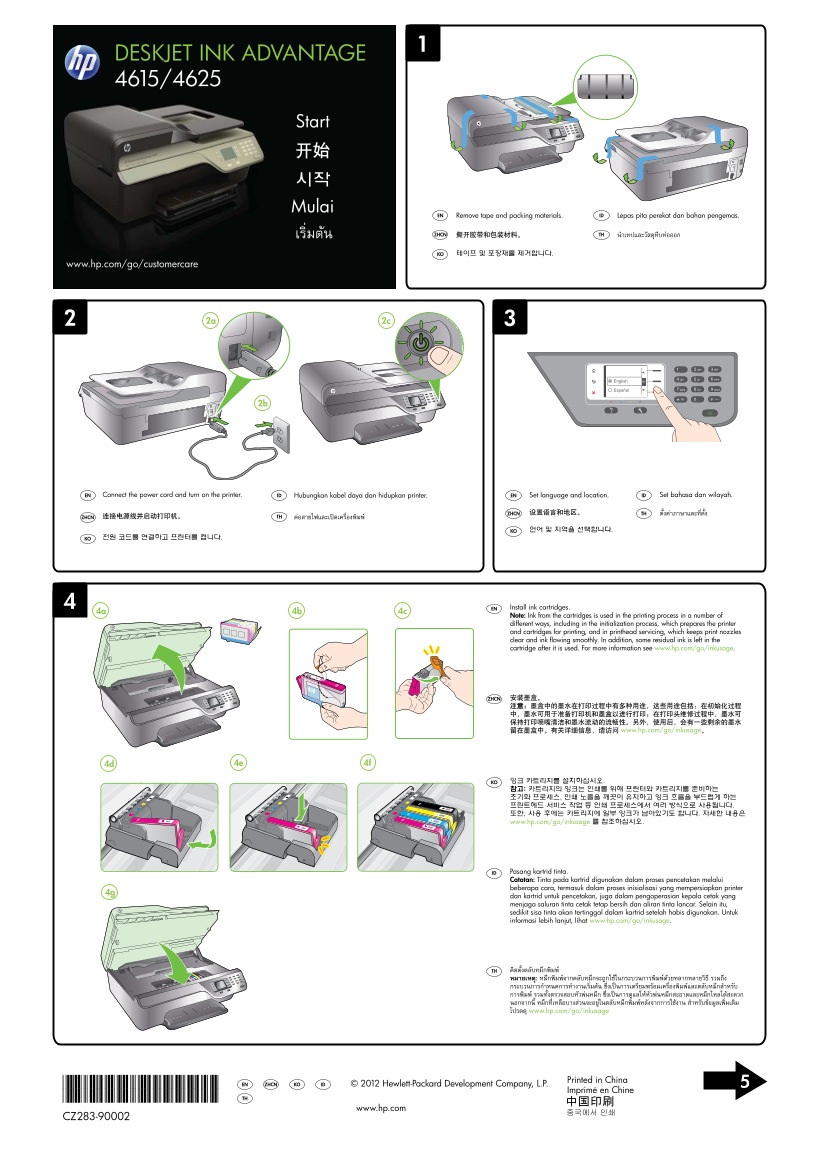
Page 1 Text Content
DESKJET INK ADVANTAGE 4615/4625
Start 开始 시작 Mulai
Remove tape and packing materials.EN Lepas pita perekat dan bahan pengemas.ID
撕开胶带和包装材料。ZHCN นำาเทปและวัสดุหีบห่อออกTHเริ่มต้น
테이프 및 포장재를 제거합니다.KO
www.hp.com/go/customercare
Connect the power cord and turn on the printer.EN Hubungkan kabel daya dan hidupkan printer.ID Set language and location.EN Set bahasa dan wilayah.ID
设置语言和地区。ZHCN ตั้งค่าภาษาและที่ตั้งTH
连接电源线并启动打印机。ZHCN ต่อสายไฟและเปิดเครื่องพิมพ์TH
언어 및 지역을 선택합니다.KO
전원 코드를 연결하고 프린터를 켭니다.KO
EN Install ink cartridges.
Note: Ink from the cartridges is used in the printing process in a number of different ways, including in the initialization process, which prepares the printer and cartridges for printing, and in printhead servicing, which keeps print nozzles clear and ink flowing smoothly. In addition, some residual ink is left in the cartridge after it is used. For more information see www.hp.com/go/inkusage.
ZHCN 安装墨盒。 注意:墨盒中的墨水在打印过程中有多种用途,这些用途包括:在初始化过程 中,墨水可用于准备打印机和墨盒以进行打印;在打印头维修过程中,墨水可 保持打印喷嘴清洁和墨水流动的流畅性。另外,使用后,会有一些剩余的墨水 留在墨盒中。有关详细信息,请访问 www.hp.com/go/inkusage。
KO 잉크 카트리지를 설치하십시오. 참고: 카트리지의 잉크는 인쇄를 위해 프린터와 카트리지를 준비하는 초기화 프로세스, 인쇄 노즐을 깨끗이 유지하고 잉크 흐름을 부드럽게 하는 프린트헤드 서비스 작업 등 인쇄 프로세스에서 여러 방식으로 사용됩니다. 또한, 사용 후에는 카트리지에 일부 잉크가 남아있기도 합니다. 자세한 내용은 www.hp.com/go/inkusage 를 참조하십시오.
ID Pasang kartrid tinta. Catatan: Tinta pada kartrid digunakan dalam proses pencetakan melalui beberapa cara, termasuk dalam proses inisialisasi yang mempersiapkan printer
dan kartrid untuk pencetakan, juga dalam pengoperasian kepala cetak yang menjaga saluran tinta cetak tetap bersih dan aliran tinta lancar. Selain itu, sedikit sisa tinta akan tertinggal dalam kartrid setelah habis digunakan. Untuk informasi lebih lanjut, lihat www.hp.com/go/inkusage.
TH ติดตั้งตลับหมึกพิมพ์ หมายเหตุ: หมึกพิมพ์จากตลับหมึกจะถูกใช้ในกระบวนการพิมพ์ด้วยหลากหลายวิธี รวมถึง กระบวนการกำาหนดการทำางานเริ่มต้น ซึ่งเป็นการเตรียมพร้อมเครื่องพิมพ์และตลับหมึกสำาหรับ การพิมพ์ รวมทั้งตรวจสอบหัวพ่นหมึก ซึ่งเป็นการดูแลให้หัวพ่นหมึกสะอาดและหมึกไหลได้สะดวก นอกจากนี้ หมึกที่เหลือบางส่วนจะอยู่ในตลับหมึกพิมพ์หลังจากการใช้งาน สำาหรับข้อมูลเพิ่มเติม โปรดดู www.hp.com/go/inkusage
*CZ283-90002* Printed in China
ZHCN KO ID © 2012 Hewlett-Packard Development Company, L.P. 5EN
Imprimé en Chine
*CZ283-90002* TH
www.hp.com
CZ283-90002
Page Summary Contents For Hewlett-Packard HP Deskjet Ink Advantage 4620 Series Install Billboard
Manual Details
| Brand | HP |
|---|---|
| Pages | 2 |
| File Size | 4.24 MB |
| Published | June 16, 2026 |
Enter the captcha to get the download link:

Frequently Asked Questions
How do I get started with the new printer setup?
Connect the power cord and turn on the printer after removing all tape and packing materials.
What is the specific uses of the ink in the cartridges?
The ink is used for initialization (preparing the machine), printhead servicing, and general printing processes.
My computer doesn't have a CD or DVD drive. How do I get the software?
You can download the required HP software from HP’s support website: www.hp.com/go/customercare.
Where should I go to register and activate my new printer?
You can register your printer later at www.register.hp.com for quicker service and efficient support.