Dell Vostro 3668 Quick User Guide - Windows 10
Summary
This Quick Start Guide for the Dell Vostro 3667/3668 desktop computer provides multilingual setup instructions for Windows 10 and Ubuntu operating systems. It covers keyboard and mouse connection, display setup with discrete graphics card guidance, optional network cable installation, power cable connection, and operating system setup. Includes SupportAssist for system health checks, Dell Product Registration, and a comprehensive hardware features diagram. Designed for small business users and IT administrators.
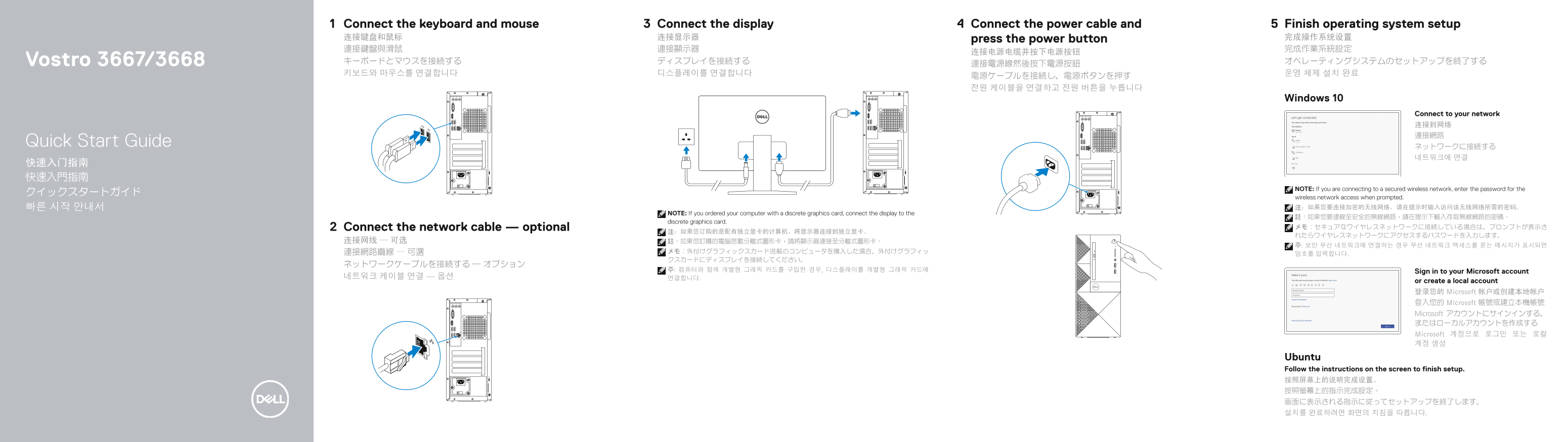
Page 1 Text Content
Connect the display Connect the power cable and 5Connect the keyboard and mouse Finish operating system setup
连接键盘和鼠标 连接显示器 press the power button 完成操作系统设置 連接鍵盤與滑鼠 連接顯示器 完成作業系統設定
Vostro 3667/3668 キーボードとマウスを接続する ディスプレイを接続する オペレーティングシステムのセットアップを終了する
Windows 10
Connect to your network 连接到网络 連接網路
Quick Start Guide
NOTE: If you are connecting to a secured wireless network, enter the password for the
wireless network access when prompted. 빠른 시작 안내서 注:如果您要连接加密的无线网络,请在提示时输入访问该无线网络所需的密码。
NOTE: If you ordered your computer with a discrete graphics card, connect the display to the
discrete graphics card.
Connect the network cable — optional メモ:セキュアなワイヤレスネットワークに接続している場合は、プロンプトが表示さ
주: 컴퓨터와 함께 개별형 그래픽 카드를 구입한 경우, 디스플레이를 개별형 그래픽 카드에 Sign in to your Microsoft account
or create a local account 登录您的 Microsoft 帐户或创建本地帐户 登入您的 Microsoft 帳號或建立本機帳號 Microsoft アカウントにサインインする、 またはローカルアカウントを作成する Microsoft 계정으로 로그인 또는 로컬 계정 생성
Ubuntu Follow the instructions on the screen to finish setup. 按照屏幕上的说明完成设置。 按照螢幕上的指示完成設定。 画面に表示される指示に従ってセットアップを終了します。 설치를 완료하려면 화면의 지침을 따릅니다.
Page Summary Contents For Dell Vostro 3668 Quick User Guide - Windows 10
Manual Details
| Brand | Dell |
|---|---|
| Pages | 2 |
| File Size | 764.13 KB |
| Published | July 01, 2026 |
Enter the captcha to get the download link:
