Dell Vostro 200 Setup Guide - Slim Tower
Summary
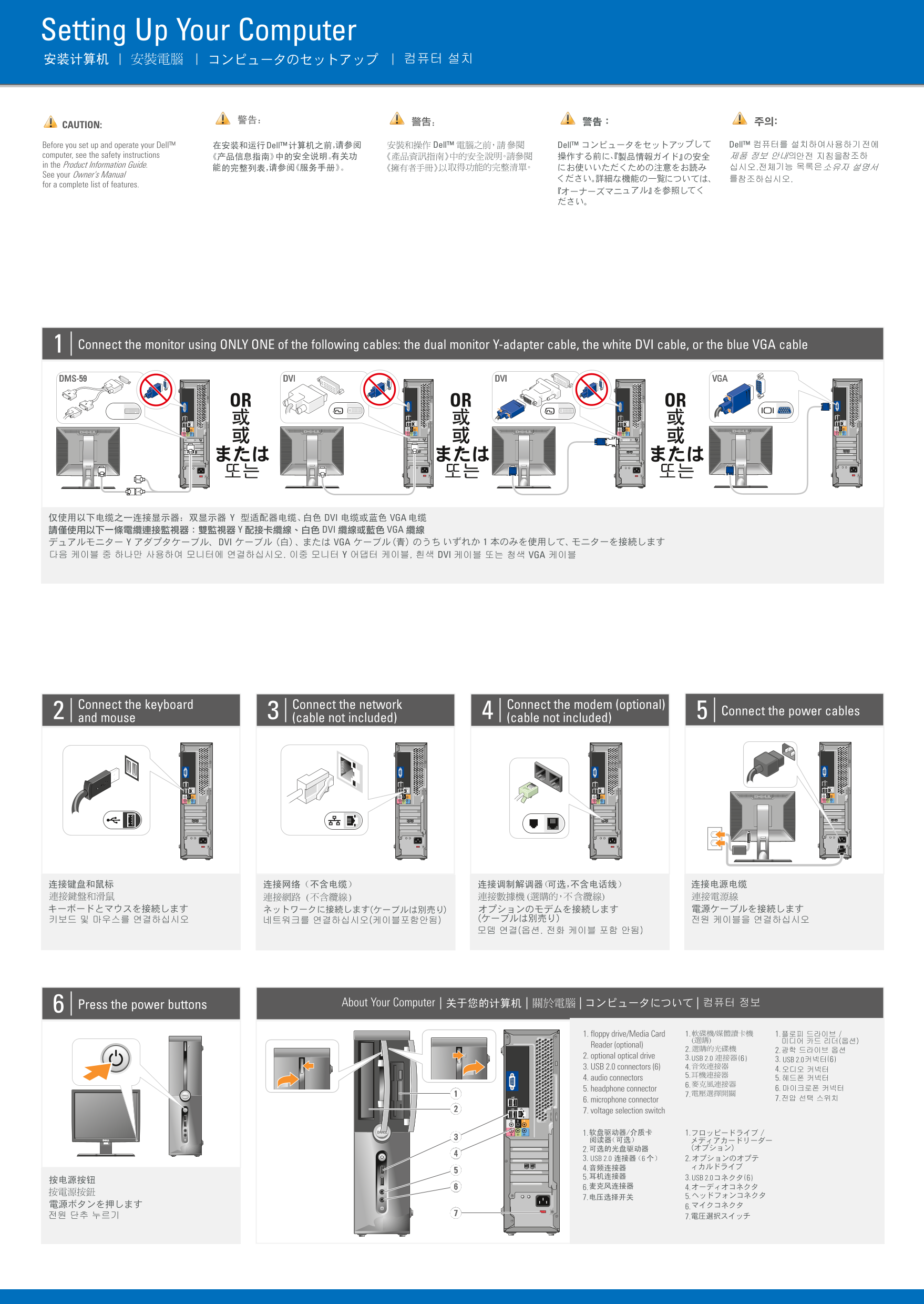
Dell Dimension desktop setup guide (September 2007) covering monitor connection via dual monitor Y-adapter cable, white DVI cable, or blue VGA cable (only one cable type), keyboard/mouse connection, network and modem cables, power cable, and wireless network configuration with router/DSL modem setup.
Page 1 Text Content
GY687cc0.qxd 13/09/2007 15:09 Page 1
Setting Up Your Computer
CAUTION:
Before you set up and operate your Dell™ computer, see the safety instructions in the Product Information Guide. See your Owner's Manual for a complete list of features.
Connect the monitor using ONLY ONE of the following cables: the dual monitor Y-adapter cable, the white DVI cable, or the blue VGA cable
DVI DVIDMS-59 VGA
OR OR OR
Connect the keyboard Connect the network Connect the modem (optional)
Connect the power cables
and mouse (cable not included) (cable not included)
Press the power buttons About Your Computer
1. floppy drive/Media Card 1. 1.
Reader (optional)
2. optional optical drive 3. USB 2.0
6( 3. USB 2.0 6(
3. USB 2.0 connectors (6) 4.
4. audio connectors 5.
5. headphone connector 6.
6. microphone connector 7.
7. voltage selection switch
2. 3. USB 2.0 2. 4. 5. 3. USB 2.0 6( 6. 4.
Page Summary Contents For Dell Vostro 200 Setup Guide - Slim Tower
Manual Details
| Brand | Dell |
|---|---|
| Pages | 2 |
| File Size | 2.55 MB |
| Published | July 03, 2026 |
Enter the captcha to get the download link:

Frequently Asked Questions
Where do I find instructions on setting up the computer?
See the Product Information Guide and your Owner's Manual for complete instructions.
What cables are available for connecting a monitor?
You can use the dual monitor Y-adapter cable, the white DVI cable, or the blue VGA cable.
How many USB 2.0 connectors does this model have?
It has six USB 2.0 connectors per side (totaling six mentioned).
Which cables are needed to power on the device?
You need to connect the network, modem (optional), and power cables before pressing the power button.