Dell Vostro 14-3478 Quick User Guide
Summary
This Quick Start Guide for the Dell Vostro 3478 notebook (Model P76G, Regulatory Type P76G002) highlights new features including Intel Kaby Lake Celeron and Pentium UMA processor support. It provides multilingual setup instructions covering power adapter connection, Windows 10 setup, and locating Dell applications such as SupportAssist for system scanning and optimization. Includes Taiwan RoHS compliance declarations and hardware feature diagrams. Suitable for small business users and IT administrators deploying entry-level business laptops.
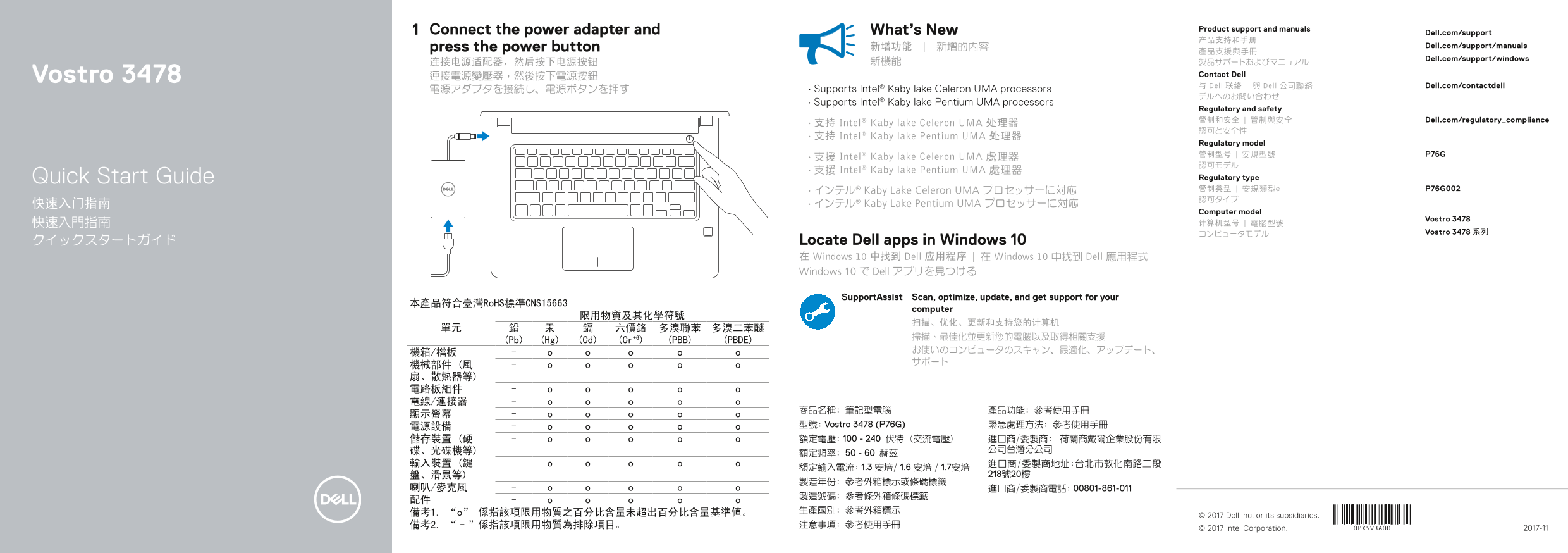
Page 1 Text Content
Connect the power adapter and What’s New Product support and manuals
Dell.com/support
press the power button 新增功能 | 新增的內容 Dell.com/support/manuals
Dell.com/support/windows
Vostro 3478 連接電源變壓器,然後按下電源按鈕 Contact Dell 与 Dell 联络 | 與 Dell 公司聯絡 Dell.com/contactdell
電源アダプタを接続し、電源ボタンを押す • Supports Intel® Kaby lake Celeron UMA processors
• Supports Intel® Kaby lake Pentium UMA processors
Regulatory and safety 管制和安全 | 管制與安全 Dell.com/regulatory_compliance
• 支持 Intel® Kaby lake Celeron UMA 处理器
• 支持 Intel® Kaby lake Pentium UMA 处理器
Regulatory model 管制型号 | 安規型號 P76G
• 支援 Intel® Kaby lake Celeron UMA 處理器
• 支援 Intel® Kaby lake Pentium UMA 處理器
Quick Start Guide Regulatory type • インテル® Kaby Lake Celeron UMA プロセッサーに対応 管制类型 | 安規類型e P76G002 認可タイプ
快速入门指南 • インテル® Kaby Lake Pentium UMA プロセッサーに対応
Computer model
Vostro 3478
コンピュータモデル Vostro 3478 系列
クイックスタートガイド Locate Dell apps in Windows 10
在 Windows 10 中找到 Dell 应用程序 | 在 Windows 10 中找到 Dell 應用程式 Windows 10 で Dell アプリを見つける
Support Assist Scan, optimize, update, and get support for your
本產品符合臺灣Ro HS標準CNS15663
computer
(Pb) (Hg) (Cd) (Cr+6) (PBB) (PBDE)
電源設備 型號: Vostro 3478 (P76G) 緊急處理方法: 參考使用手冊 儲存裝置 (硬 額定電壓: 100 - 240 伏特 (交流電壓) 進口商/委製商: 荷蘭商戴爾企業股份有限
備考1. “o” 係指該項限用物質之百分比含量未超出百分比含量基準値。 © 2017 Dell Inc. or its subsidiaries.
© 2017 Intel Corporation. 2017-11
Page Summary Contents For Dell Vostro 14-3478 Quick User Guide
Manual Details
| Brand | Dell |
|---|---|
| Pages | 2 |
| File Size | 235.71 KB |
| Published | July 01, 2026 |
Enter the captcha to get the download link:

Frequently Asked Questions
How do I power on the Vostro 3478 laptop?
Connect the power adapter and then press the power button to turn it on.
What processors are supported by this model?
It supports Intel Kaby Lake Celeron UMA or Pentium UMA processors.
Does the laptop have specific ports/connections?
Yes, it includes HDMI, VGA (port 17), USB 3.1 Gen 1, USB 2.0, and a network port.
Are there optional security features available?
Yes, it supports an optional fingerprint reader and has a security cable slot.