Dell U3421WE Monitor Teardown Instructions
Summary
This manual provides detailed disassembly procedures for the Dell U3421WEB monitor, including step-by-step instructions for removing the rear cover, stand, control board, interface board, USB board, speaker, main shield, and panel. It includes screw torque specifications and disassembly order recommendations for service technicians and repair professionals.
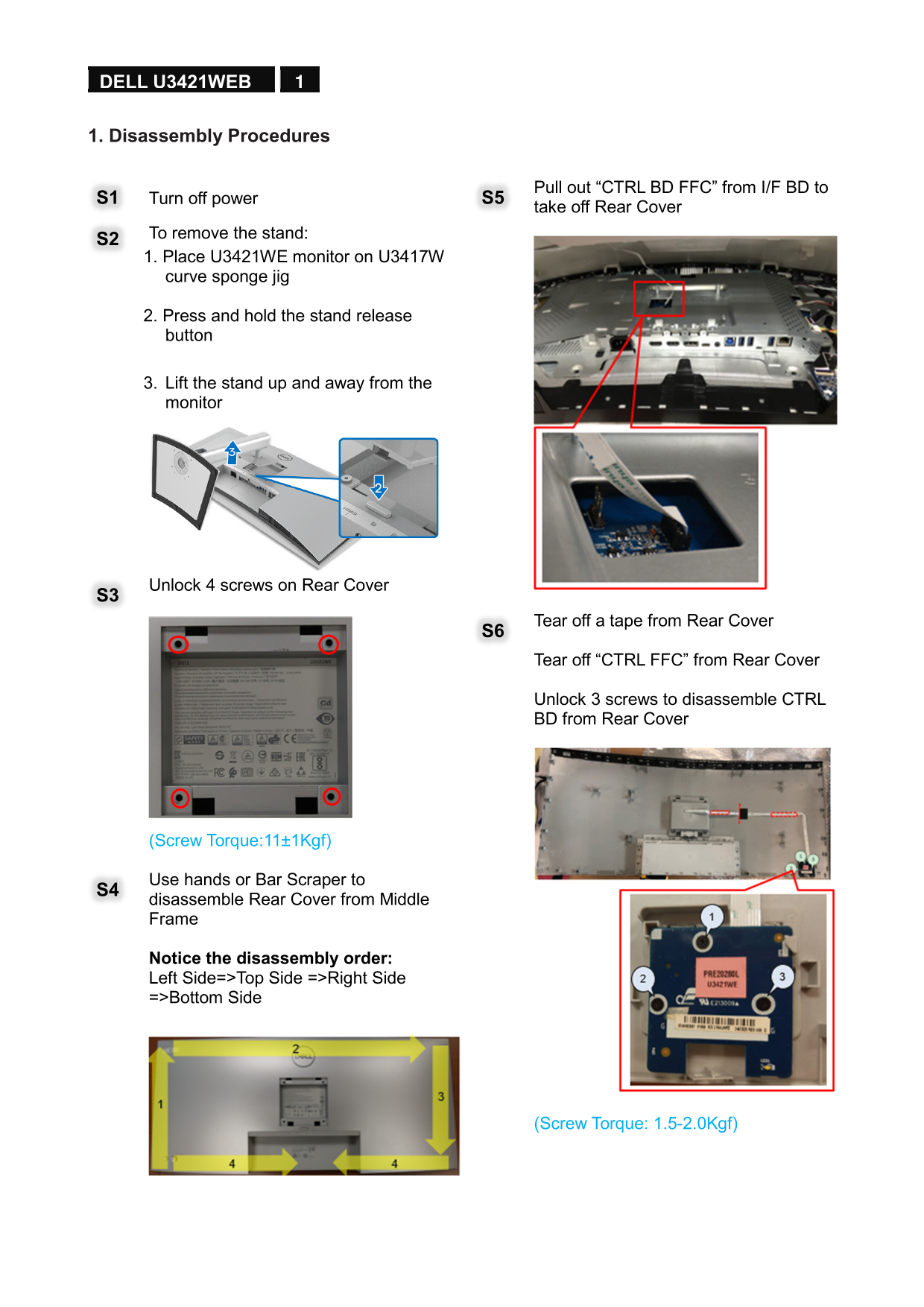
Page 1 Text Content
1 DELL U3421WEB
1. Disassembly Procedures
Pull out “CTRL BD FFC” from I/F BD to
S1 Turn off power S5
take off Rear Cover
S2 To remove the stand: 1. Place U3421WE monitor on U3417W curve sponge jig
2. Press and hold the stand release button
3. Lift the stand up and away from the monitor
Unlock 4 screws on Rear Cover S3
Tear off a tape from Rear Cover S6 Tear off “CTRL FFC” from Rear Cover
Unlock 3 screws to disassemble CTRL BD from Rear Cover
(Screw Torque:11±1Kgf)
Use hands or Bar Scraper to S4 disassemble Rear Cover from Middle Frame
Notice the disassembly order: Left Side=>Top Side =>Right Side =>Bottom Side
(Screw Torque: 1.5-2.0Kgf)
Page Summary Contents For Dell U3421WE Monitor Teardown Instructions
Manual Details
| Brand | Dell |
|---|---|
| Pages | 6 |
| File Size | 3.20 MB |
| Published | June 24, 2026 |
Enter the captcha to get the download link:

Frequently Asked Questions
What tools are needed to disassemble the DELL U3421WE?
You need a screwdriver, penknife, bar scraper, and a U3417W Curve Sponge Jig.
How do I remove the stand?
Place the monitor on a curve jig, press the release button, and lift the stand away.
Where should the Rear Cover screws be torqued?
Middle Frame screws require 1.5-2.0Kgf, while CTRL BD screws require 11±1Kgf.
What materials must be disposed of separately?
Electrolyte capacitors, PCBs larger than 10 sq cm, and LCD displays larger than 100 sq cm.