Dell U2723QE Monitor Teardown Instructions
Summary
This is a disassembly and assembly procedures document for the Dell U2723QE monitor. It provides step-by-step visual and textual instructions for monitor disassembly including removing the rear cover, disconnecting cables, removing the middle bezel, accessing the LED board, USB board, interface board, and panel components. It specifies screw sizes, torque values, and proper handling procedures for each step. Target users are Dell-authorized service technicians and repair professionals performing component-level repairs, panel replacements, and maintenance on U2723QE monitors.
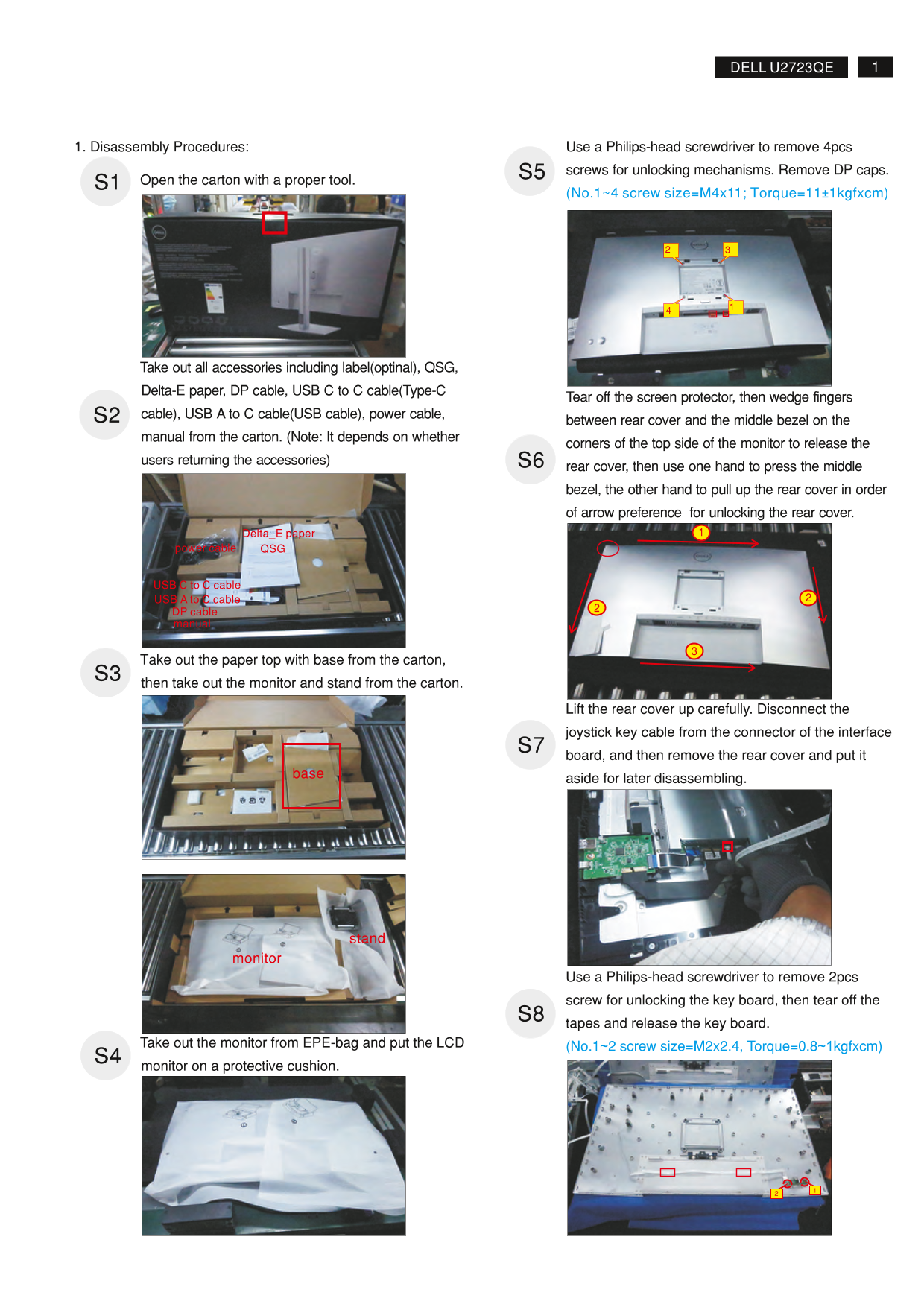
Page 1 Text Content
1DELL U2723QE
1. Disassembly Procedures: Use a Philips-head screwdriver to remove 4pcs
S5 screws for unlocking mechanisms. Remove DP caps.
Open the carton with a proper tool. S1
(No.1~4 screw size=M4x11; Torque=11±1kgfxcm)
Take out all accessories including label(optinal), QSG,
Delta-E paper, DP cable, USB C to C cable(Type-C
Tear off the screen protector, then wedge fingers
S2 cable), USB A to C cable(USB cable), power cable,
between rear cover and the middle bezel on the
manual from the carton. (Note: It depends on whether
corners of the top side of the monitor to release the
users returning the accessories) S6
rear cover, then use one hand to press the middle bezel, the other hand to pull up the rear cover in order of arrow preference for unlocking the rear cover.
Delta_E paper
power cable QSG
USB C to C cable USB A to C cable DP cable manual
Take out the paper top with base from the carton, S3 then take out the monitor and stand from the carton.
Lift the rear cover up carefully. Disconnect the joystick key cable from the connector of the interface S7 board, and then remove the rear cover and put it aside for later disassembling.
stand
monitor
Use a Philips-head screwdriver to remove 2pcs screw for unlocking the key board, then tear off the S8 tapes and release the key board.
Take out the monitor from EPE-bag and put the LCD (No.1~2 screw size=M2x2.4, Torque=0.8~1kgfxcm) S4
monitor on a protective cushion.
Page Summary Contents For Dell U2723QE Monitor Teardown Instructions
Manual Details
| Brand | Dell |
|---|---|
| Pages | 5 |
| File Size | 1.47 MB |
| Published | June 23, 2026 |
Enter the captcha to get the download link:

Frequently Asked Questions
What tools are needed to disassemble the monitor?
Use a Phillips-head screwdriver (#1, #2), a penknife, and a soldering iron with an absorber.
How do I remove the rear cover?
Wedge fingers between the rear cover and bezel to release it, then press the bezel and pull up the cover.
How should the monitor be disposed of?
Separate and recover specific components like PCBs, LCDs, capacitors, and cables from general waste.
What are the torque specifications for the middle bezel screws?
Use 5±0.5kgf·cm torque for M3x5 screws and 5±0.5kgf·cm torque for M3x4.5 screws.