Dell U2422HE Monitor Teardown Instructions
Summary
This service manual provides disassembly and repair procedures for the Dell U2422HEB monitor. Covers removing the stand, rear cover, control board, USB board, and main shield with specific torque specifications and cable disconnection procedures. Includes capacitor removal from circuit boards. Intended for certified repair technicians performing hardware maintenance on Dell U2422HEB displays.
Page 1 Text Content
1 DELL U2422HEB
1. Disassembly Procedures
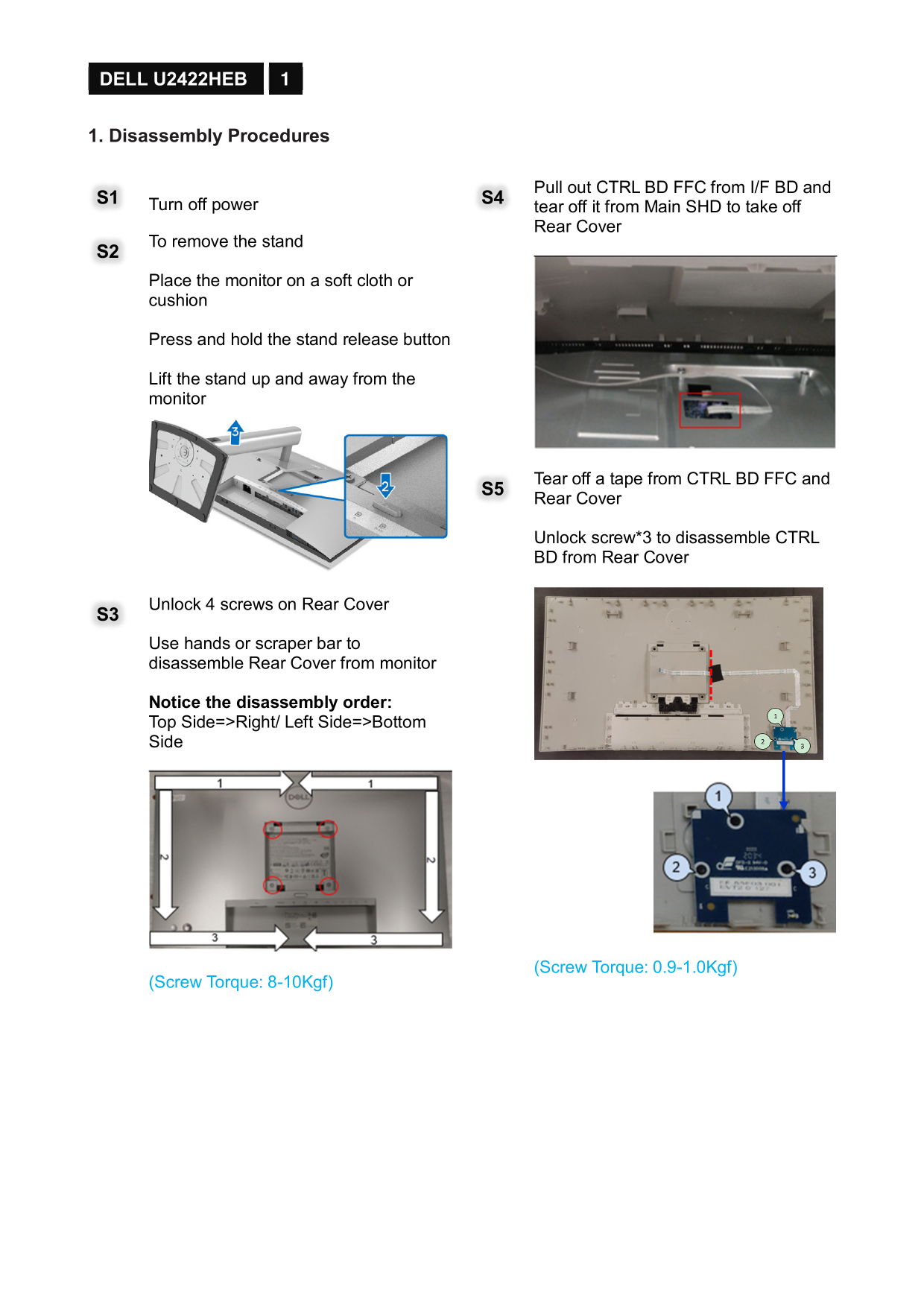
Pull out CTRL BD FFC from I/F BD and
S1 Turn off power S4
tear off it from Main SHD to take off Rear Cover
To remove the stand S2 Place the monitor on a soft cloth or cushion
Press and hold the stand release button
Lift the stand up and away from the monitor
Tear off a tape from CTRL BD FFC and S5 Rear Cover
Unlock screw*3 to disassemble CTRL BD from Rear Cover
Unlock 4 screws on Rear Cover S3 Use hands or scraper bar to disassemble Rear Cover from monitor
Notice the disassembly order: Top Side=>Right/ Left Side=>Bottom Side
(Screw Torque: 0.9-1.0Kgf)
(Screw Torque: 8-10Kgf)
Page Summary Contents For Dell U2422HE Monitor Teardown Instructions
Manual Details
| Brand | Dell |
|---|---|
| Pages | 6 |
| File Size | 3.28 MB |
| Published | June 26, 2026 |
Enter the captcha to get the download link:

Frequently Asked Questions
What should I do before taking apart the display?
Turn off power, place monitor on soft cloth/cushion, press stand release button to lift it up.
How should I disassemble the various shields and components?
Start by removing tapes (Backlight wire, USB wire). Then, systematically unlock screws according to the order: Top Side -> Right/Left Side -> Bottom Side for the Rear Cover.
What specialized handling is needed when removing certain parts?
When disconnecting USB FFC from I/F BD, press on the lock of connector before pulling to avoid damage.
Which materials must be disposed of separately according to WEEE directives?
Dispose separately: Capacitors (containing No used PCB/PCT), Mercury containing components, Batteries, Printed circuit boards (>10 cm²), and Electrolyte capacitors (>25mm).
What tools are necessary for disassembly?
A Screwdriver, Penknife, and Bar scraper are the required tools.