Dell SE2722HX Monitor Teardown Instructions
Summary
Mechanical disassembly manual for a Dell monitor display. Details step-by-step disassembly: base assembly, rear cover, bezel panel, LVDS cable, mainboard, power board, and keyboard panel. Specifies tools: power screwdrivers, cross screwdriver, turnbuckle driver with torque settings (6 kgF.Cm). Includes figures with tool annotations. Contains WEEE compliance material information listing PCBs, LCD display, and cables requiring separate disposal per EU Directive 75/442/EEC. For repair technicians and recycling facilities.
Page 1 Text Content
1. Mechanical Instruction
1.1Disassembly Procedures
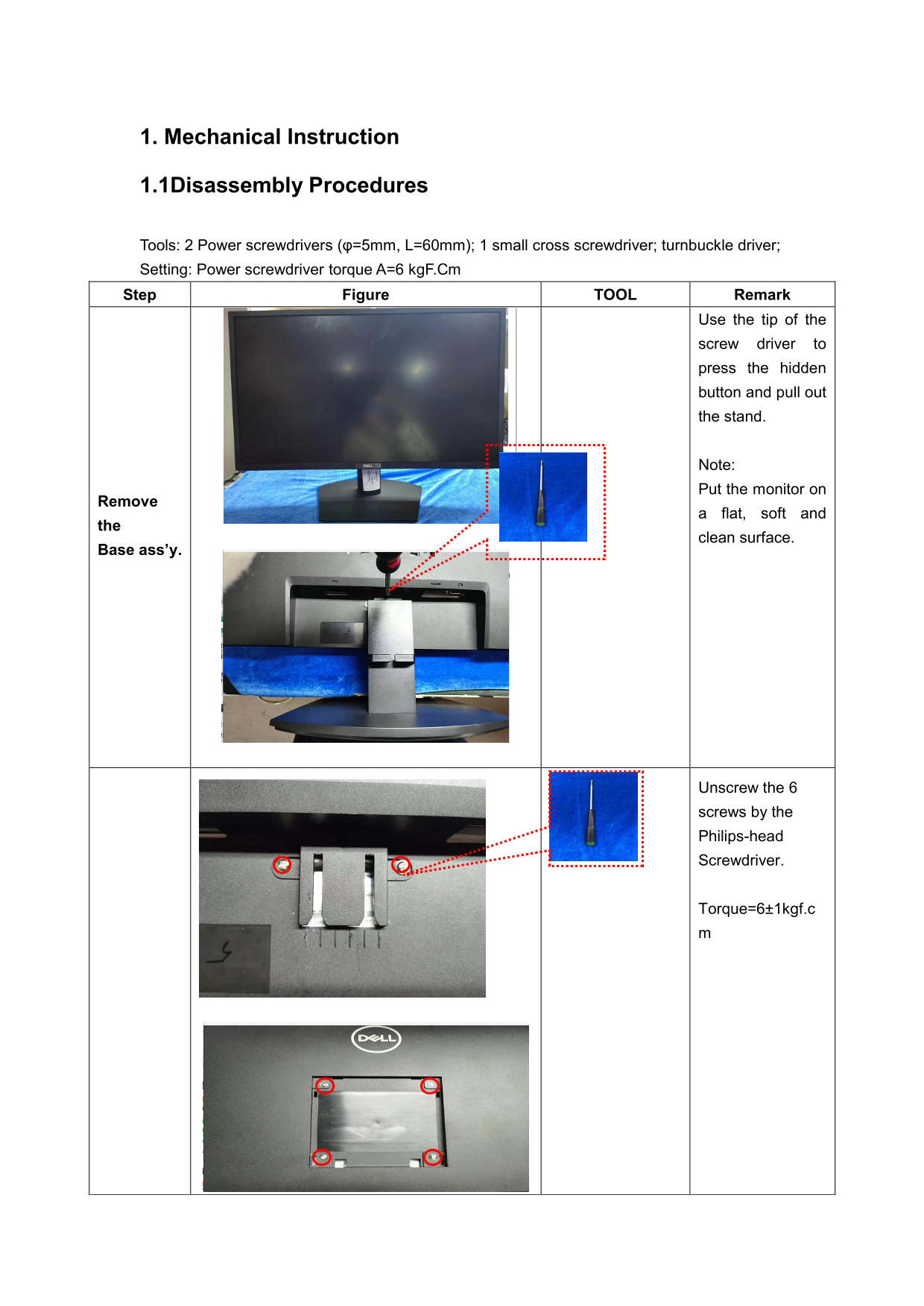
Tools: 2 Power screwdrivers (φ=5mm, L=60mm); 1 small cross screwdriver; turnbuckle driver; Setting: Power screwdriver torque A=6 kg F.Cm Step Figure TOOL Remark
Use the tip of the
screw driver to press the hidden button and pull out the stand.
Note: Put the monitor on
Remove
a flat, soft and
clean surface.
Base ass’y.
Unscrew the 6 screws by the Philips-head Screwdriver.
Torque=6±1kgf.c
Page Summary Contents For Dell SE2722HX Monitor Teardown Instructions
Manual Details
| Brand | Dell |
|---|---|
| Pages | 4 |
| File Size | 742.35 KB |
| Published | June 25, 2026 |
Enter the captcha to get the download link:

Frequently Asked Questions
What tools are needed to disassemble the device?
Use a 5mm/60mm power screwdriver, small cross screwdriver, turnbuckle driver, penknife, soldering iron, and absorber.
How do I remove the monitor stand?
Press the hidden button with the screwdriver tip and pull the stand out while placing the monitor on a flat surface.
What is the required torque for screws during disassembly?
Set the power screwdriver to a torque of 6 kgF.Cm.
What materials must be disposed of separately?
Capacitors, PCBs, batteries, and cables should be recovered separately.
What type of screwdrivers are required?
You need a Phillips-head screwdriver and a hexagonal screwdriver.