Dell S2740L Monitor Contour Guide User Manual
Summary
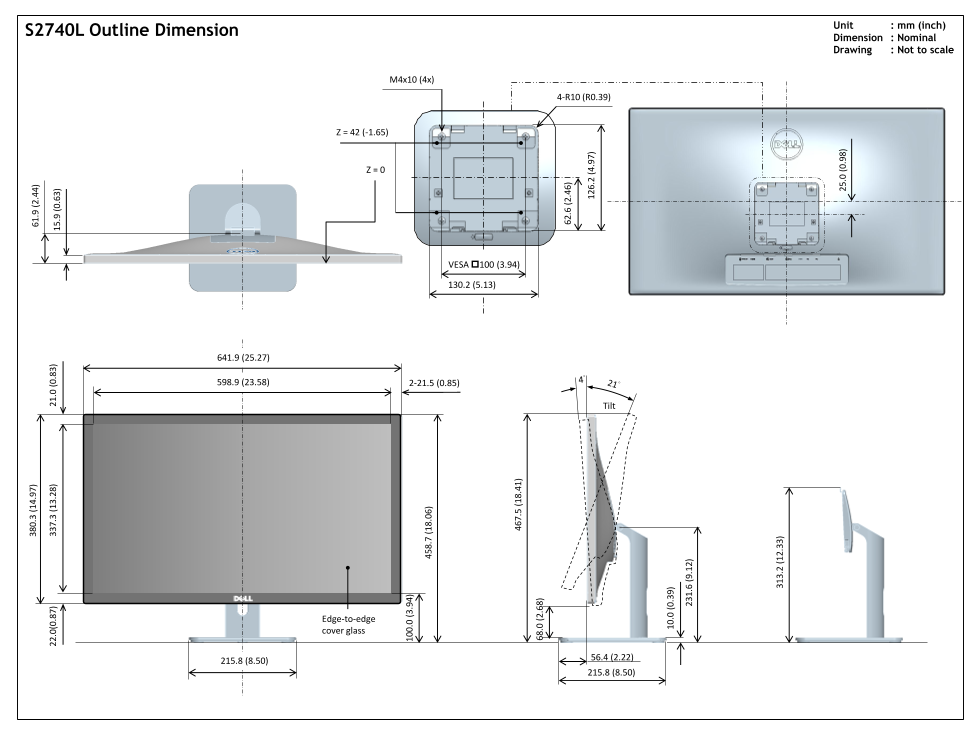
This technical manual provides comprehensive specifications for a high-precision electronic panel or display unit. It details all essential dimensions, including outline measurements, adjustable tilt ranges, and standardized mounting options like VESA p100. This documentation is crucial for integrators, engineers, and system builders who require precise installation planning, ensuring seamless compatibility during commercial buildouts or custom industrial setup projects.
Page 1 Text Content
S2740L Outline Dimension Unit : mm (inch) .3 4.
Dimension : Nominal Drawing : Not to scale
VESA p100 (3.94)
Edge-to-edge cover glass
Page Summary Contents For Dell S2740L Monitor Contour Guide User Manual
Manual Details
| Brand | Contour |
|---|---|
| Pages | 1 |
| File Size | 274.68 KB |
| Published | May 18, 2026 |
Enter the captcha to get the download link:

Frequently Asked Questions
What are the VESA mounting options for this display?
It supports VESA p100 and VESA p100 (3.94).
How wide is the screen at its maximum tilt angle?
The width is 215.8 inches.
What are the overall dimensions of the unit?
The approximate dimensions are 130.2 inches by 641.9 inches by 598.9 inches (in metric and imperial units).
Does it include mounting hardware specifications?
Yes, the design specifies M4x10 holes (4x) and recommends a radius of R0.39.