Dell P2314T/P2714T Monitor Contour Guide/Owner's Manual
Summary
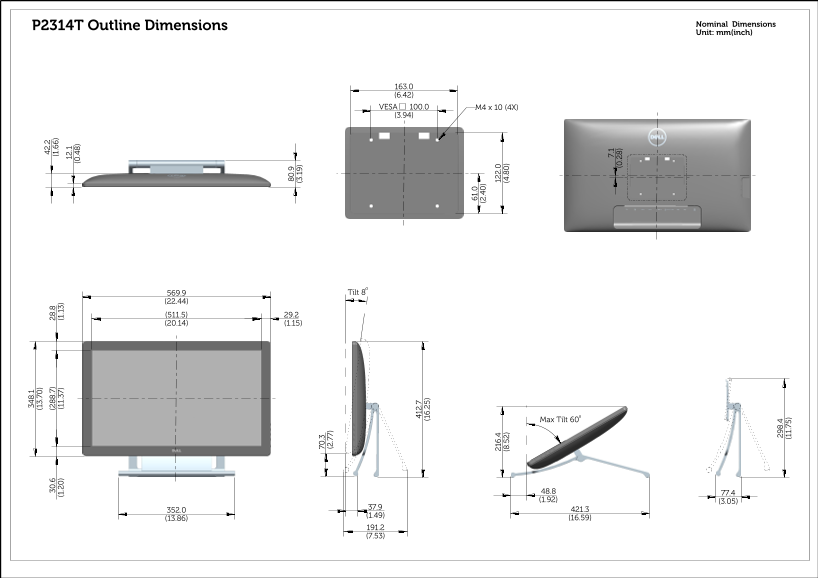
Elevate your workstation with this professional-grade display articulating mount. Designed for optimal ergonomic support, it ensures secure and versatile positioning for multiple monitors in commercial or advanced home environments. The accompanying manual provides comprehensive technical specifications, including detailed outline dimensions, multi-angle tilt adjustments (up to 60 degrees), and precise VESA mounting compatibility for seamless installation. Ideal for IT professionals, corporate offices, and users requiring highly customized display setups.
Page 1 Text Content
P2314T Outline Dimensions Nominal Dimensions
.1 Unit: mm(inch) (1 3.
163.0 (6.42) VESA 100.0 M4 x 10 (4X) (3.94)
569.9 Tilt 8 .9 (22.44) (3 .1 9)
.7 Max Tilt 60 (1 6.
Page Summary Contents For Dell P2314T/P2714T Monitor Contour Guide/Owner's Manual
Manual Details
| Brand | Contour |
|---|---|
| Pages | 2 |
| File Size | 553.13 KB |
| Published | May 18, 2026 |
Enter the captcha to get the download link:

Frequently Asked Questions
What VESA mounting pattern is compatible with this display unit?
The unit requires a 100.0 mm VESA mount pattern, utilizing M4 x 10 (4X) hardware.
What are the maximum supported tilt angles for the model?
The maximum adjustable tilt angle supported by the unit is 60 degrees.
What is the nominal width dimension for installation?
The nominal outline dimension is 163.0 mm (6.42 inches).