Dell S2721QS Monitor Teardown Instructions
Summary
The Dell S2721QSB monitor disassembly manual provides detailed teardown procedures for service and repair. It covers step-by-step instructions for removing the stand, rear cover, speakers, middle frame, control board, interface board, power supply board, and electrolyte capacitors. The manual specifies screw torque values and safety precautions including proper handling of bulk capacitors. It is designed for certified monitor repair technicians and service centers.
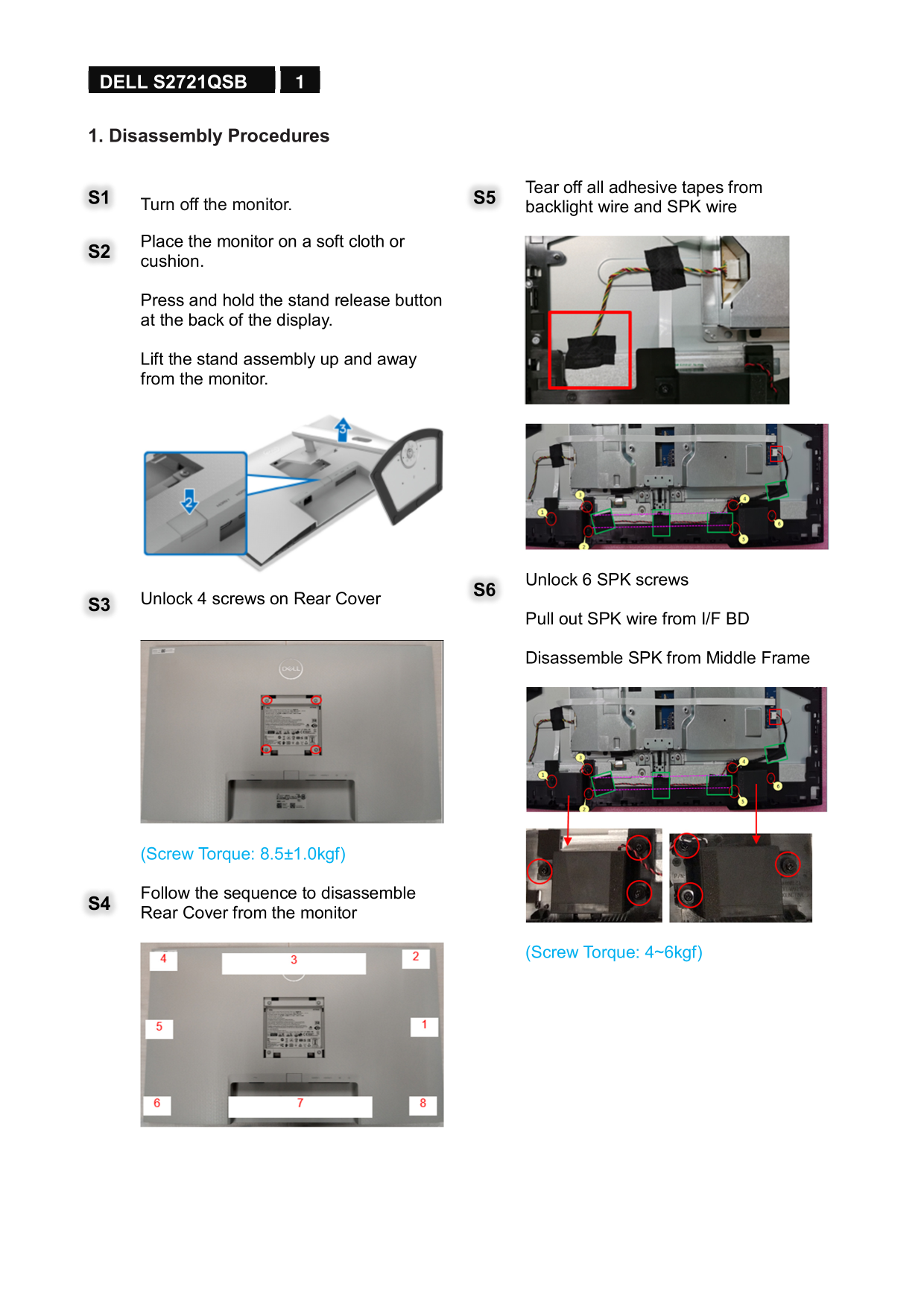
Page 1 Text Content
1 DELL S2721QSB
1. Disassembly Procedures
Tear off all adhesive tapes from
S1 Turn off the monitor. S5
backlight wire and SPK wire
Place the monitor on a soft cloth or S2 cushion.
Press and hold the stand release button at the back of the display.
Lift the stand assembly up and away from the monitor.
Unlock 6 SPK screws S6
S3 Unlock 4 screws on Rear Cover
Pull out SPK wire from I/F BD
Disassemble SPK from Middle Frame
(Screw Torque: 8.5±1.0kgf)
Follow the sequence to disassemble S4 Rear Cover from the monitor
(Screw Torque: 4~6kgf)
Page Summary Contents For Dell S2721QS Monitor Teardown Instructions
Manual Details
| Brand | Dell |
|---|---|
| Pages | 6 |
| File Size | 3.04 MB |
| Published | June 24, 2026 |
Enter the captcha to get the download link:

Frequently Asked Questions
How do I disassemble the stand from the monitor?
Turn off the monitor, press and hold the stand release button at the back, then lift the assembly up and away.
What tools are required to disassemble the device?
Tools required include a screwdriver, scraper bar, penknife, and a soldering iron with absorber.
How should electrolyte capacitors be removed?
Cut the glue between the bulk capacitor and PCB with a knife, then solder and remove the pin with an iron.
Which components are classified as hazardous waste?
Mercury-containing components, printed circuit boards, and electrolyte capacitors require separate disposal.