Dell S2421HS Monitor User Guide
Summary
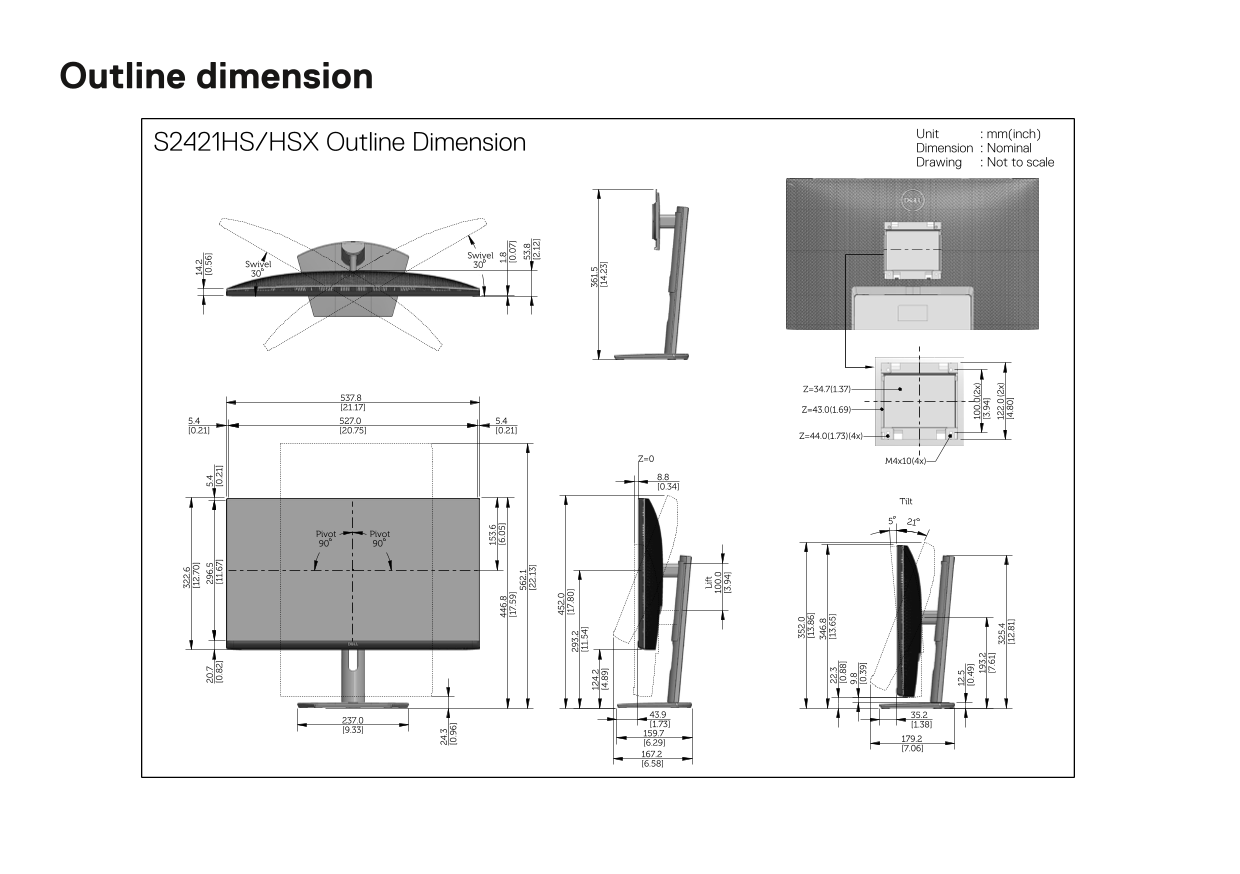
This document provides the outline dimension drawing for the Dell S2421HS/HSX monitor, including detailed measurements in millimeters and inches for tilt, swivel (plus/minus 30 degrees), pivot (90 degrees), and lift adjustments. It specifies the monitor's physical footprint, VESA mounting pattern (M4x10, 100x100mm), and overall dimensions for all viewing configurations. Designed for workspace planners, IT procurement teams, and system integrators who need precise dimensional data for monitor deployment and desk layout planning.
Page 1 Text Content
Outline dimension
Unit : mm(inch)
S2421HS/HSX Outline Dimension Dimension : Nominal
Drawing : Not to scale
Swivel
Swivel
6. [6 .0 1. Tilt
.1 3. [2 .1 3] Pivot Pivot [2 .1
Li ft
Page Summary Contents For Dell S2421HS Monitor User Guide
Manual Details
| Brand | Dell |
|---|---|
| Pages | 1 |
| File Size | 271.28 KB |
| Published | July 01, 2026 |
Enter the captcha to get the download link:

Frequently Asked Questions
What are the available swivel heights for this unit?
The two listed dimensions are Z=34.7 (1.37) and Z=43.0 (1.69).
How many mounting points does the unit use?
It is secured using four M4x10 (8.8 [0.34]) screws/mounting holes.
What is the maximum specified lift dimension?
The main horizontal extension for the lift function measures 352.0 mm [13.86].