Dell S2419H Monitor Teardown Instructions
Summary
Disassembly procedure guide for the Dell S2419H, S2419HN, and S2419NX monitors, providing step-by-step teardown instructions with specified screw sizes and torque values. Covers stand removal via release button, rear cover separation using penknife technique, speaker disconnection (S2419H only, six M3x6 screws at 6 kgf.cm), mainframe removal (three P3x4 screws at 3 kgf.cm), middle frame removal (ten M3x3 screws at 3 kgf.cm), panel FFC cable disconnection, and main board and converter board extra
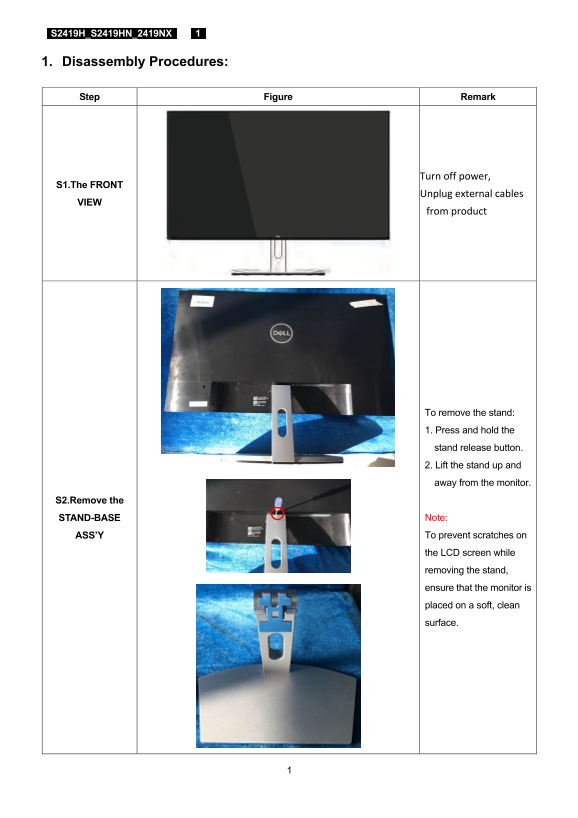
Page 1 Text Content
S2419H_S2419HN_2419NX 1
1. Disassembly Procedures:
Step Figure Remark
Turn off power,
S1.The FRONT
Unplug external cables
from product
To remove the stand: 1. Press and hold the stand release button. 2. Lift the stand up and away from the monitor.
S2.Remove the
STAND-BASE Note: ASS’Y To prevent scratches on the LCD screen while removing the stand, ensure that the monitor is placed on a soft, clean surface.
Page Summary Contents For Dell S2419H Monitor Teardown Instructions
Manual Details
| Brand | Dell |
|---|---|
| Pages | 7 |
| File Size | 1.38 MB |
| Published | June 18, 2026 |
Enter the captcha to get the download link:

Frequently Asked Questions
What tools are required for product disassembly?
The necessary tools include a Philips-head screwdriver, a penknife, and optionally, a soldering iron and absorber.
How do I remove the monitor's stand?
Press and hold the stand release button, then lift the stand up and away from the LCD screen. Ensure the monitor is placed on a soft surface to prevent scratches.
How should specific components be disposed of?
Capacitors/condensers, printed circuit boards (greater than 10 sq cm), and electrolyte capacitors must be separated for disposal according to WEEE directives.
What is the torque specification for removing screws on the rear cover?
The required torque specified for certain screws, such as those securing the speaker, is 6±1kgf.cm.