Dell S2319H Monitor Teardown Instructions
Summary
This comprehensive technical guide is essential for certified electronics technicians requiring precise disassembly procedures for a complex computing unit. It provides detailed, step-by-step instructions covering everything from removing external panels and keyboards to accessing main circuit boards. Furthermore, the manual ensures proper waste management by outlining material identification and selective component separation guidelines (WEEE compliance), making it an indispensable resource for professional repairs and advanced recycling processes.
Page 1 Text Content
1. Mechanical Instruction
1.1Disassembly Procedures
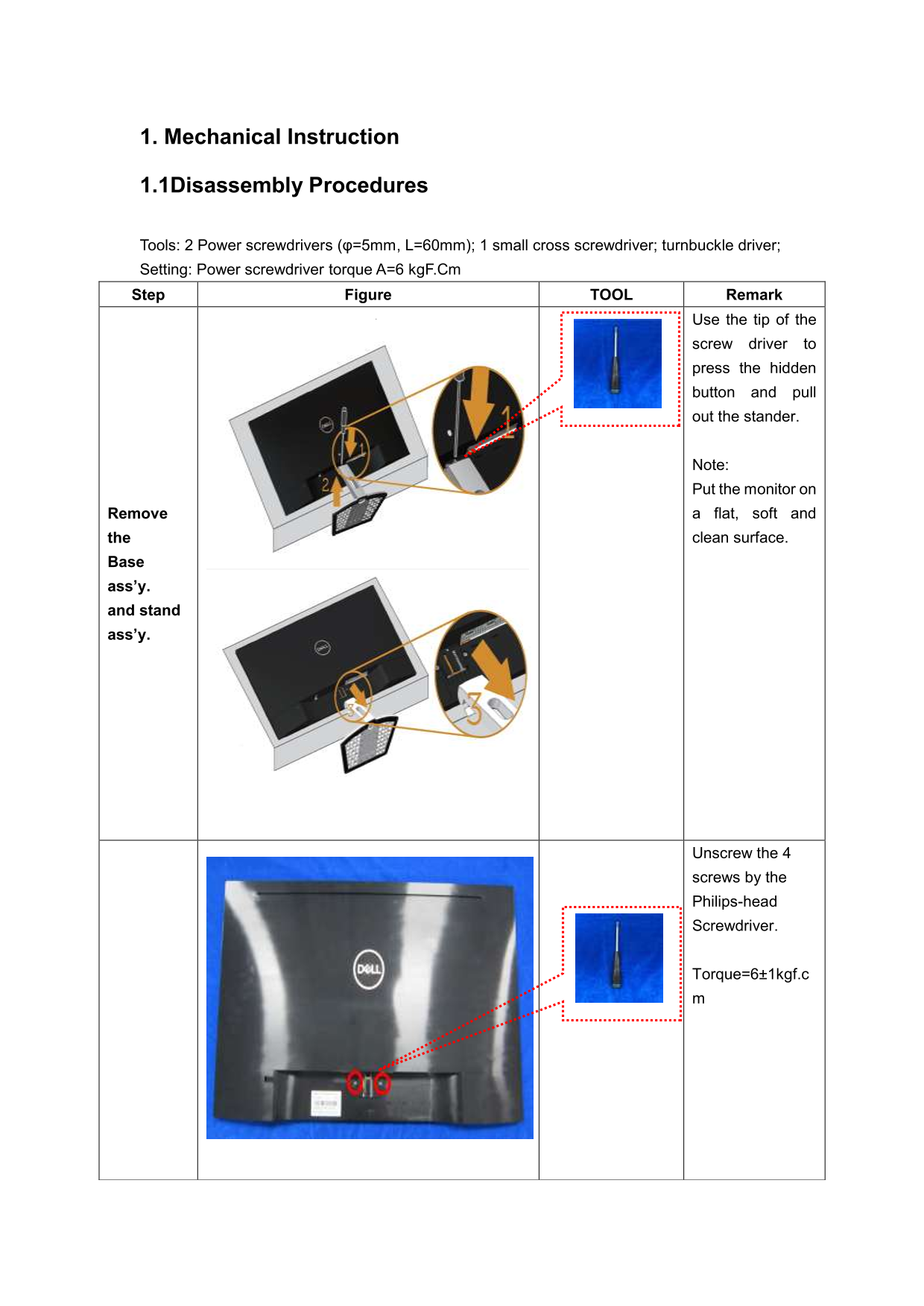
Tools: 2 Power screwdrivers (φ=5mm, L=60mm); 1 small cross screwdriver; turnbuckle driver; Setting: Power screwdriver torque A=6 kg F.Cm Step Figure TOOL Remark
Use the tip of the
screw driver to press the hidden button and pull out the stander.
Note: Put the monitor on Remove a flat, soft and the clean surface.
ass’y. and stand ass’y.
Unscrew the 4
screws by the Philips-head Screwdriver.
Torque=6±1kgf.c
Page Summary Contents For Dell S2319H Monitor Teardown Instructions
Manual Details
| Brand | Dell |
|---|---|
| Pages | 5 |
| File Size | 335.12 KB |
| Published | June 23, 2026 |
Enter the captcha to get the download link:

Frequently Asked Questions
What tools are needed to dismantle the product?
Required tools include Philip-head and hexagonal screwdrivers, a penknife, and soldering iron with an absorber.
What is the recommended torque when removing screws?
The standard torque setting for most screws is 6 ± 1 kgF.Cm.
How should the product be disposed of concerning waste materials?
Specific components like PCBs, capacitors, and batteries must be disposed of separately according to EU Directive 75/442/EEC.
Does this product contain hazardous materials requiring special disposal?
The manual specifies separate disposal for items such as printed circuit boards, mercury containing components, and specific plastics.