Dell S2240T Contour Picture User's Guide
Summary
Essential dimensional specifications and technical guides for mounting equipment. This manual provides comprehensive measurements, including VESA compatibility standards, adjustable geometry parameters, and detailed outline dimensions across multiple configurations. Designed for system integrators, professional installers, and technicians requiring precise structural details to ensure optimal setup and flawless installation of displays or monitors.
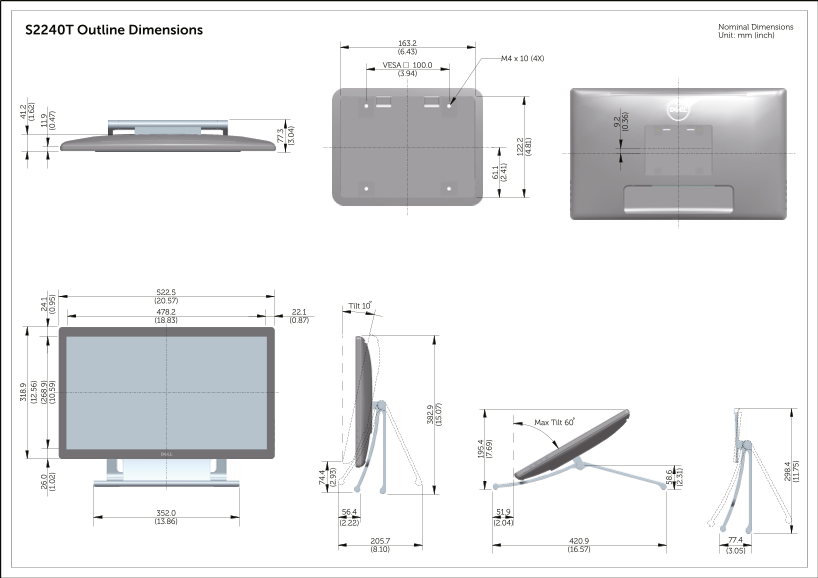
Page 1 Text Content
Nominal Dimensions
S2240T Outline Dimensions (1 .6
(1 .5 6) Unit: mm (inch)
VESA 100.0 (3.94)
Tilt 10
Max Tilt 60
Page Summary Contents For Dell S2240T Contour Picture User's Guide
Manual Details
| Brand | Contour |
|---|---|
| Pages | 1 |
| File Size | 1.61 MB |
| Published | May 18, 2026 |
Enter the captcha to get the download link:

Frequently Asked Questions
What are the physical dimensions of the S2240T model?
Its outline dimensions are listed as 163.2 mm (6.43 in), M4 x 10 (4X), VESA 100.0 (3.94 in), and 522.5 mm (20.57 inches).
What is the maximum usable tilt angle?
The manual lists a Max Tilt of 60 degrees. The current displayed tilt values range from 0 to 10 degrees.
Does this unit support VESA mounting?
Yes, it supports VESA mounting with a pattern of 100.0 mm (3.94 in).
What is the minimum depth clearance required for setup?
The measurements show that the most compact dimension is 77.3 mm (3.04 inches) at certain angles.