Dell OptiPlex 7090 Ultra - Statement of Volatility
Summary
Statement of Volatility document for Dell OptiPlex 7090 Ultra compact desktop system, cataloging all volatile and non-volatile memory components on the system board. Lists embedded controller flash, system BIOS with ME firmware, DDR4 DIMM memory modules, USB Type-C PD firmware, Thunderbolt 4 bridge firmware, RTC CMOS memory, UMA video memory, and LOM serial flash with data retention characteristics and remedial actions. Intended for IT security professionals managing data sanitization during system disposal or redeployment.
Page 1 Text Content
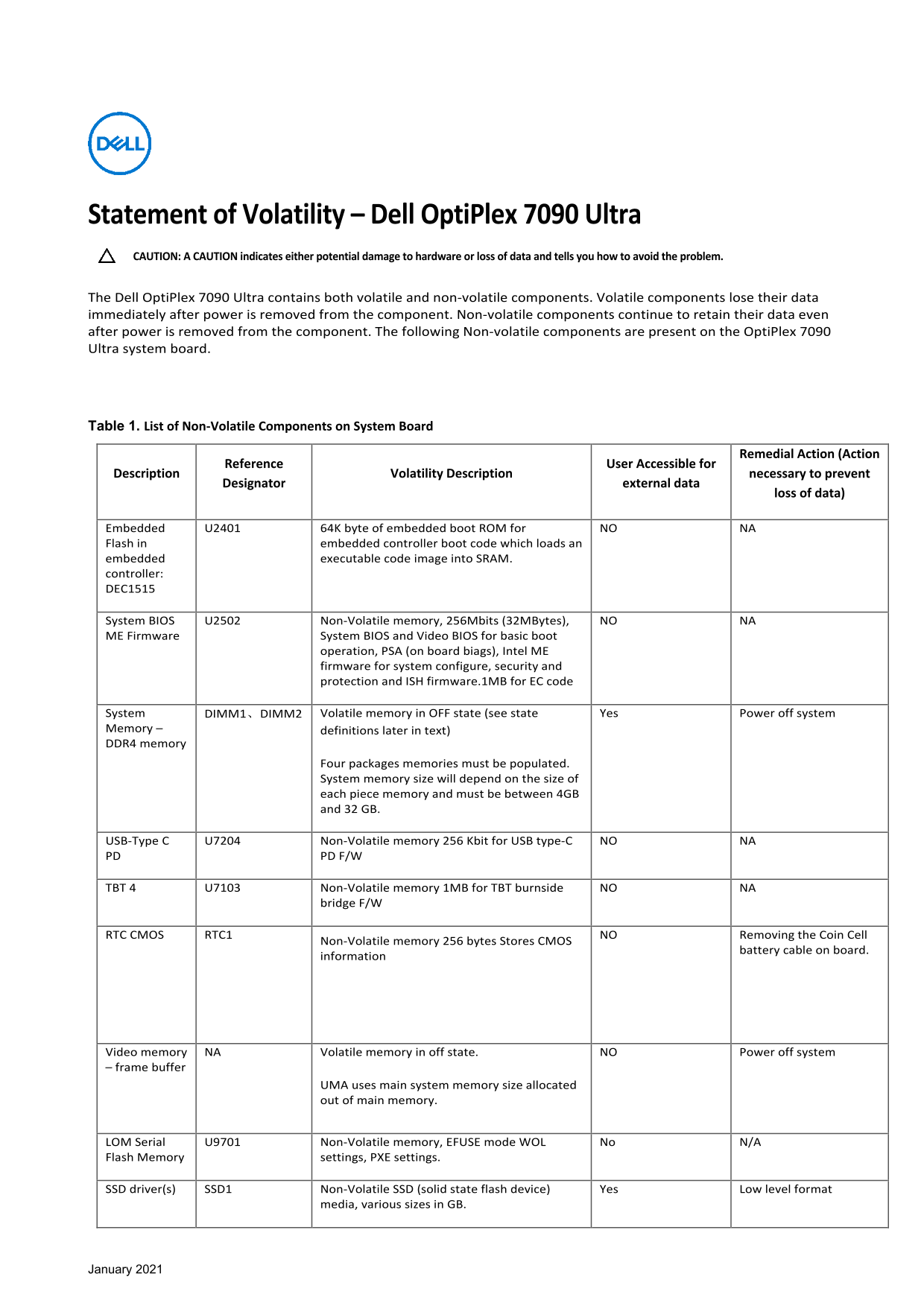
Statement of Volatility – Dell Opti Plex 7090 Ultra CAUTION: A CAUTION indicates either potential damage to hardware or loss of data and tells you how to avoid the problem. The Dell Opti Plex 7090 Ultra contains both volatile and non-volatile components. Volatile components lose their data immediately after power is removed from the component. Non-volatile components continue to retain their data even after power is removed from the component. The following Non-volatile components are present on the Opti Plex 7090 Ultra system board.
Table 1. List of Non-Volatile Components on System Board
Remedial Action (Action
Reference User Accessible for
Description Volatility Description necessary to prevent
Designator external data
loss of data)
Embedded U2401 64K byte of embedded boot ROM for NO NA Flash in embedded controller boot code which loads an embedded executable code image into SRAM. controller: DEC1515
System BIOS U2502 Non-Volatile memory, 256Mbits (32MBytes), NO NA ME Firmware System BIOS and Video BIOS for basic boot
operation, PSA (on board biags), Intel ME firmware for system configure, security and protection and ISH firmware.1MB for EC code
System DIMM1、DIMM2 Volatile memory in OFF state (see state Yes Power off system Memory – definitions later in text) DDR4 memory
Four packages memories must be populated. System memory size will depend on the size of each piece memory and must be between 4GB and 32 GB.
USB-Type C U7204 Non-Volatile memory 256 Kbit for USB type-C NO NA PD PD F/W
TBT 4 U7103 Non-Volatile memory 1MB for TBT burnside NO NA
bridge F/W
RTC CMOS RTC1 Non-Volatile memory 256 bytes Stores CMOS NO Removing the Coin Cell
battery cable on board.
information
Video memory NA Volatile memory in off state. NO Power off system – frame buffer
UMA uses main system memory size allocated out of main memory.
LOM Serial U9701 Non-Volatile memory, EFUSE mode WOL No N/A Flash Memory settings, PXE settings.
SSD driver(s) SSD1 Non-Volatile SSD (solid state flash device) Yes Low level format
media, various sizes in GB.
January 2021
Page Summary Contents For Dell OptiPlex 7090 Ultra - Statement of Volatility
Manual Details
| Brand | Dell |
|---|---|
| Pages | 2 |
| File Size | 201.10 KB |
| Published | June 26, 2026 |
Enter the captcha to get the download link:

Frequently Asked Questions
What kind of memory components retain data after power removal?
Non-volatile components, such as the embedded boot ROM (U2401), System BIOS (U2502), and USB-Type C flash (U7204), retain data.
How do I maintain system configuration settings or timekeeping information?
To prevent loss of system configuration and date/time, the on-board coin-cell battery must not be removed.
Does the OptiPlex 7090 Ultra use dedicated Video Memory (UMA)?
No, UMA uses main system memory size allocated out of DDR4 main memory.
What is required to utilize both SSD and HDD storage options?
Both are non-volatile devices that require a low level format process for utilization.