Dell OptiPlex 7040 Small Form Factor Quick User Guide (Windows 10)
Summary
The Dell OptiPlex 7040 Small Form Factor Quick Start Guide provides multi-language setup instructions covering keyboard and mouse connection, display connection (noting discrete graphics card routing), optional network cable connection, power cable attachment, and Windows 10 initial configuration. It includes guidance for connecting to secured wireless networks and signing into a Microsoft account. The guide serves as the initial reference for users setting up the OptiPlex 7040 SFF desktop in bu
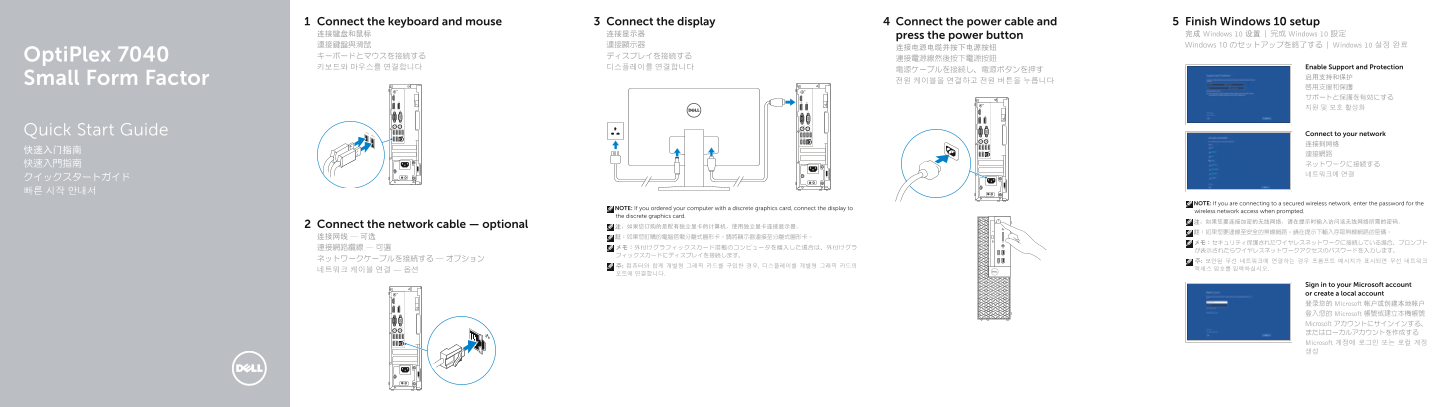
Page 1 Text Content
Connect the keyboard and mouse Connect the display Connect the power cable and Finish Windows 10 setup 连接键盘和鼠标 连接显示器 press the power button 完成 Windows 10 设置 | 完成 Windows 10 設定
連接鍵盤與滑鼠 連接顯示器 Windows 10 のセットアップを終了する | Windows 10 설정 완료
Opti Plex 7040 キーボードとマウスを接続する ディスプレイを接続する
키보드와 마우스를 연결합니다 디스플레이를 연결합니다 Enable Support and Protection
Small Form Factor 전원 케이블을 연결하고 전원 버튼을 누릅니다
Quick Start Guide Connect to your network
NOTE: If you are connecting to a secured wireless network, enter the password for the
NOTE: If you ordered your computer with a discrete graphics card, connect the display to
wireless network access when prompted.
the discrete graphics card.
Connect the network cable — optional 注:如果您订购的是配有独立显卡的计算机,使用独立显卡连接显示器。
Sign in to your Microsoft account or create a local account 登录您的 Microsoft 帐户或创建本地帐户 登入您的 Microsoft 帳號或建立本機帳號 Microsoft アカウントにサインインする、 またはローカルアカウントを作成する Microsoft 계정에 로그인 또는 로컬 계정 생성
Page Summary Contents For Dell OptiPlex 7040 Small Form Factor Quick User Guide (Windows 10)
Manual Details
| Brand | Dell |
|---|---|
| Pages | 2 |
| File Size | 561.70 KB |
| Published | June 18, 2026 |
Enter the captcha to get the download link:

Frequently Asked Questions
How do I connect the display?
If using a discrete graphics card, connect the display to that specific card's output.
Can I use my computer with a secure Wi-Fi network?
Yes, you must enter the associated password when prompted during setup.
Which ports are available for connections?
Ports include HDMI, DisplayPort, VGA (optional), USB 3.0, USB 2.0, and serial/PS2 connectors.
How do I ensure network connectivity?
The manual notes to connect a network cable via the optional network connector port.