Dell Linear Tape File System Single Drive Edition Best Practices Guide User Manual
Summary
Explore Linear Tape File System (LTFS), technology that transforms traditional tape drives into highly usable, disk-like storage solutions. This guide clarifies LTFS capabilities, detailing how tape partitions, handles multi-threaded operations, and maintains data integrity across platforms like LTO5/LTO6. Ideal for users requiring robust, cost-effective archival storage combined with the ease of file management found on flash drives.
Page 1 Text Content
Linear Tape File System Single Drive Edition (LTFS SDE) Best Practices
Content obtained by permission from “Optimizing LTFS Usage” whitepaper by Shawn O. Brume, Sc.D, IBM, United States
Abstract
With the introduction of the Linear Tape File System (LTFS), a new dimension of capability and usability has been opened up for the tape storage environments. While the usability of the tape drive in general is improved to the level of using a USB flash drive, the misconception that the tape drive storage on LTFS will work exactly like a disk drive is not completely accurate. This white paper will help to clarify some of the misconceptions and introduce operational considerations not yet considered.
LTFS Definition
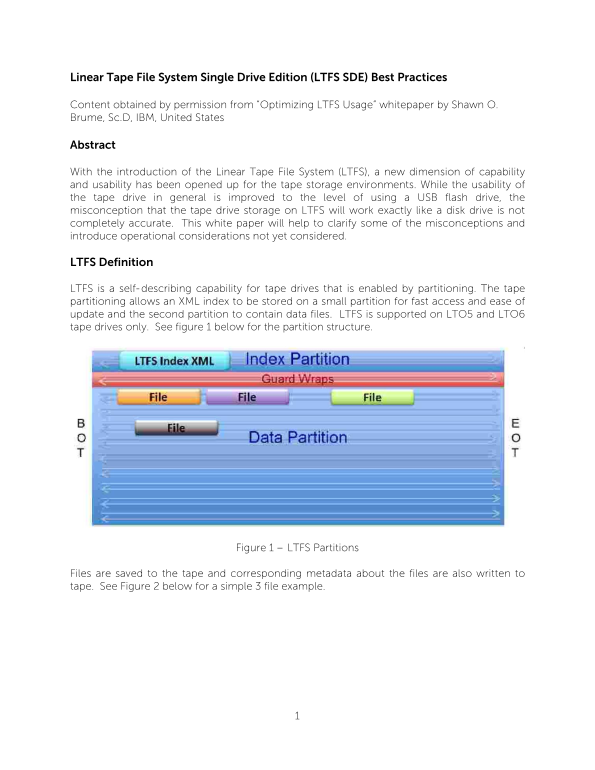
LTFS is a self-describing capability for tape drives that is enabled by partitioning. The tape partitioning allows an XML index to be stored on a small partition for fast access and ease of update and the second partition to contain data files. LTFS is supported on LTO5 and LTO6 tape drives only. See figure 1 below for the partition structure.
Figure 1 – LTFS Partitions
Files are saved to the tape and corresponding metadata about the files are also written to tape. See Figure 2 below for a simple 3 file example.
Page Summary Contents For Dell Linear Tape File System Single Drive Edition Best Practices Guide User Manual
Manual Details
| Brand | Linear |
|---|---|
| Pages | 7 |
| File Size | 247.28 KB |
| Published | May 25, 2026 |
Enter the captcha to get the download link:

Frequently Asked Questions
What LTO generations support LTFS?
LTFS is supported on LTO5 and LTO6 tape drives only.
How does LTFS simulate disk drive functionality?
The LTFS driver presents the tape as a mount point, allowing files to be manipulated similarly to on a disk or flash drive.
What file naming conventions should I use for optimal compatibility?
Avoid special characters when naming files, and limit file names to no more than 255 characters.
Can LTFS handle multiple simultaneous file transfers?
Yes, LTFS supports multi-thread copying (interlacing), allowing the host system to save data continuously from multiple actions.