Dell Latitude 13 Quick User Guide
Summary
This Quick Start Guide for the Dell Latitude 13 7000 Series 2-in-1 notebook provides multilingual setup instructions covering power adapter connection, Windows setup completion, security and update settings, and network connectivity. It documents micro-SIM card installation for LTE/HSPA+ cellular models and optional SD memory card insertion, along with detailed hardware features including USB 3.0 ports, dock release slider, and SIM card slot access. Includes Dell Backup and Recovery, My Dell, pr
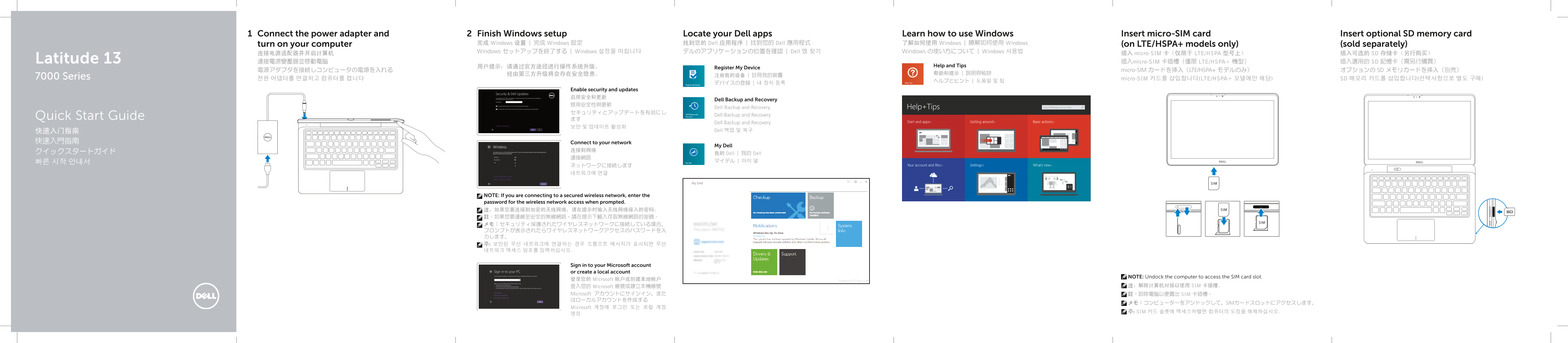
Page 1 Text Content
Connect the power adapter and Finish Windows setup Locate your Dell apps Learn how to use Windows Insert micro-SIM card Insert optional SD memory card
turn on your computer 完成 Windows 设置 | 完成 Windows 設定 找到您的 Dell 应用程序 | 找到您的 Dell 應用程式 了解如何使用 Windows | 瞭解如何使用 Windows (on LTE/HSPA+ models only) (sold separately) Windows セットアップを終了する | Windows 설정을 마칩니다 デルのアプリケーションの位置を確認 | Dell 앱 찾기 Windows の使い方について | Windows 사용법
连接电源适配器并开启计算机 插入 micro-SIM 卡(仅限于 LTE/HSPA 型号上) 插入可选的 SD 存储卡(另行购买)
Latitude 13 連接電源變壓器並啟動電腦 插入micro-SIM 卡插槽(僅限 LTE/HSPA+ 機型) 插入選用的 SD 記憶卡(需另行購買)
用户提示:请通过官方途径进行操作系统升级, Help and Tips
Register My Device
電源アダプタを接続しコンピュータの電源を入れる micro-SIM カードを挿入(LTE/HSPA+ モデルのみ) オプションの SD メモリカードを挿入(別売)
7000 Series 注册我的设备 | 註冊我的裝置
전원 어댑터를 연결하고 컴퓨터를 켭니다 micro-SIM 카드를 삽입합니다(LTE/HSPA+ 모델에만 해당) SD 메모리 카드를 삽입합니다(선택사항으로 별도 구매)
Enable security and updates 启用安全和更新
Dell Backup and Recovery
Dell Backup and Recovery
Quick Start Guide Dell Backup and Recovery
Dell Backup and Recovery
快速入门指南 Dell 백업 및 복구
快速入門指南 Connect to your network
My Dell
クイックスタートガイド 我的 Dell | 我的 Dell
NOTE: If you are connecting to a secured wireless network, enter the password for the wireless network access when prompted. 注:如果您要连接到加密的无线网络,请在提示时输入无线网络接入的密码。 註:如果您要連線至安全的無線網路,請在提示下輸入存取無線網路的密碼。 メモ:セキュリティ保護されたワイヤレスネットワークに接続している場合、 プロンプトが表示されたらワイヤレスネットワークアクセスのパスワードを入 力します。 주: 보안된 무선 네트워크에 연결하는 경우 프롬프트 메시지가 표시되면 무선 네트워크 액세스 암호를 입력하십시오.
Sign in to your Microsoft account or create a local account
NOTE: Undock the computer to access the SIM card slot.
登录您的 Microsoft 帐户或创建本地帐户
登入您的 Microsoft 帳號或建立本機帳號 注:解除计算机对接以使用 SIM 卡插槽。
Microsoft アカウントにサインイン、また 註:卸除電腦以便露出 SIM 卡插槽。 はローカルアカウントを作成する
メモ:コンピューターをアンドックして、SIMカードスロットにアクセスします。
Microsoft 계정에 로그인 또는 로컬 계정
주: SIM 카드 슬롯에 액세스하렬면 컴퓨터의 도킹을 해제하십시오.
Page Summary Contents For Dell Latitude 13 Quick User Guide
Manual Details
| Brand | Dell |
|---|---|
| Pages | 2 |
| File Size | 2.07 MB |
| Published | July 02, 2026 |
Enter the captcha to get the download link:

Frequently Asked Questions
How do I connect the device to a secure wireless network?
When prompted, you must enter the dedicated password for the wireless network access.
Where can I find the SIM card slot on this model?
You must undock the computer unit to access and utilize the micro-SIM card slot.
If I need to install a new operating system, what should I be careful about?
Use official channels for OS upgrades, as third-party methods carry inherent security risks.
Is there an option to boost power delivery through the USB ports?
Yes, there is a specific USB 3.0 connector that supports PowerShare capability.