Dell Inspiron 17R 5721 Quick User Guide - Windows 8
Summary
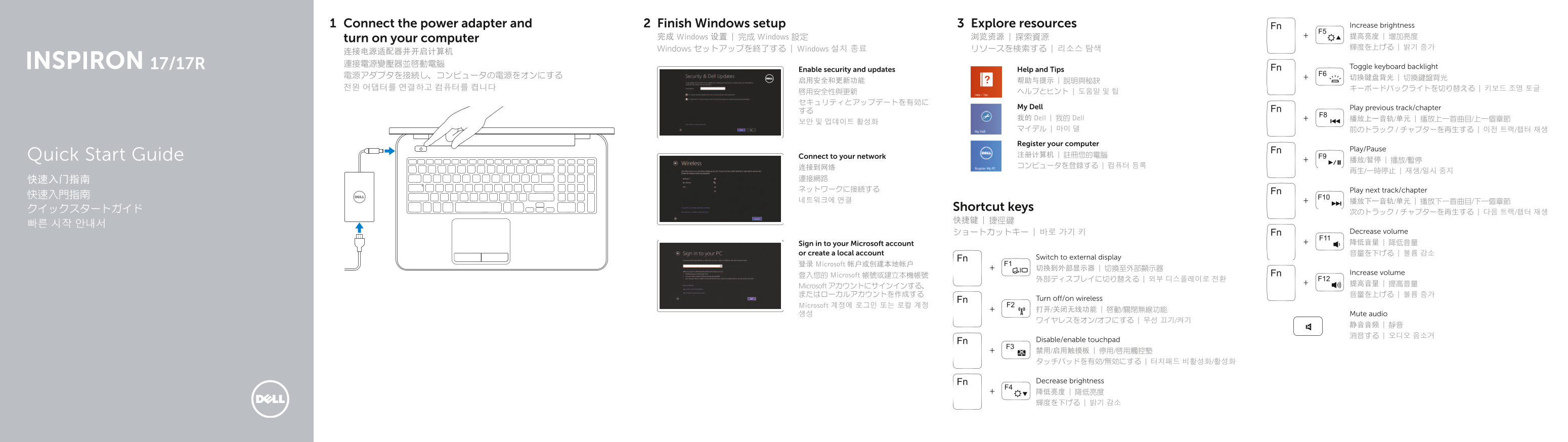
Quick Start Guide for the Dell Inspiron 17/17R laptop with Windows 8. Multi-language document covering power adapter connection, Windows setup, network connectivity, and extensive shortcut key functions including multimedia controls, brightness adjustment, keyboard backlight toggle, wireless on/off, touchpad toggle, external display switching, and Fn-key operations. Features details include camera, USB 3.0/2.0, HDMI, and optical drive.
Page 1 Text Content
Connect the power adapter and Finish Windows setup Explore resources Increase brightness
完成 Windows 设置 | 完成 Windows 設定 浏览资源 | 探索資源 提高亮度 | 增加亮度
turn on your computer
Windows セットアップを終了する | Windows 설치 종료 リソースを検索する | 리소스 탐색 輝度を上げる | 밝기 증가
Toggle keyboard backlight
Enable security and updates Help and Tips
My Dell Play previous track/chapter
我的 Dell | 我的 Dell 播放上一音轨/单元 | 播放上一首曲目/上一個章節
Register your computer
Play/Pause
Quick Start Guide Connect to your network 注册计算机 | 註冊您的電腦
快速入门指南 連接網路 ネットワークに接続する Play next track/chapter
クイックスタートガイド Shortcut keys
ショートカットキー | 바로 가기 키 Decrease volume Sign in to your Microsoft account 降低音量 | 降低音量
or create a local account 音量を下げる | 볼륨 감소
Switch to external display
登录 Microsoft 帐户或创建本地帐户
Increase volume
登入您的 Microsoft 帳號或建立本機帳號
Microsoft アカウントにサインインする、 またはローカルアカウントを作成する 音量を上げる | 볼륨 증가
Turn off/on wireless
Microsoft 계정에 로그인 또는 로컬 계정
생성 Mute audio
Disable/enable touchpad 禁用/启用触摸板 | 停用/啟用觸控墊 タッチパッドを有効/無効にする | 터치패드 비활성화/활성화
Decrease brightness 降低亮度 | 降低亮度 輝度を下げる | 밝기 감소
Page Summary Contents For Dell Inspiron 17R 5721 Quick User Guide - Windows 8
Manual Details
| Brand | Dell |
|---|---|
| Pages | 2 |
| File Size | 258.67 KB |
| Published | July 03, 2026 |
Enter the captcha to get the download link:

Frequently Asked Questions
What are the available video ports?
The laptop includes an HDMI port (6) and potentially multiple USB ports for connectivity.
Where can I find support or manuals for this model?
You can visit dell.com/support or use the quick start guide for technical documentation.
What security features does the hardware offer?
The system includes a security cable slot (19) and supports network connections via a port (7).
Is there a dedicated microphone input?
Yes, there is a digital microphone (3) built into the unit.