Dell Inspiron 17R 5721 Quick Start Guide - Windows 7 Owner's Manual
Summary
This is the Dell Inspiron 17/17R Quick Start Guide, featuring multilingual content including English, Chinese, Japanese, Korean, and Spanish. It provides an overview of computer features including digital microphone, camera, security-cable slot, optical drive, USB ports, media-card reader, touchpad, HDMI port, network port, and power-adapter port. The guide also includes NOM regulatory information for Mexico. It is designed for end-users setting up their new Dell Inspiron laptop computers.
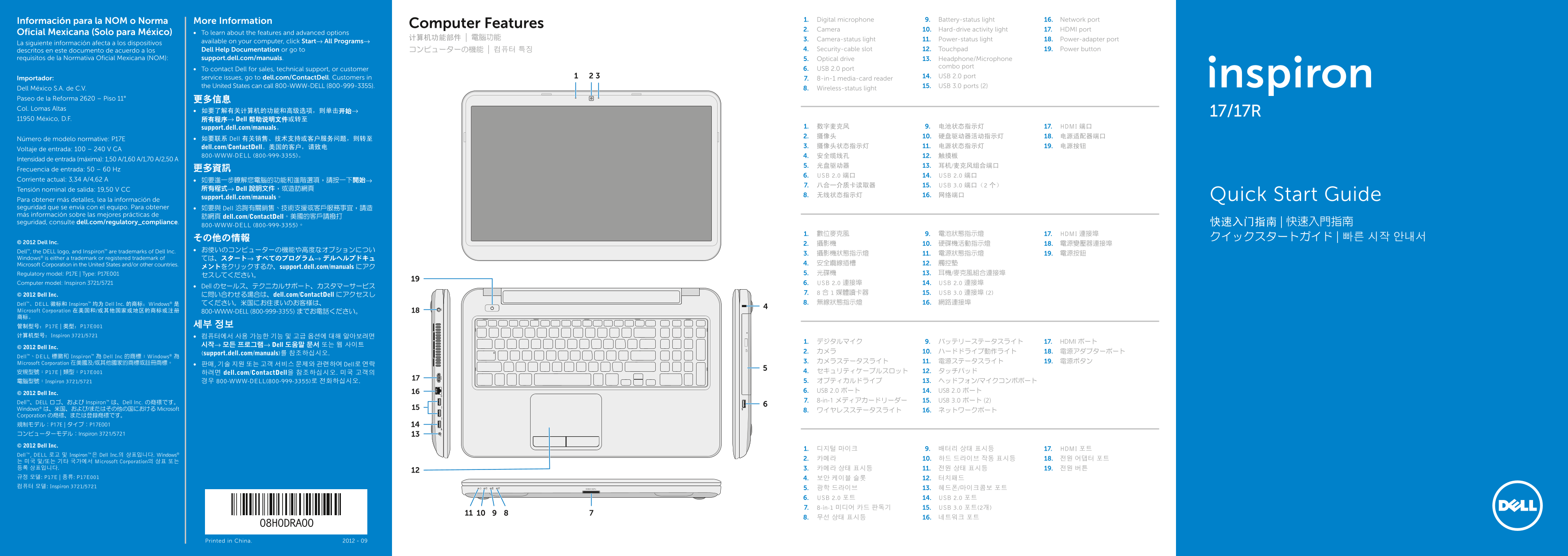
Page 1 Text Content
Información para la NOM o Norma More Information Digital microphone1. Battery-status light9. Network port16.
Computer Features
Camera2. Hard-drive activity light10. HDMI port17.
Oficial Mexicana (Solo para México) To learn about the features and advanced options •
计算机功能部件 | 電腦功能 Camera-status light3. Power-status light11. Power-adapter port18.
La siguiente información afecta a los dispositivos available on your computer, click Start→ All Programs→
descritos en este documento de acuerdo a los Dell Help Documentation or go to コンピューターの機能 | 컴퓨터 특징 Security-cable slot4. Touchpad12. Power button19.
requisitos de la Normativa Oficial Mexicana (NOM): support.dell.com/manuals. Optical drive5. Headphone/Microphone 13.
combo port
To contact Dell for sales, technical support, or customer • USB 2.0 port6.
service issues, go to dell.com/Contact Dell. Customers in USB 2.0 port14.
Importador: 8-in-1 media-card reader7.
the United States can call 800-WWW-DELL (800-999-3355). USB 3.0 ports (2)15.
Dell México S.A. de C.V. Wireless-status light8.
Paseo de la Reforma 2620 – Piso 11° 更多信息 Col. Lomas Altas
11950 México, D.F. 所有程序→ Dell 帮助说明文件或转至
support.dell.com/manuals。 数字麦克风1. 电池状态指示灯9. HDMI 端口17. 摄像头2. 硬盘驱动器活动指示灯10. 电源适配器端口18.
Número de modelo normative: P17E 如要联系 Dell 有关销售、技术支持或客户服务问题,则转至 •
dell.com/Contact Dell。美国的客户,请致电 摄像头状态指示灯3. 电源状态指示灯11. 电源按钮19.
Voltaje de entrada: 100 – 240 V CA
800-WWW-DELL (800-999-3355)。 安全缆线孔4. 触摸板12.
Intensidad de entrada (máxima): 1,50 A/1,60 A/1,70 A/2,50 A
Frecuencia de entrada: 50 – 60 Hz 更多資訊
USB 2.0 端口6. USB 2.0 端口14.
Corriente actual: 3,34 A/4,62 A 如要進一步瞭解您電腦的功能和進階選項,請按一下• 開始→
八合一介质卡读取器7. USB 3.0 端口(2 个)15.
Tensión nominal de salida: 19,50 V CC 所有程式→ Dell 說明文件,或造訪網頁
无线状态指示灯8. 网络端口16. Quick Start Guide
support.dell.com/manuals。
Para obtener más detalles, lea la información de seguridad que se envía con el equipo. Para obtener 如要與 Dell 洽詢有關銷售、技術支援或客戶服務事宜,請造• más información sobre las mejores prácticas de
訪網頁 dell.com/Contact Dell。美國的客戶請撥打
seguridad, consulte dell.com/regulatory_compliance. 快速入门指南 | 快速入門指南
800-WWW-DELL (800-999-3355)。
數位麥克風1. 電池狀態指示燈9. HDMI 連接埠17.
© 2012 Dell Inc. 攝影機2. 硬碟機活動指示燈10. 電源變壓器連接埠18.
Dell™, the DELL logo, and Inspiron™ are trademarks of Dell Inc. お使いのコンピューターの機能や高度なオプションについ•
Windows® is either a trademark or registered trademark of ては、スタート→ すべてのプログラム→ デルヘルプドキュ
Microsoft Corporation in the United States and/or other countries. 安全纜線插槽4. 觸控墊12.
メントをクリックするか、support.dell.com/manuals にアク
Regulatory model: P17E | Type: P17E001 光碟機5. 耳機/麥克風組合連接埠13.
Computer model: Inspiron 3721/5721 USB 2.0 連接埠6. USB 2.0 連接埠14.
Dell のセールス、テクニカルサポート、カスタマーサービス•
© 2012 Dell Inc. 8 合 1 媒體讀卡器7. USB 3.0 連接埠 (2)15.
に問い合わせる場合は、dell.com/Contact Dell にアクセスし
Dell™、DELL 徽标和 Inspiron™ 均为 Dell Inc. 的商标;Windows® 是 てください。米国にお住まいのお客様は、 無線狀態指示燈8. 網路連接埠16.
Microsoft Corporation 在美国和/或其他国家或地区的商标或注册 800-WWW-DELL (800-999-3355) までお電話ください。 商标。
计算机型号:Inspiron 3721/5721 컴퓨터에서 사용 가능한 기능 및 고급 옵션에 대해 알아보려면 •
デジタルマイク1. バッテリーステータスライト9. HDMI ポート17.
시작→ 모든 프로그램→ Dell 도움말 문서 또는 웹 사이트
© 2012 Dell Inc.
(support.dell.com/manuals)를 참조하십시오. カメラ2. ハードドライブ動作ライト10. 電源アダプターポート18.
Dell™、DELL 標徽和 Inspiron™ 為 Dell Inc 的商標;Windows® 為
Microsoft Corporation 在美國及/或其他國家的商標或註冊商標。 カメラステータスライト3. 電源ステータスライト11. 電源ボタン19.
판매, 기술 지원 또는 고객 서비스 문제와 관련하여 Dell로 연락 •
安規型號:P17E | 類型:P17E001 하려면 dell.com/Contact Dell을 참조하십시오. 미국 고객의 セキュリティケーブルスロット4. タッチパッド12. 電腦型號:Inspiron 3721/5721 경우 800-WWW-DELL(800-999-3355)로 전화하십시오. オプティカルドライブ5. ヘッドフォン/マイクコンボポート13. USB 2.0 ポート6. USB 2.0 ポート14.
© 2012 Dell Inc.
Dell™、DELL ロゴ、および Inspiron™ は、Dell Inc. の商標です。 8-in-1 メディアカードリーダー7. USB 3.0 ポート (2)15.
Windows® は、米国、および/またはその他の国における Microsoft ワイヤレスステータスライト8. ネットワークポート16. Corporation の商標、または登録商標です。 規制モデル:P17E | タイプ:P17E001 コンピューターモデル:Inspiron 3721/5721
© 2012 Dell Inc.
디지털 마이크1. 배터리 상태 표시등9. HDMI 포트17.
Dell™, DELL 로고 및 Inspiron™은 Dell Inc.의 상표입니다. Windows®
는 미국 및/또는 기타 국가에서 Microsoft Corporation의 상표 또는 등록 상표입니다. 카메라 상태 표시등3. 전원 상태 표시등11. 전원 버튼19. 규정 모델: P17E | 종류: P17E001 보안 케이블 슬롯4. 터치패드12. 컴퓨터 모델: Inspiron 3721/5721
광학 드라이브5. 헤드폰/마이크콤보 포트13. USB 2.0 포트6. USB 2.0 포트14. 8-in-1 미디어 카드 판독기7. USB 3.0 포트(2개)15. 무선 상태 표시등8. 네트워크 포트16.
Printed in China. 2012 - 09
Page Summary Contents For Dell Inspiron 17R 5721 Quick Start Guide - Windows 7 Owner's Manual
Manual Details
| Brand | Dell |
|---|---|
| Pages | 2 |
| File Size | 1.16 MB |
| Published | June 29, 2026 |
Enter the captcha to get the download link:

Frequently Asked Questions
How do I get technical support for this device?
Visit dell.com/ContactDell or call 800-WWW-DELL (800-999-3355) in the US.
What regulations must I follow regarding support documentation?
For NOM compliance information, visit support.dell.com/manuals.
How can I connect to an external display?
Use the HDMI port and press the appropriate function key (referencing multi-lingual text).
Where are the USB ports located and what types are available?
The device has multiple USB 2.0 ports, a dedicated USB 3.0 port, and potentially others.