Dell Inspiron 15r 5537 Quick Start Guide - Windows 7
Summary
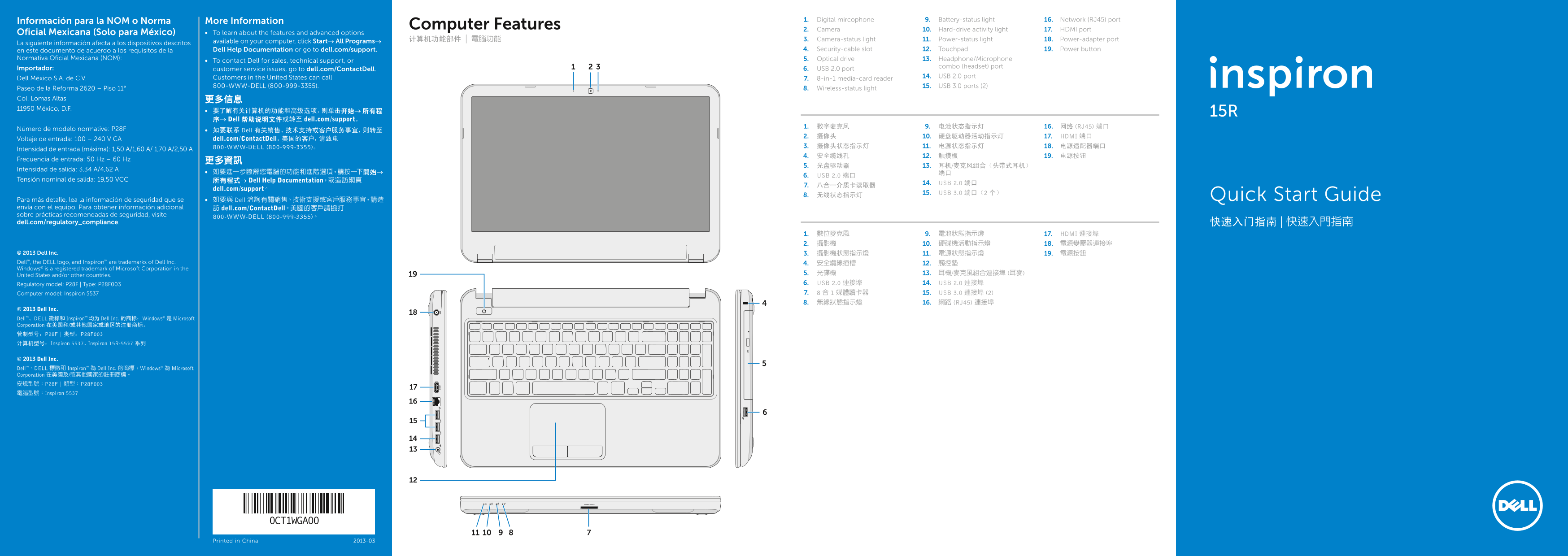
Quick Start Guide for the Dell Inspiron 15R laptop (Regulatory Model P28F). Multi-language document covering computer features including digital microphone, camera, optical drive, 8-in-1 media card reader, battery and wireless status lights, touchpad, USB 2.0/3.0 ports, HDMI, and network port. Includes Mexican NOM regulatory information and Dell support contact details.
Page 1 Text Content
Información para la NOM o Norma More Information 1. Digital mircophone 9. Battery-status light 16. Network (RJ45) port
Computer Features
2. Camera 10. Hard-drive activity light 17. HDMI port
Oficial Mexicana (Solo para México) To learn about the features and advanced options
计算机功能部件 | 電腦功能 3. Camera-status light 11. Power-status light 18. Power-adapter port
La siguiente información afecta a los dispositivos descritos available on your computer, click Start→ All Programs→
en este documento de acuerdo a los requisitos de la Dell Help Documentation or go to dell.com/support. 4. Security-cable slot 12. Touchpad 19. Power button
Normativa Oficial Mexicana (NOM): 5. Optical drive 13. Headphone/Microphone
To contact Dell for sales, technical support, or
Importador: combo (headset) port
customer service issues, go to dell.com/Contact Dell. 6. USB 2.0 port
Customers in the United States can call 14. USB 2.0 port
Dell México S.A. de C.V. 7. 8-in-1 media-card reader
800-WWW-DELL (800-999-3355). 15. USB 3.0 ports (2)
Paseo de la Reforma 2620 – Piso 11° 8. Wireless-status light
Col. Lomas Altas 更多信息 11950 México, D.F.
要了解有关计算机的功能和高级选项,则单击开始→ 所有程 15R 序→ Dell 帮助说明文件或转至 dell.com/support。
1. 数字麦克风 9. 电池状态指示灯 16. 网络 (RJ45) 端口
Número de modelo normative: P28F 如要联系 Dell 有关销售、技术支持或客户服务事宜,则转至
2. 摄像头 10. 硬盘驱动器活动指示灯 17. HDMI 端口
Voltaje de entrada: 100 – 240 V CA dell.com/Contact Dell。美国的客户,请致电
800-WWW-DELL (800-999-3355)。 3. 摄像头状态指示灯 11. 电源状态指示灯 18. 电源适配器端口
Intensidad de entrada (máxima): 1,50 A/1,60 A/ 1,70 A/2,50 A
Frecuencia de entrada: 50 Hz – 60 Hz 更多資訊
Intensidad de salida: 3,34 A/4,62 A
6. USB 2.0 端口
Tensión nominal de salida: 19,50 VCC 所有程式→ Dell Help Documentation,或造訪網頁
14. USB 2.0 端口
dell.com/support。
15. USB 3.0 端口(2 个)
8. 无线状态指示灯 Quick Start Guide
Para más detalle, lea la información de seguridad que se 如要與 Dell 洽詢有關銷售、技術支援或客戶服務事宜,請造 envía con el equipo. Para obtener información adicional 訪 dell.com/Contact Dell。美國的客戶請撥打 sobre prácticas recomendadas de seguridad, visite
800-WWW-DELL (800-999-3355)。
dell.com/regulatory_compliance. 快速入门指南 | 快速入門指南
1. 數位麥克風 9. 電池狀態指示燈 17. HDMI 連接埠 2. 攝影機 10. 硬碟機活動指示燈 18. 電源變壓器連接埠
© 2013 Dell Inc. 3. 攝影機狀態指示燈 11. 電源狀態指示燈 19. 電源按鈕 Dell™, the DELL logo, and Inspiron™ are trademarks of Dell Inc. 4. 安全纜線插槽 12. 觸控墊 Windows® is a registered trademark of Microsoft Corporation in the
United States and/or other countries. 5. 光碟機 13. 耳機/麥克風組合連接埠 (耳麥) Regulatory model: P28F | Type: P28F003 6. USB 2.0 連接埠 14. USB 2.0 連接埠 Computer model: Inspiron 5537 7. 8 合 1 媒體讀卡器 15. USB 3.0 連接埠 (2) 8. 無線狀態指示燈 16. 網路 (RJ45) 連接埠
© 2013 Dell Inc. Dell™、DELL 徽标和 Inspiron™ 均为 Dell Inc. 的商标;Windows® 是 Microsoft Corporation 在美国和/或其他国家或地区的注册商标。 管制型号:P28F | 类型:P28F003 计算机型号:Inspiron 5537、Inspiron 15R-5537 系列
© 2013 Dell Inc. Dell™、DELL 標徽和 Inspiron™ 為 Dell Inc. 的商標;Windows® 為 Microsoft Corporation 在美國及/或其他國家的註冊商標。 安規型號:P28F | 類型:P28F003 電腦型號:Inspiron 5537
Printed in China 2013-03
Page Summary Contents For Dell Inspiron 15r 5537 Quick Start Guide - Windows 7
Manual Details
| Brand | Dell |
|---|---|
| Pages | 2 |
| File Size | 947.80 KB |
| Published | July 02, 2026 |
Enter the captcha to get the download link:

Frequently Asked Questions
How do I get technical support for Dell products?
Visit dell.com/support, or call the specified numbers for regional service.
What types of ports are available on this computer model?
It includes USB 2.0 (x2), USB 3.0 (x2), HDMI, RJ45 network port, and an optical drive.
How do I manually control the wireless functionality?
Use the dedicated key combination marked for Wireless ON/OFF next to the relevant function keys.
What is required for compliance inquiries regarding this device?
Refer to dell.com/regulatory_compliance for information on safety and regulatory practices.